Create a Skill
Author a skill in the editor — name, description, markdown instructions — and grow it with new versions.
The fastest way to make a skill is the built-in editor: you write the instructions in markdown, and Dynamiq packages them into a versioned SKILL.md for you. This page walks through authoring a real skill and updating it over time.
Create a skill in the editor
Open the editor
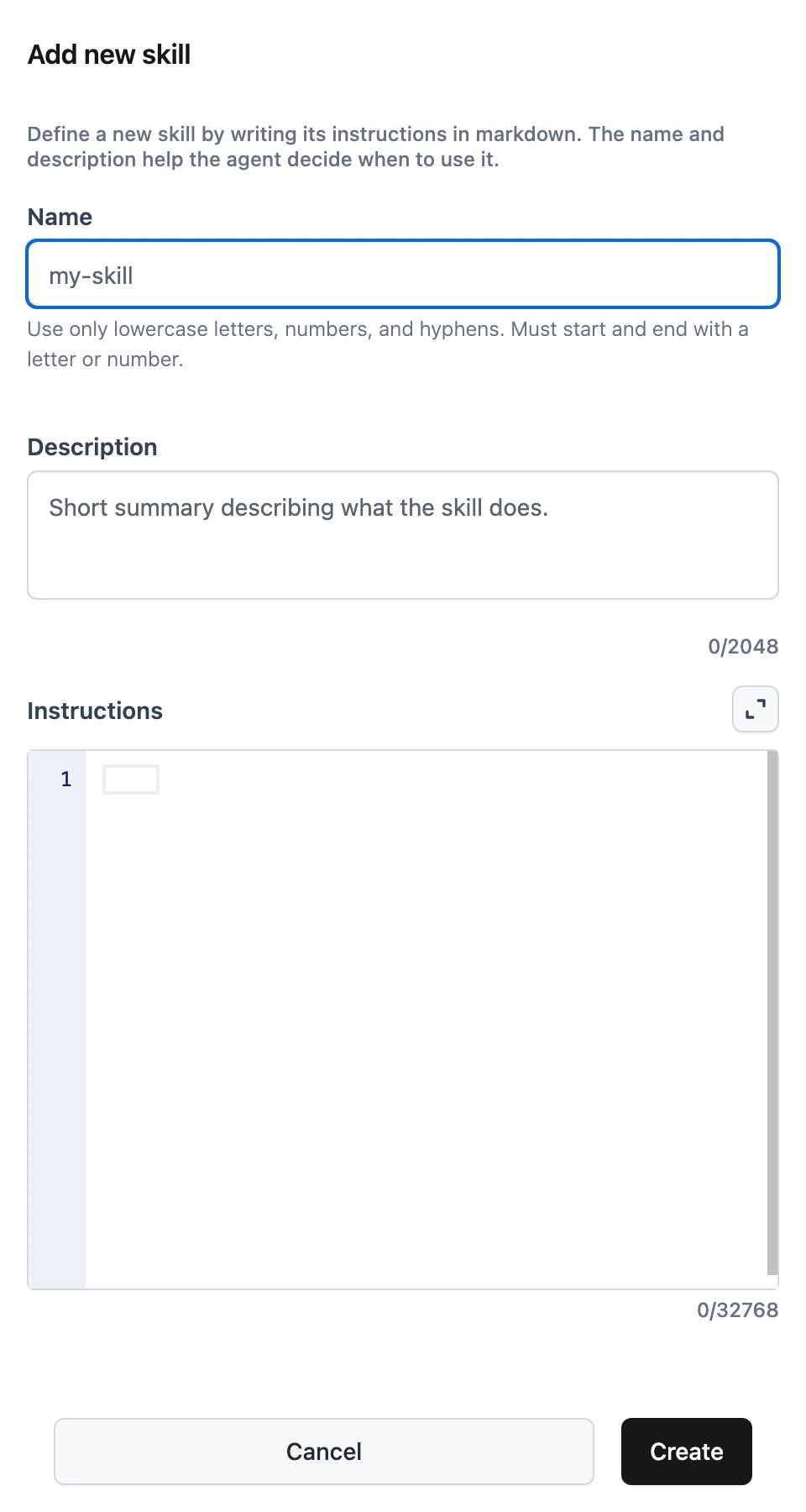
In your project, open Skills, click Add new skill, and choose Create manually. The Add new skill sheet opens.
Name it
Enter a Name such as release-notes. Names must be lowercase letters and digits with single hyphens between them (pattern ^[a-z0-9](?:-?[a-z0-9]){0,127}$) — my-skill works, My_Skill does not.
Describe it for the agent
Write a Description (up to 2048 characters). The name and description are all the agent sees before deciding to load the skill, so describe the task trigger, not the implementation:
Write release notes from a list of merged pull requests, grouped by type with a consistent tone.
Write the instructions
Fill the Skill instructions markdown editor (expandable to full screen, up to 32768 characters) with the actual procedure:
# Release notes

When asked to produce release notes:

1. Group changes into **Features**, **Fixes**, and **Internal**.
2. Write one line per change, starting with a verb, no trailing period.
3. Credit external contributors with their GitHub handle.
4. End with an "Upgrade notes" section only if a change is breaking.

## Tone

Plain, factual, no exclamation marks. Refer to the product as "Dynamiq".
Good skills read like instructions to a competent new teammate: concrete steps, formatting rules, and examples — not vague encouragement.
Create
Click Create. Dynamiq builds a SKILL.md with your name and description as YAML frontmatter and the instructions as the body, zips it, and stores it as version 1. The skill is immediately attachable to agents — see Skills overview.
Update a skill (versions)
Open a skill from the list to the Update skill sheet. Two approaches are offered:
- Edit manually — Type form fields directly. Change the description or instructions and click Save as new version.
- Upload ZIP — Create a new version from a SKILL.md archive. Upload a zip whose
SKILL.mdfrontmatternamematches the skill's name; a mismatch is rejected.
Every save produces a new immutable version. The sheet also lists existing versions; superseded versions can be archived, but the latest version cannot. Agents that pinned an older version keep using it until you repoint them.
The skill's name is fixed by its versions' SKILL.md frontmatter — to rename a skill, create a new one. The description, by contrast, is just another versioned field.
Create via the API
POST /v1/skills creates a skill from raw fields (Dynamiq generates the SKILL.md and zip):
curl -X POST "https://api.getdynamiq.ai/v1/skills" \
  -H "Authorization: Bearer $DYNAMIQ_PAT" \
  -H "Content-Type: application/json" \
  -d '{
    "name": "release-notes",
    "description": "Write release notes from a list of merged pull requests, grouped by type with a consistent tone.",
    "instructions": "# Release notes\n\nWhen asked to produce release notes:\n\n1. Group changes into Features, Fixes, and Internal.\n2. Write one line per change, starting with a verb, no trailing period.\n3. Credit external contributors with their GitHub handle.\n4. End with an Upgrade notes section only if a change is breaking.",
    "project_id": "<your-project-id>"
  }'
New versions of an existing skill:
# From raw fields
curl -X POST "https://api.getdynamiq.ai/v1/skills/<skill-id>/versions" \
  -H "Authorization: Bearer $DYNAMIQ_PAT" \
  -H "Content-Type: application/json" \
  -d '{
    "description": "Write release notes from merged PRs; now with an Upgrade notes policy.",
    "instructions": "# Release notes\n\n(updated instructions...)"
  }'

# From a zip archive (SKILL.md name must match the skill)
curl -X POST "https://api.getdynamiq.ai/v1/skills/<skill-id>/versions/upload" \
  -H "Authorization: Bearer $DYNAMIQ_PAT" \
  -F "file=@release-notes.zip"

# Archive a superseded version
curl -X POST "https://api.getdynamiq.ai/v1/skills/<skill-id>/versions/<version-id>/archive" \
  -H "Authorization: Bearer $DYNAMIQ_PAT"
To create a skill from an archive or a GitHub folder instead of raw fields, see Import Skills & the Official Library.