Skills
Package repeatable instructions as versioned skills that agents load on demand — in workflows and in Chat.
A skill is a named package of instructions an agent can pull in when a task calls for it: a SKILL.md markdown file with YAML frontmatter, optionally bundled with supporting files in a zip archive. Instead of bloating an agent's role with every procedure it might need, you keep procedures as skills — the agent sees each skill's name and description, and fetches the full instructions only when relevant.
Anatomy of a skill
Every skill version is stored as a zip archive containing at least a SKILL.md:
---
name: release-notes
description: Write release notes from a list of merged pull requests, grouped by type with a consistent tone.
---

# Release notes

When asked to produce release notes:

1. Group changes into **Features**, **Fixes**, and **Internal**.
2. Write one line per change, starting with a verb, no trailing period.
3. Credit external contributors with their GitHub handle.
4. End with an "Upgrade notes" section only if a change is breaking.name— required; lowercase letters, digits, and single hyphens, up to 128 characters (pattern^[a-z0-9](?:-?[a-z0-9]){0,127}$).description— required, up to 2048 characters. This is what the agent reads when deciding whether to load the skill, so make it specific.- The markdown body holds the full instructions (up to 32768 characters when created in the editor).
Skills are project-scoped — manage them on the Skills page of a project — and versioned: every edit or upload creates a new immutable version, and you can pin or roll back. Older versions can be archived (the latest version cannot).
How agents use skills
In workflows — open an Agent node's configuration and find the Skills section. Click Add skill to attach any skill from the project; each attached skill row lets you pick the version. Under the hood the agent gets:
- A summary of each attached skill's name and description injected into its system prompt.
- A skills tool with two actions —
list(discover available skills) andget(fetch a skill's full instructions) — so it loads instructions only when needed. - When the agent has a sandbox enabled, skill files are also ingested into the sandbox filesystem (under
/home/user/skills/<name>/SKILL.md), so the agent can read them — and any bundled scripts — directly with shell tools.
In Chat — every user has a personal skill library. Click Add skills in Chat settings to open the Skills modal, where you can enable or disable each skill with a toggle and add new ones. See Import Skills & the Official Library for the ways to bring skills in.
The Skills page
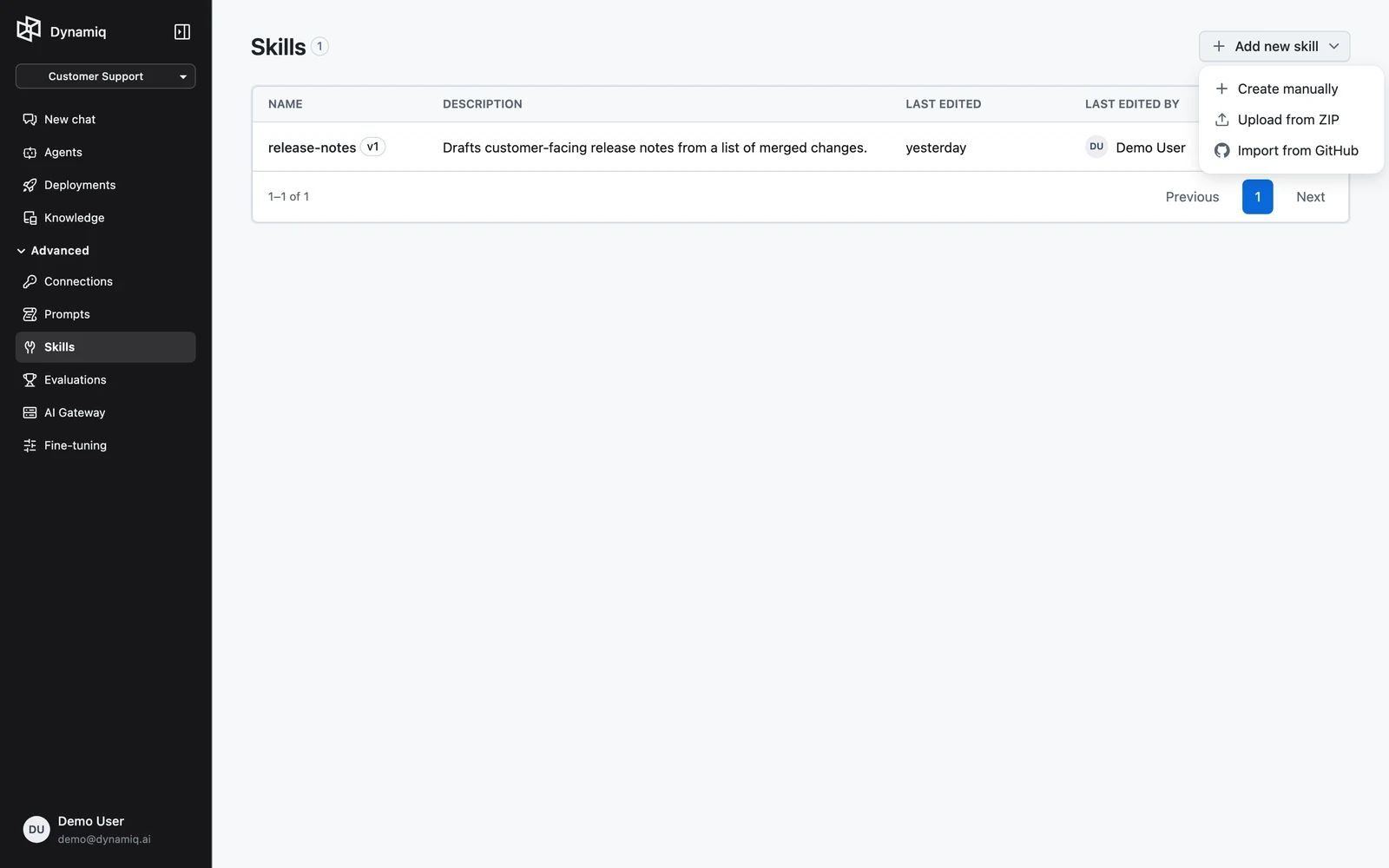
In your project, open Skills. The list shows each skill's NAME (with its latest version badge), DESCRIPTION, LAST EDITED, and LAST EDITED BY. The Add new skill menu offers three paths:
- Create manually — write the skill in a form editor; see Create a Skill.
- Upload from ZIP — upload a
.ziparchive containing aSKILL.md(max 1 MB). - Import from GitHub — paste a link to a GitHub folder containing a
SKILL.md.
Deleting a skill permanently removes it and all its versions.
Skills via the API
# List a project's skills
curl "https://api.getdynamiq.ai/v1/skills?project_id=<your-project-id>" \
  -H "Authorization: Bearer $DYNAMIQ_PAT"

# Get one skill and its versions
curl "https://api.getdynamiq.ai/v1/skills/<skill-id>" \
  -H "Authorization: Bearer $DYNAMIQ_PAT"
curl "https://api.getdynamiq.ai/v1/skills/<skill-id>/versions" \
  -H "Authorization: Bearer $DYNAMIQ_PAT"

# Download a version's SKILL.md or its full zip
curl -OJ "https://api.getdynamiq.ai/v1/skills/<skill-id>/versions/<version-id>/instructions" \
  -H "Authorization: Bearer $DYNAMIQ_PAT"
curl -OJ "https://api.getdynamiq.ai/v1/skills/<skill-id>/versions/<version-id>/download" \
  -H "Authorization: Bearer $DYNAMIQ_PAT"
Creation and import endpoints are covered on the next two pages.