Parameterized Connections
Http and HttpApiKey Connections carry default request parameters — URL, method, headers, query params, body — that nodes and run input extend or override at request time.
Most Connections store only credentials. The Http and HttpApiKey connection types are different: they store a reusable request definition — base URL, default headers, query parameters, and body fields — that workflow nodes parameterize further. The same Connection can back many HTTP API Call nodes, each adding its own parameters on top, and an agent can add a final layer of parameters per call at run time.
The Http connection type
A Connection of type dynamiq.connections.Http (label Http in the Type dropdown) accepts these config fields:
urlstringmethodstringrequiredheadersobjectparamsobjectdataobjectThe simpler dynamiq.connections.HttpApiKey type (HttpApiKey) stores just url and api_key (both required) — use it when the target is one API-key-authenticated endpoint and you don't need default headers, params, or body fields.
How parameters merge at run time
When an HTTP API Call node executes, it builds the request from three layers. Later layers win on key conflicts:
| Layer | Set where | When |
|---|---|---|
| 1. Connection | the Connection's url, method, headers, params, data | once per project |
| 2. Node | the same fields on the node's configuration | at build time, per node |
| 3. Run input | url, method, headers, params, data passed as node input | per request — including by an agent calling the node as a tool |
headers, params, and data are merged key-by-key across all three layers (run input overrides node, node overrides Connection). url and method are not merged — the most specific non-empty value wins: run input first, then the node, then the Connection. If no layer supplies a URL, the request fails with No url provided.
This is what makes the Connection "parameterized": it fixes the parts that should never vary (host, auth header, API version pin) while each node — and each individual call — fills in the rest.
Example: one API, many calls
Suppose several workflows call your internal billing API. Create one Http Connection holding the base URL and auth:
Create the Connection
On the Connections page, click Add new connection, pick Http from the Type dropdown, and enter a Name such as billing-api. Fill in:
- URL —
https://billing.example.com/api/v2 - Method —
GET - Headers —
{"Authorization": "Bearer <your-billing-api-token>"} - Params and Data — leave empty unless every call shares them.
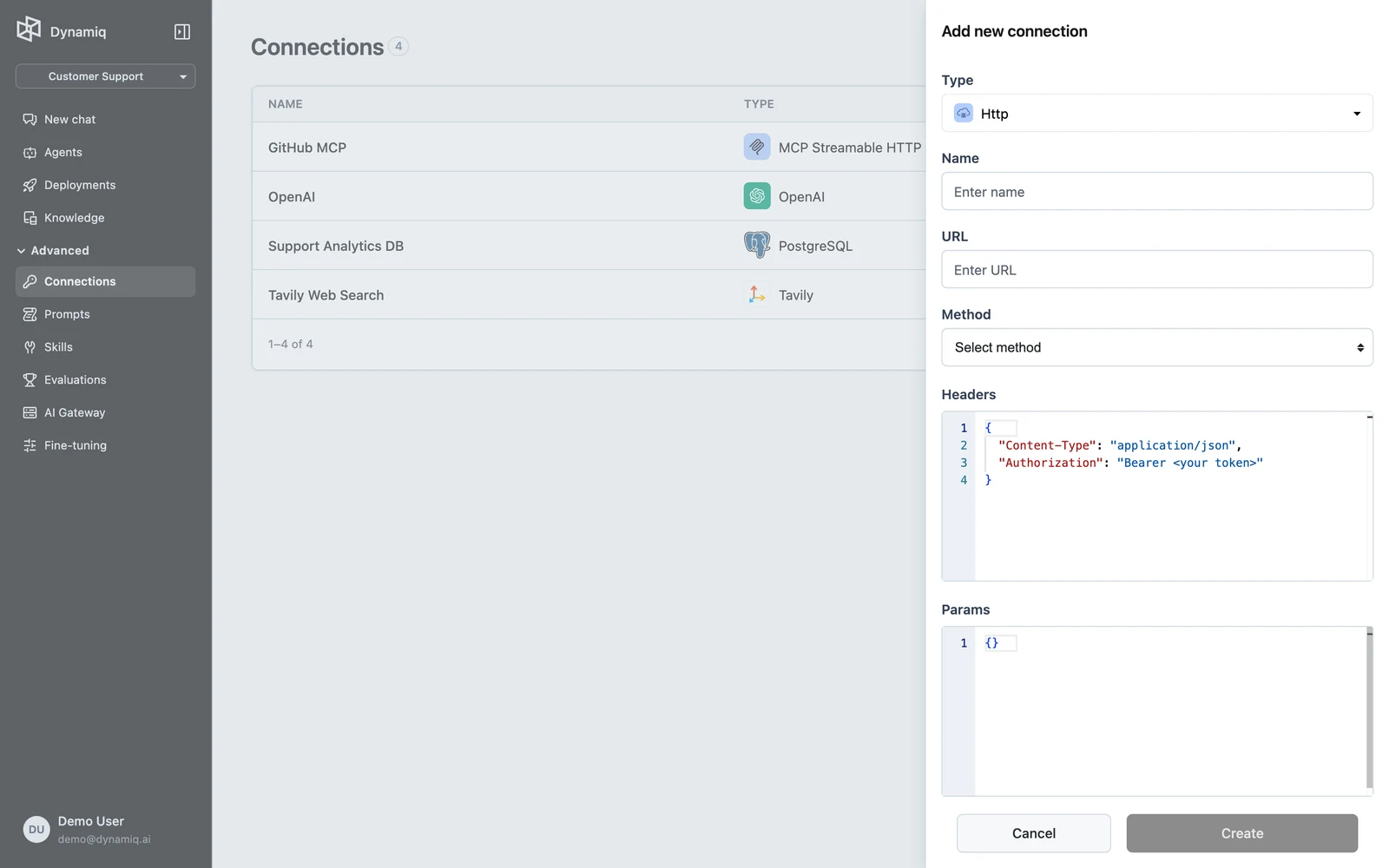
Parameterize it on each node
Add an HTTP API Call node to a workflow and select the billing-api Connection. On the node, set only what's specific to this call — for example url https://billing.example.com/api/v2/invoices and params {"status": "overdue"}. The Connection's Authorization header is applied automatically.
Let run input fill the rest
Map workflow input — or let an agent using the node as a tool decide — the final layer, for example params {"customer_id": "cus_123"}. At run time the node sends one request carrying the Connection's auth header, the node's status filter, and the per-run customer_id, merged together.
curl -X POST "https://api.getdynamiq.ai/v1/connections" \
  -H "Authorization: Bearer $DYNAMIQ_PAT" \
  -H "Content-Type: application/json" \
  -d '{
    "name": "billing-api",
    "project_id": "'"$DYNAMIQ_PROJECT_ID"'",
    "type": "dynamiq.connections.Http",
    "config": {
      "url": "https://billing.example.com/api/v2",
      "method": "GET",
      "headers": {
        "Authorization": "Bearer '"$BILLING_API_TOKEN"'"
      }
    }
  }'
import os
import requests
API = "https://api.getdynamiq.ai"
headers = {"Authorization": f"Bearer {os.environ['DYNAMIQ_PAT']}"}
connection = requests.post(
f"{API}/v1/connections",
headers=headers,
json={
"name": "billing-api",
"project_id": os.environ["DYNAMIQ_PROJECT_ID"],
"type": "dynamiq.connections.Http",
"config": {
"url": "https://billing.example.com/api/v2",
"method": "GET",
"headers": {
"Authorization": f"Bearer {os.environ['BILLING_API_TOKEN']}",
},
},
},
).json()["data"]
print("Connection id:", connection["id"])Rotating the billing token now means updating one Connection — every node layered on top keeps its own parameters.
In the Python SDK
The same layering works in code. The Http connection carries the defaults; the HttpApiCall node and its run input add the rest:
from dynamiq.connections import Http as HttpConnection
from dynamiq.connections import HTTPMethod
from dynamiq.nodes.tools.http_api_call import HttpApiCall, ResponseType

connection = HttpConnection(
    url="https://billing.example.com/api/v2",
    method=HTTPMethod.GET,
    headers={"Authorization": "Bearer my-billing-api-token"},
)

node = HttpApiCall(
    connection=connection,
    url="https://billing.example.com/api/v2/invoices",
    params={"status": "overdue"},
    response_type=ResponseType.JSON,
)

# The final layer arrives as input at run time and overrides the layers below.
result = node.run(input_data={"params": {"customer_id": "cus_123"}})
print(result.output["content"])
Choosing the right mechanism
Parameterized Connections vary request parameters within one set of credentials. Two related features vary the credentials themselves:
- Runtime connection overrides — how a deployed App resolves which credentials a node uses at run time.
- End-user connection requirements — each end user of a deployed App connects their own account, substituted per
user_id.
Next steps
OAuth Connections
Connect Google, Dropbox, Microsoft, Box, and Notion with an OAuth consent flow — authorize, automatic token refresh, scopes, and expiry handling.
SSH Tunnels
Reach databases on private networks by adding an ssh_tunnel block to a database Connection — supported types, config fields, and where to configure it.