Overview
Connections store credentials and configuration for external services — encrypted at rest, scoped to a project, and resolved at runtime.
A Connection is a named, stored set of credentials and configuration for an external service — an LLM provider API key, a PostgreSQL host and password, a Pinecone account, an MCP server URL. You create a Connection once per project, then reference it everywhere: workflow nodes, Knowledge Bases, the AI gateway, and evaluation metrics all resolve credentials through Connections instead of holding raw secrets.
How Connections work
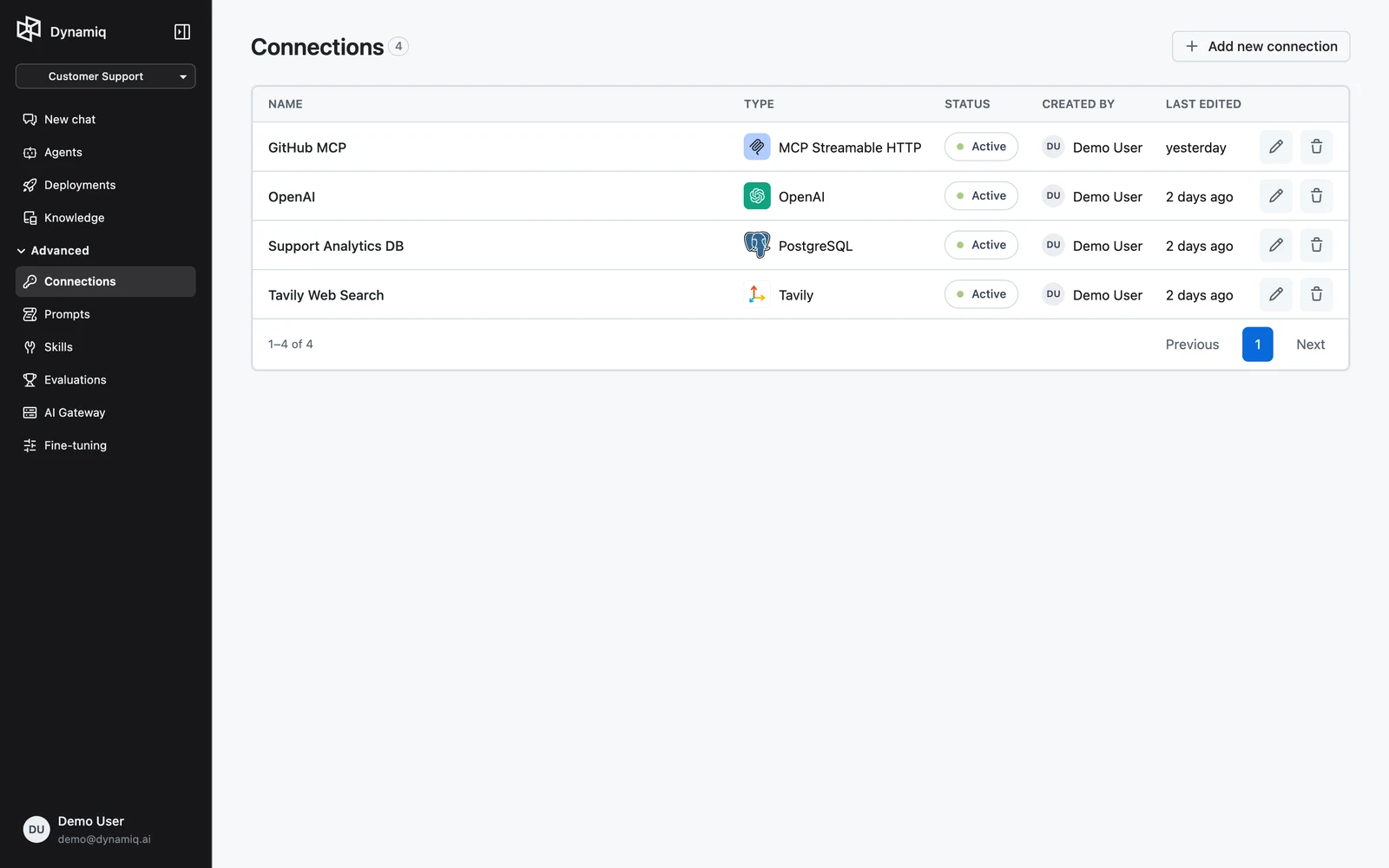
Every Connection has four parts:
- Name — a label you choose, unique enough to identify it in pickers ("openai-prod", "analytics-postgres").
- Type — the service it connects to, such as
dynamiq.connections.OpenAIordynamiq.connections.PostgreSQL. The type determines which config fields the Connection accepts. See the full catalog in Create a Connection. - Config — the type-specific fields: an
api_keyfor most LLM providers,host/port/database/user/passwordfor SQL databases, OAuth scopes for cloud storage providers. - Status — one of
active,incomplete, orexpired. Most Connections areactiveimmediately after creation; OAuth Connections stayincompleteuntil you authorize them with the provider, and becomeexpiredif their tokens can no longer be refreshed.
Project scoping
Connections belong to a project. You create them inside a project, and the resources in that project — workflows, Knowledge Bases, deployed Apps — pick from that project's Connections. When you list Connections through the API you filter by project_id.
Where Connections are used
| Surface | How it uses Connections |
|---|---|
| Workflow nodes | LLM nodes, tool nodes, database nodes, and the Agent node each reference a Connection by ID; see Node configuration |
| Knowledge Bases | A Knowledge Base uses Connections for its embedding model and its vector store backend; see Create a Knowledge Base |
| AI gateway | The models router resolves provider credentials from Connections; see AI models router |
| Evaluations | LLM-as-judge metrics reference a Connection for the judge model |
| Deployed Apps | Apps can override which Connection a node uses at request time; see Runtime connection overrides |
Connections vs. Connectors
These are different things:
- A Connection (this section) is project-scoped stored credentials/config used by workflows, Knowledge Bases, and the gateway.
- A Connector is an OAuth app integration linked in Chat — for example connecting your own Google Drive so the Chat agent can read your files. A Connector can be personal to one user or shared with an entire organization, but either way it is still not a workflow Connection — Connections are shared across the project, not the chat agent.
Security model
- Secrets stay server-side. Connection secrets are stored encrypted and are never embedded in workflow definitions. A workflow JSON references a Connection only by its ID; the execution engine fetches the credentials at runtime.
- The API redacts sensitive data. When you read a Connection back, OAuth tokens and state are stripped from the response, and system-managed Connections return no config at all.
- Credentials access is explicit. Raw credentials are only returned by the dedicated
POST /v1/connections/{connection_id}/credentialsendpoint, which requires authenticated access to the project.
Editing a Connection updates it everywhere it is referenced — every workflow node and Knowledge Base pointing at it picks up the new credentials on the next run. There is no need to redeploy Apps after rotating a key.
API quick reference
All endpoints live on the management API at https://api.getdynamiq.ai and require a Authorization: Bearer token.
| Method | Path | Purpose |
|---|---|---|
POST | /v1/connections | Create a Connection |
GET | /v1/connections | List Connections (project_id, type, include_system query params) |
GET | /v1/connections/{connection_id} | Get one Connection |
PUT | /v1/connections/{connection_id} | Update a Connection's type and config |
DELETE | /v1/connections/{connection_id} | Delete a Connection |
POST | /v1/connections/{connection_id}/credentials | Fetch the decrypted credentials |
POST | /v1/connections/{connection_id}/oauth2/authorize | Start the OAuth authorization flow (returns a consent url) |
List the Connections in a project:
curl "https://api.getdynamiq.ai/v1/connections?project_id=$DYNAMIQ_PROJECT_ID" \
  -H "Authorization: Bearer $DYNAMIQ_PAT"
import os
import requests
response = requests.get(
"https://api.getdynamiq.ai/v1/connections",
headers={"Authorization": f"Bearer {os.environ['DYNAMIQ_PAT']}"},
params={"project_id": os.environ["DYNAMIQ_PROJECT_ID"]},
)
response.raise_for_status()
for connection in response.json()["data"]:
print(connection["name"], connection["type"], connection["status"])const params = new URLSearchParams({
project_id: process.env.DYNAMIQ_PROJECT_ID!,
});
const response = await fetch(
`https://api.getdynamiq.ai/v1/connections?${params}`,
{
headers: {
Authorization: `Bearer ${process.env.DYNAMIQ_PAT}`,
},
},
);
const { data } = await response.json();
for (const connection of data) {
console.log(connection.name, connection.type, connection.status);
}