Evaluation Runs
Run metrics over a dataset version — optionally piping each row through a workflow first — and read, download, or rerun the results.
An evaluation run takes a released dataset version, optionally executes a workflow for every row, and scores the results with your metrics. Start runs from the Runs tab of Evaluations.
Start a run from the UI
Open the run dialog
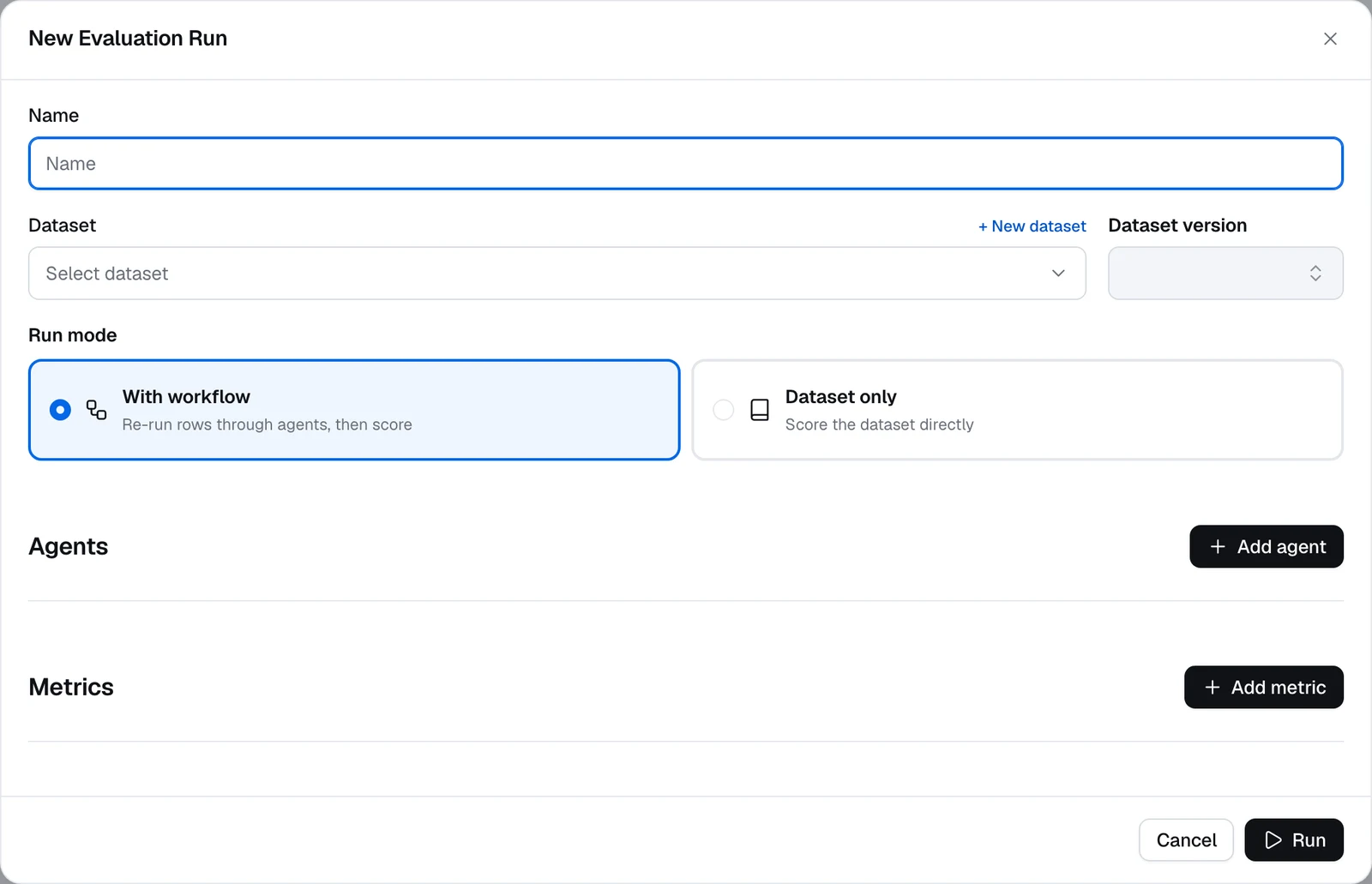
On Evaluations → Runs, click Run evaluation. The New Evaluation Run dialog opens.
Name it and pick the data
Enter a Name, then choose a Dataset and Dataset version. Only datasets with at least one released version appear — release a draft first if yours is missing (see Datasets). Pick a released version: a run started on a draft fails with Dataset version is not released.
Choose the run mode
- With workflow — Re-run rows through agents, then score. Each dataset row is fed into one or more workflows, and metrics can score the fresh outputs. Rows captured from traces are the exception: they are scored as recorded, without running the workflow.
- Dataset only — Score the dataset directly. No workflow executes; metrics read what was recorded. Use this for datasets captured from traces. Rows without trace fields (
input,output,status,trace_id) are not scored in this mode — their tasks fail.
(With workflow) add agents
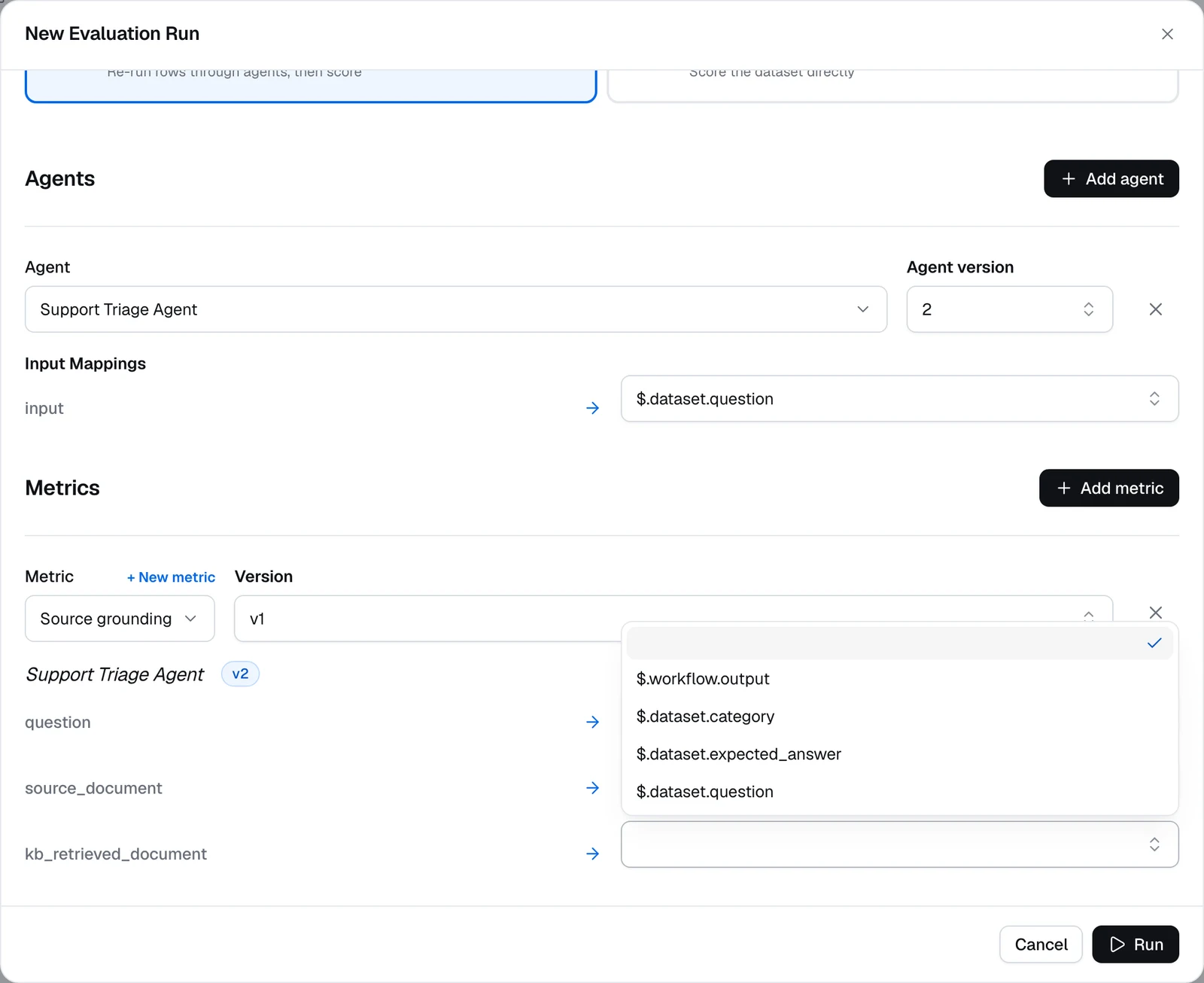
Click Add agent and pick a workflow (Agent) and an Agent version. Then fill in its Input Mappings: each field of the workflow's Input node gets a selector drawn from your dataset columns, like $.dataset.question.
Add metrics and map their inputs
Click Add metric and pick a saved Metric. For every metric input, choose a source:
$.dataset.<column>— a dataset field.$.workflow.<field>— a field of the chosen agent version's Output node (with-workflow mode). Only Output node fields are listed; to score another node's result, such as the documents a retriever returned, add it to the Output node — see Score intermediate results.$.trace— the full recorded trace, offered in dataset-only mode when items carryinput,output,status, andtrace_idfields. It's passed as text — every node's input and output, with strings longer than 2,000 characters truncated — so it suits LLM-as-a-judge metrics.
Selectors are picked from a list. Nested paths such as $.dataset.input.question also work, but only in runs started through the API.
Run and watch the results
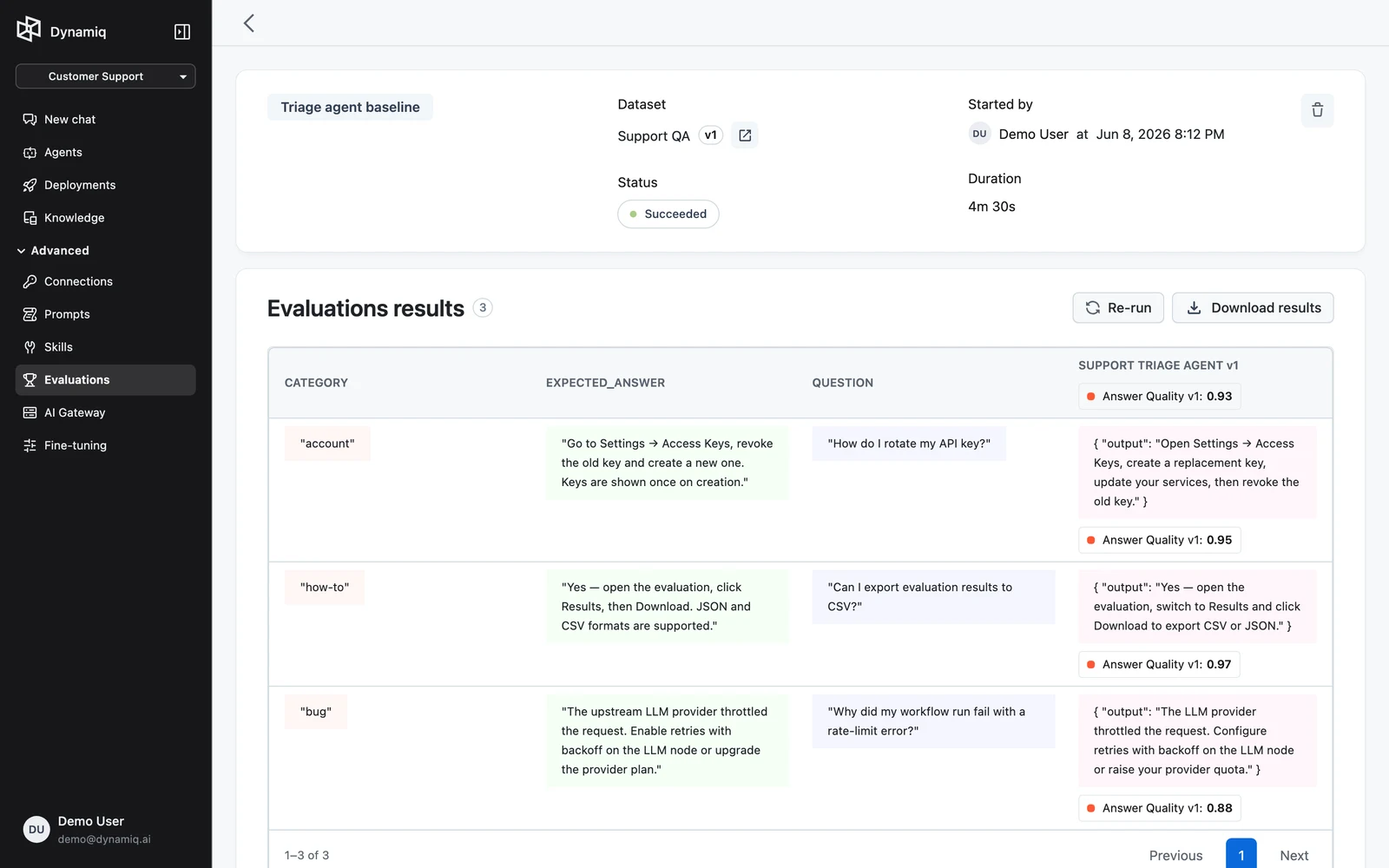
Start the run. It appears in the runs list with NAME, STATUS, STARTED BY, and STARTED AT columns; statuses progress through pending, running, and end at succeeded, failed, or canceled.
Open the run to see the Evaluations results table: one row per dataset item with the item's fields and one column per metric score, plus run status. Click Download results to save the full result set as JSON (disabled while the run is still running).
Rerunning is for recovery, not variation: rerun re-executes only the failed tasks of a run, keeping the original metric and workflow versions pinned. If nothing failed, the API responds with "No failed tasks to rerun." To evaluate a changed workflow or metric, start a new run.
Score intermediate results
A metric can read only what the run exposes: your dataset columns and the workflow's final output. Results produced mid-workflow — the documents a Knowledge Base retriever returned, a tool's response, a draft from an LLM node — can't be selected directly. Add them to the workflow's Output node and they become $.workflow.<field>.
For example, to check that answers are built from the right source, use a metric with three inputs: question, source_document (the document the answer should come from), and kb_retrieved_document (what the retriever actually returned).
Expose the retriever's output
In the workflow, open the Output node and click Add field. Name the field kb_content, type / in its value, and pick content under your retriever node — the picker lists every node upstream of the Output node, and the value becomes $.knowledge-base-retriever.output.content (using your retriever node's name). Save a new version.
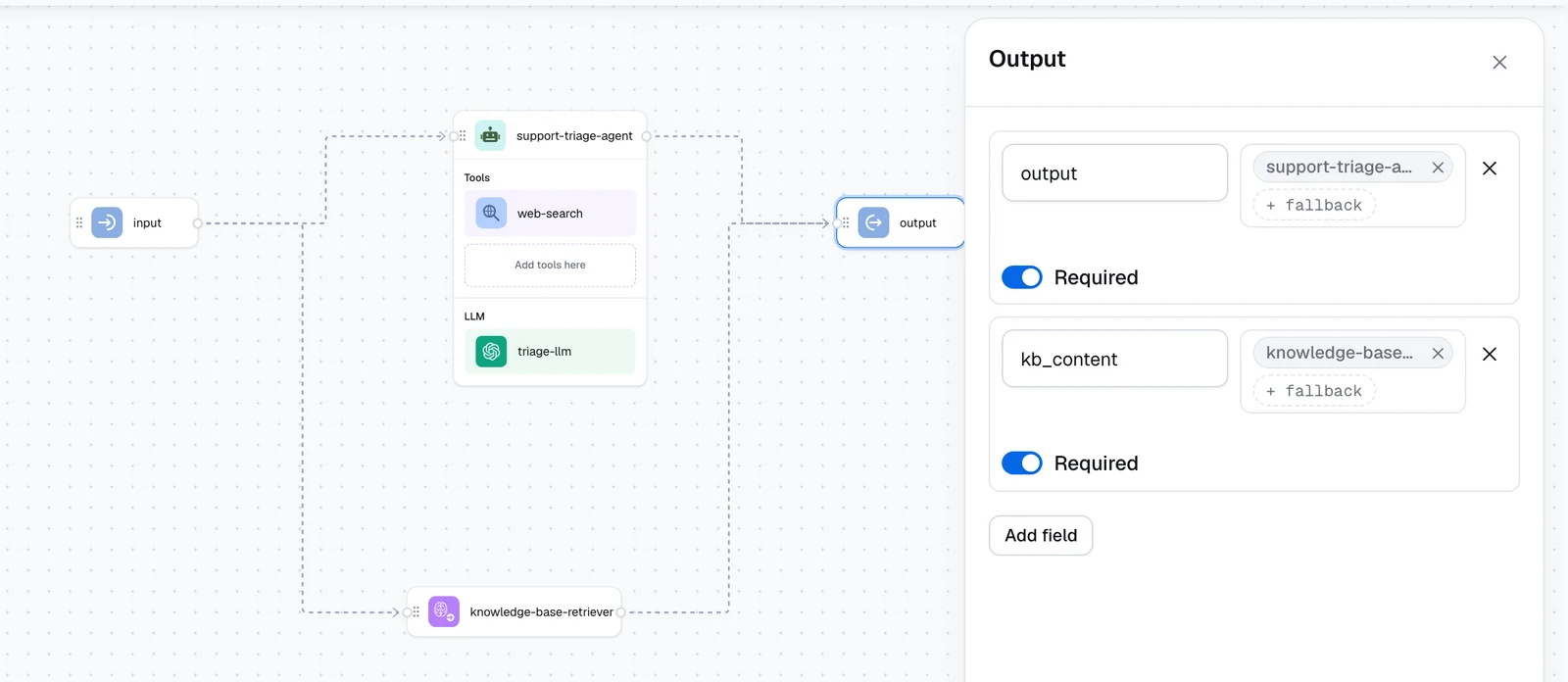
The retriever's content is one text block with every retrieved chunk and its source metadata (such as title, source, and the relevance score). Its documents output holds the same results as a list of {id, content, metadata, score} objects.
Add the expected source to the dataset
Give the dataset a question column and a source_document column holding the document each answer should be grounded in, then Release the version.
Write the metric
Create an LLM-as-a-judge metric whose instructions reference all three inputs:
Decide whether the answer was built from the correct source.

Question: {{question}}
Expected source document: {{source_document}}
Documents the retriever returned: {{kb_retrieved_document}}

Score 1 if the expected source document is among the retrieved documents, otherwise 0.
Respond exactly as {"score": X}.
Map the inputs in the run
Start a With workflow run, add the agent at the version you just saved, and map its question input to $.dataset.question. Then add the metric and map:
| Metric input | Selector |
|---|---|
question | $.dataset.question |
source_document | $.dataset.source_document |
kb_retrieved_document | $.workflow.kb_content |
- Map text, not lists, to judges. LLM-as-a-judge and predefined metrics treat a list value as a batch of separate inputs, so mapping
documentsfails when its length differs from the other inputs. Map thecontenttext instead. Code metrics receive lists unchanged, sodocumentsworks there. - The field is part of the App's response. Output node fields are returned to callers of any App deployed from this version.
- Only canvas nodes can be referenced. A retriever attached to an Agent node as a tool doesn't appear in the Output node's picker.
- Online evaluations read the same field. On a deployed App, the field is in the trace's output, so an online evaluation reaches it with an Input path of
$.output.
Start a run via the API
POST /v1/evaluations starts a run. config is a list of entries, each pairing an optional workflow with the metrics that score it; omit workflow for a dataset-only run over a dataset captured from traces. Input mappings use the same input_transformer.selector syntax as the UI:
curl -X POST "https://api.getdynamiq.ai/v1/evaluations" \
  -H "Authorization: Bearer $DYNAMIQ_PAT" \
  -H "Content-Type: application/json" \
  -d '{
    "name": "rag-v2-vs-regression-set",
    "project_id": "<your-project-id>",
    "dataset_id": "<dataset-id>",
    "dataset_version_id": "<released-version-id>",
    "config": [
      {
        "workflow": {
          "id": "<workflow-id>",
          "version_id": "<workflow-version-id>",
          "input_transformer": {
            "selector": {
              "question": "$.dataset.question",
              "context": "$.dataset.context"
            }
          }
        },
        "metrics": [
          {
            "id": "<metric-id>",
            "input_transformer": {
              "selector": {
                "questions": "$.dataset.question",
                "ground_truth_answers": "$.dataset.ground_truth_answer",
                "answers": "$.workflow.answer"
              }
            }
          }
        ]
      }
    ]
  }'
Each metric entry may also pin a version_id; without it the metric's latest version is captured at start time so the stored config stays stable for reruns.
Read and manage runs:
# List runs / get one
curl "https://api.getdynamiq.ai/v1/evaluations?project_id=<your-project-id>" \
  -H "Authorization: Bearer $DYNAMIQ_PAT"
curl "https://api.getdynamiq.ai/v1/evaluations/<evaluation-id>" \
  -H "Authorization: Bearer $DYNAMIQ_PAT"

# Per-row results (paginated) and metric summaries
curl "https://api.getdynamiq.ai/v1/evaluations/<evaluation-id>/results" \
  -H "Authorization: Bearer $DYNAMIQ_PAT"
curl "https://api.getdynamiq.ai/v1/evaluations/<evaluation-id>/metrics" \
  -H "Authorization: Bearer $DYNAMIQ_PAT"

# Download everything as a JSON file
curl -OJ "https://api.getdynamiq.ai/v1/evaluations/<evaluation-id>/results/download" \
  -H "Authorization: Bearer $DYNAMIQ_PAT"

# Rerun failed tasks / delete a run
curl -X POST "https://api.getdynamiq.ai/v1/evaluations/<evaluation-id>/rerun" \
  -H "Authorization: Bearer $DYNAMIQ_PAT"
curl -X DELETE "https://api.getdynamiq.ai/v1/evaluations/<evaluation-id>" \
  -H "Authorization: Bearer $DYNAMIQ_PAT"
Next steps
API reference: Evaluations
The full REST contract for starting, inspecting, and downloading evaluation runs.
Metrics
Tune rubrics and code metrics before wiring them into runs.
Datasets
Release the dataset versions your runs will score.
Versions & Releases
Understand the workflow versions an evaluation pins.