Metrics
Define how outputs are scored: LLM-as-a-judge rubrics, predefined RAG evaluators, or your own Python code.
A metric is a reusable scoring function. You create metrics once on the Metrics tab of Evaluations, then attach them to evaluation runs. Metrics are versioned — every edit creates a new version, and runs pin the version they used, so reruns stay reproducible. A metric's type cannot be changed after creation.
The three metric types
Open Evaluations → Metrics and click Add new metric. The dialog asks for a Name and a Metric type:
| Type | How it scores | Best for |
|---|---|---|
| LLM-as-a-judge | An LLM follows your written rubric and returns a score | Subjective qualities: hallucination, relevance, tone, frustration |
| Predefined | A built-in evaluator from the Dynamiq Python library | Standard RAG quality measures with known semantics |
| Code | A Python evaluate(...) function you write | Deterministic checks: exact match, regex, JSON validity |
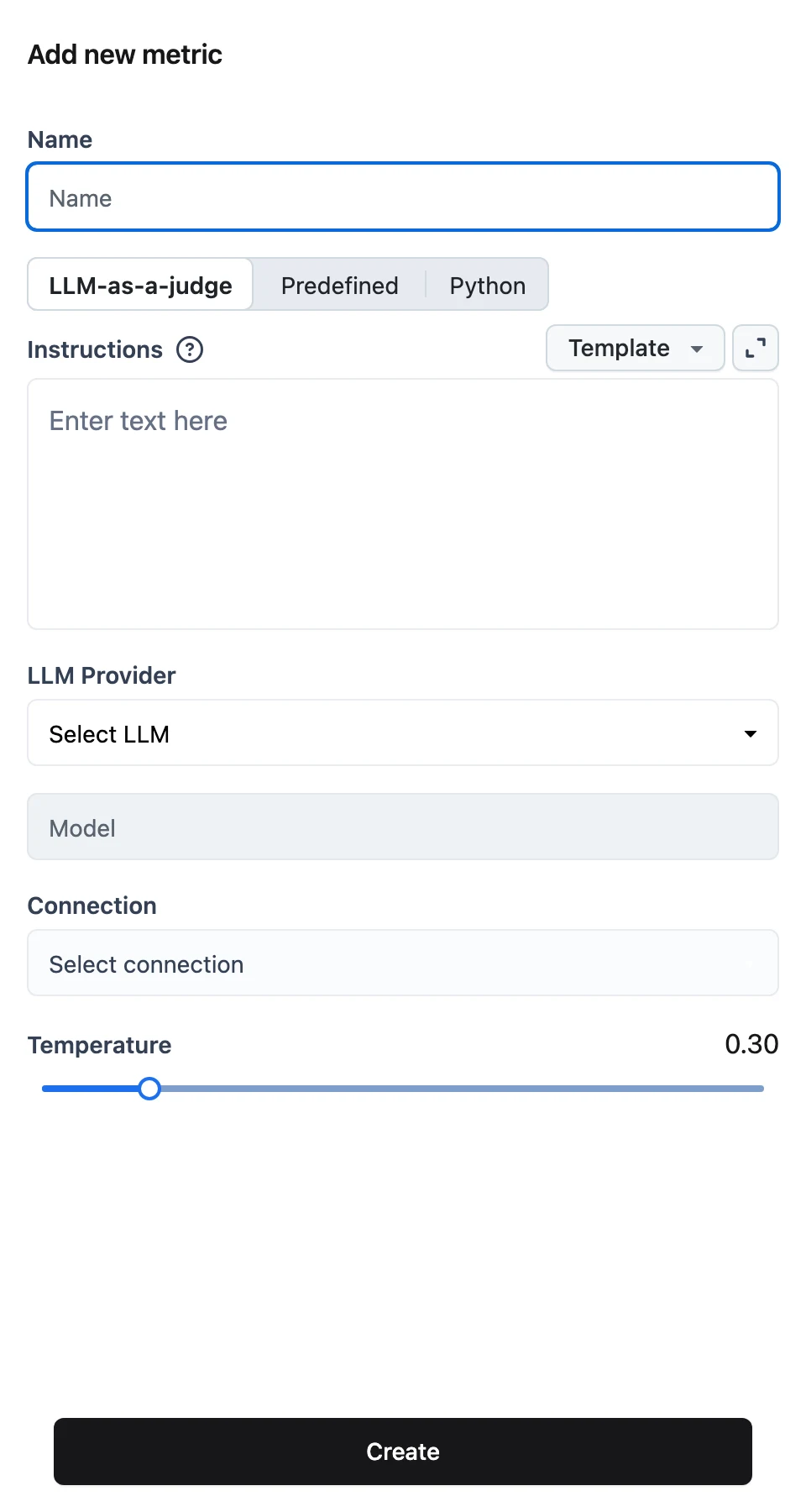
LLM-as-a-judge
Configure the judge model and the rubric:
- LLM Provider, Model, Connection, and Temperature — the model that performs the judging. The Connection dropdown offers your existing Connections, with + New connection inline.
- Instructions — the rubric. Use the Template menu to start from a built-in rubric: Custom, Hallucination, Factual Accuracy, Completeness, Clarity and Coherence, Relevance, Language Quality, Ethical Compliance, Originality and Creativity, or User Frustration.
Placeholders written as {{question}}, {{answer}}, {{context}}, and so on become the metric's Inputs — they are listed as labels under the editor, and at run time you map dataset fields or workflow outputs onto each one. A good rubric describes the task, the scoring scale, and instructs the model to return strict JSON like {"score": X} — the built-in templates all follow this pattern.
You can also provide few-shot examples (pairs of inputs and outputs) in the metric config via the API to anchor the judge's scoring.
Predefined
Pick a Metric Preset and the judge LLM it should use. The platform ships five presets, each with fixed inputs you map at run time:
| Preset | Inputs | Measures |
|---|---|---|
AnswerCorrectness | questions, answers, ground_truth_answers | How close answers are to the ground truth |
ContextPrecision | questions, answers, contexts_list | Whether retrieved contexts that mattered rank high |
ContextRecall | questions, answers, contexts | Whether the contexts cover the ground truth |
FactualCorrectness | answers, contexts | Claim-level factual overlap between answer and context |
Faithfulness | questions, answers, contexts | Whether the answer is grounded in the contexts |
These map to evaluator classes in the Dynamiq Python library (dynamiq.evaluations.metrics.AnswerCorrectnessEvaluator, ContextPrecisionEvaluator, ContextRecallEvaluator, FactualCorrectnessEvaluator, FaithfulnessEvaluator). The library itself contains additional evaluators (BLEU, ROUGE, exact match, string similarity) that you can use from the Python SDK; the five above are the ones exposed as platform presets.
Code
Write a Python function named evaluate in the Source Code editor. Its parameters become the metric's Inputs, and its return value is the score:
def evaluate(answer, expected):
    return 1 if answer == expected else 0
The Template menu offers ready-made examples: Exact Match, Email Presence, Phone Presence, String Presence, Arithmetic Sum, JSON Validity Check, and Check Answer Letter Match. A regex-based template looks like this:
import re

def evaluate(answer):
    # Default email regex pattern
    email_pattern = r"[a-zA-Z0-9_.+-]+@[a-zA-Z0-9-]+\.[a-zA-Z0-9-.]+"
    return 1 if re.search(email_pattern, answer) else 0
Click Create to save the metric. Opening an existing metric from the list shows a read-only Metric preview.
Metric versions
Every edit to a metric's config creates a new version — the metric's detail page has no in-place edit, only Save new version. The card at the top of the page shows a Version field: with more than one version it's a dropdown listing each as v<n> (the newest labeled v<n> (latest)); with a single version it's a plain label.
Selecting an older version loads its config read-only, with a banner: "You are viewing an older version. Switch to the latest version to make changes." The Save new version button itself only appears while the latest version is selected. If a version's snapshot fails to load, the page shows "This version could not be loaded." with a Back to latest version button.
Versions matter beyond the editor: evaluation runs pin the metric version they used (version_id in the run's metrics config), and online evaluations pin one via metric_version_id — both keep scoring the same rubric even after you save newer versions, so update the pinned version explicitly to pick up changes. GET /v1/metrics/{metric_id}/versions lists a metric's versions newest-first, and GET /v1/metrics/{metric_id}/versions/{version_id} fetches one in full (the version_id path segment also accepts the literal latest).
Manage metrics via the API
Create a metric with POST /v1/metrics. The payload is name, project_id, a type of llm_as_a_judge, predefined, or custom, and a type-specific config:
curl -X POST "https://api.getdynamiq.ai/v1/metrics" \
  -H "Authorization: Bearer $DYNAMIQ_PAT" \
  -H "Content-Type: application/json" \
  -d '{
    "name": "hallucination-judge",
    "project_id": "<your-project-id>",
    "type": "llm_as_a_judge",
    "config": {
      "instructions": "Score 0-5 how hallucinated the answer is given the context. Question: {{question}} Context: {{context}} Answer: {{answer}}. Respond exactly as {\"score\": X}.",
      "llm": {
        "type": "dynamiq.nodes.llms.OpenAI",
        "model": "gpt-4o-mini",
        "connection_id": "<your-connection-id>"
      }
    }
  }'
config.examples is optional: a list of {"inputs": {...}, "outputs": {...}} few-shot pairs. llm.temperature and llm.max_tokens are also optional.
curl -X POST "https://api.getdynamiq.ai/v1/metrics" \
  -H "Authorization: Bearer $DYNAMIQ_PAT" \
  -H "Content-Type: application/json" \
  -d '{
    "name": "answer-correctness",
    "project_id": "<your-project-id>",
    "type": "predefined",
    "config": {
      "type": "dynamiq.evaluations.metrics.AnswerCorrectnessEvaluator",
      "config": {
        "llm": {
          "type": "dynamiq.nodes.llms.OpenAI",
          "model": "gpt-4o-mini",
          "connection_id": "<your-connection-id>"
        }
      }
    }
  }'
Valid config.type values: dynamiq.evaluations.metrics.AnswerCorrectnessEvaluator, ContextPrecisionEvaluator, ContextRecallEvaluator, FactualCorrectnessEvaluator, FaithfulnessEvaluator (same prefix). FactualCorrectnessEvaluator additionally accepts optional mode, beta, atomicity, and coverage fields.
curl -X POST "https://api.getdynamiq.ai/v1/metrics" \
  -H "Authorization: Bearer $DYNAMIQ_PAT" \
  -H "Content-Type: application/json" \
  -d '{
    "name": "exact-match",
    "project_id": "<your-project-id>",
    "type": "custom",
    "config": {
      "code": "def evaluate(answer, expected):\n    return 1 if answer == expected else 0"
    }
  }'
Related endpoints: GET /v1/metrics?project_id=... lists metrics, PUT /v1/metrics/{metric_id} updates one (creating a new version — the type must stay the same), DELETE /v1/metrics/{metric_id} removes it, and GET /v1/metrics/{metric_id}/versions lists versions newest-first.
Test a metric
POST /v1/metrics/test runs one or more metric configurations against sample inputs without creating anything — useful for tuning a rubric before saving it. Each entry carries the metric config, a sample input, and an input_transformer whose selector maps input fields onto the metric's parameters:
curl -X POST "https://api.getdynamiq.ai/v1/metrics/test" \
  -H "Authorization: Bearer $DYNAMIQ_PAT" \
  -H "Content-Type: application/json" \
  -d '{
    "project_id": "<your-project-id>",
    "metrics": [
      {
        "id": "1",
        "metric": {
          "type": "llm_as_a_judge",
          "instructions": "Score 1-5 the factual accuracy of the answer. Question: {{question}} Answer: {{answer}} Ground truth: {{ground_truth}}. Respond exactly as {\"score\": X}.",
          "llm": {
            "type": "dynamiq.nodes.llms.OpenAI",
            "model": "gpt-4o-mini",
            "connection_id": "<your-connection-id>"
          }
        },
        "input_transformer": {
          "selector": {
            "question": "$.question",
            "answer": "$.answer",
            "ground_truth": "$.ground_truth"
          }
        },
        "input": {
          "question": "What is the capital of France?",
          "answer": "Paris is the capital of France.",
          "ground_truth": "Paris is the capital of France."
        }
      }
    ]
  }'
The response's results array carries one object per entry with your id, a status, the computed score, and an error field when scoring failed. The same selector syntax ($.field paths) is what you configure as input mappings when wiring metrics into an evaluation run.
Next steps
API reference: Metrics
The full REST contract for creating, versioning, and testing metrics.
Datasets
Build the versioned test data your metrics will score.
Evaluation Runs
Map dataset fields to metric inputs and read the scores.
Create a Connection
Add the LLM provider credentials your judge metrics need.