AI Models Router
Call any routed LLM through the OpenAI-compatible endpoint at router.getdynamiq.ai — base URL swap, streaming, and access-key auth.
The models router is an OpenAI-compatible POST /v1/chat/completions endpoint at https://router.getdynamiq.ai. You send a router model slug as model; the gateway resolves it to a configured upstream provider, authenticates to that provider with a Dynamiq-managed Connection, and relays the request and response. Your code uses one credential — a Dynamiq Access Key — for every model.
Models and providers
Dynamiq maintains the catalog of router models and providers. Each model has a slug (the value you pass as model) and is served by one or more providers; the gateway maps your slug to the provider's own model identifier and that provider's server-side credentials, so the routing is invisible to your client.
To see what's available:
Open the AI MODELS tab
In your project, open AI Gateway in the sidebar. The AI MODELS tab is active by default.
Pick a model
Under Model, select a model from the dropdown — the list shows every routable slug. Supported Providers updates to show which providers serve that model.
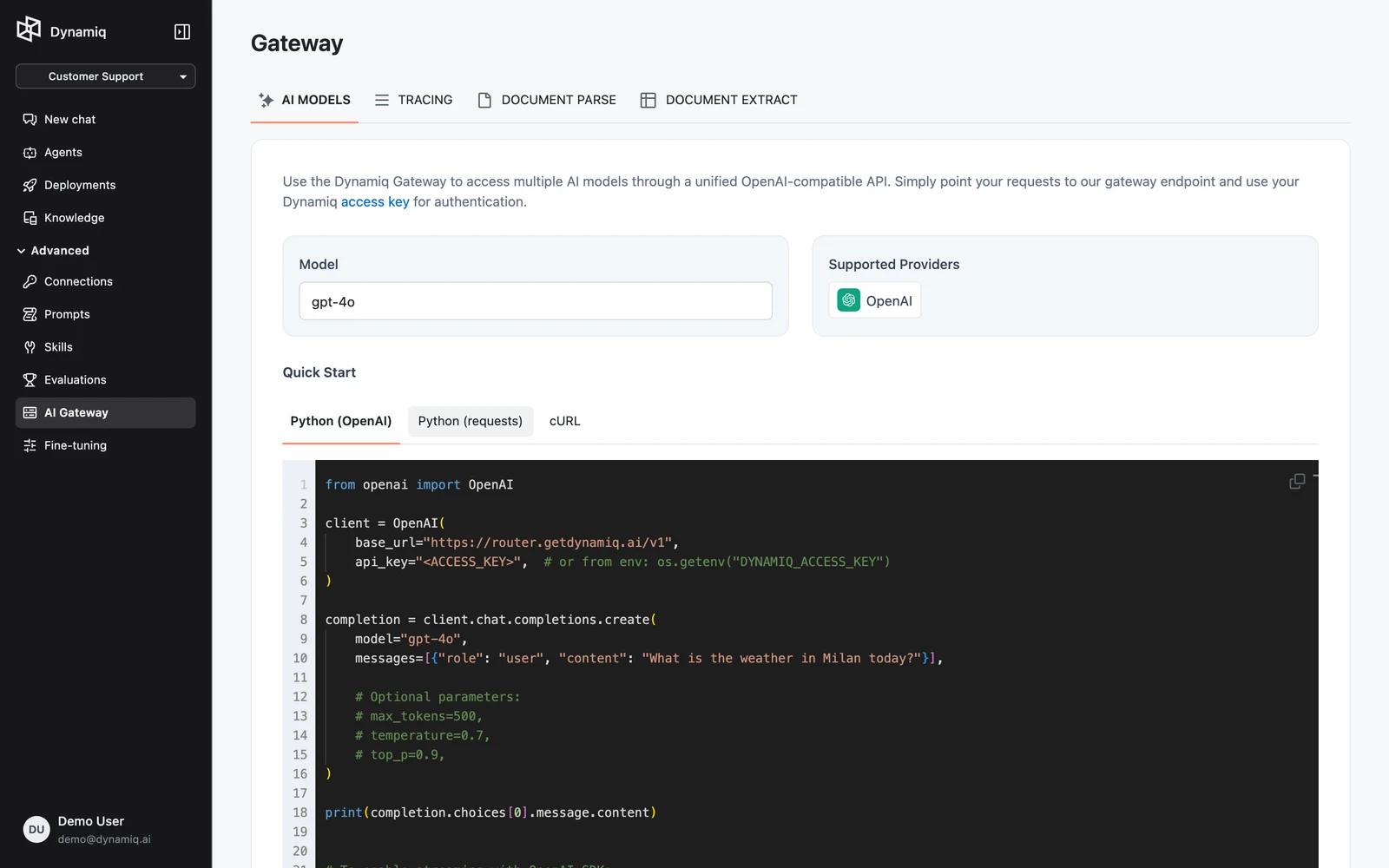
Copy the quick-start code
Under Quick Start, switch between Python (OpenAI), Python (requests), and cURL — each sample is prefilled with the selected model's slug. Authentication uses an Access Key; the tab links to Settings → Access Keys where you create one.
You can also list models programmatically from the management API: GET https://api.getdynamiq.ai/v1/router/models returns the catalog (each item has id, slug, and name), and GET /v1/router/models/{model_id}/providers returns the providers serving a model.
Make a request
The endpoint accepts the standard OpenAI chat completions request body. The only Dynamiq-specific part is that model must be a router model slug from the AI MODELS tab.
modelstringrequiredmessagesarrayrequiredstreambooleantemperaturenumbermax_tokensintegerstoparraytop_pnumberseedintegerpresence_penaltynumberfrequency_penaltynumbertoolsarraytool_choicestringFields not listed here are accepted and passed through to the upstream provider, so provider-specific parameters that fit the chat completions shape still work.
import os
from openai import OpenAI

client = OpenAI(
    base_url="https://router.getdynamiq.ai/v1",
    api_key=os.getenv("DYNAMIQ_ACCESS_KEY"),
)

completion = client.chat.completions.create(
    model="gpt-4o-mini",
    messages=[{"role": "user", "content": "What is the weather in Milan today?"}],
    temperature=0.7,
    max_tokens=500,
)

print(completion.choices[0].message.content)
import OpenAI from "openai";
const client = new OpenAI({
baseURL: "https://router.getdynamiq.ai/v1",
apiKey: process.env.DYNAMIQ_ACCESS_KEY,
});
const completion = await client.chat.completions.create({
model: "gpt-4o-mini",
messages: [{ role: "user", content: "What is the weather in Milan today?" }],
temperature: 0.7,
max_tokens: 500,
});
console.log(completion.choices[0].message.content);curl https://router.getdynamiq.ai/v1/chat/completions \
-H "Content-Type: application/json" \
-H "Authorization: Bearer $DYNAMIQ_ACCESS_KEY" \
-d '{
"model": "gpt-4o-mini",
"messages": [{"role": "user", "content": "What is the weather in Milan today?"}],
"temperature": 0.7,
"max_tokens": 500
}'The response is a standard chat.completion object. The model field in the response echoes the slug you requested, not the provider's internal model name.
Streaming
Set "stream": true and the endpoint returns Server-Sent Events where each data: line is a JSON chat.completion.chunk object, terminated by data: [DONE] — exactly what OpenAI SDK streaming clients expect:
import os
from openai import OpenAI

client = OpenAI(
    base_url="https://router.getdynamiq.ai/v1",
    api_key=os.getenv("DYNAMIQ_ACCESS_KEY"),
)

stream = client.chat.completions.create(
    model="gpt-4o-mini",
    messages=[{"role": "user", "content": "Tell me something interesting."}],
    stream=True,
)

for chunk in stream:
    print(chunk.choices[0].delta.content or "", end="", flush=True)
curl -N https://router.getdynamiq.ai/v1/chat/completions \
-H "Content-Type: application/json" \
-H "Authorization: Bearer $DYNAMIQ_ACCESS_KEY" \
-d '{
"model": "gpt-4o-mini",
"messages": [{"role": "user", "content": "Tell me something interesting."}],
"stream": true
}'Authentication and limits
Requests authenticate with Authorization: Bearer $DYNAMIQ_ACCESS_KEY, where the key is an org- or project-scoped Access Key from Settings → Access Keys. Unauthenticated requests get 401.
Gateway completions are metered against your organization's plan; when the quota is exhausted the request is rejected with a subscription-limit error. See Usage & Billing for plan details.
Errors
| Status | Cause |
|---|---|
401 | Missing or invalid Access Key |
422 | Request body failed validation (e.g. missing messages) |
400 | The model slug isn't in the router catalog, no provider is configured for it, or the upstream provider call failed — the error detail says which |