Document Extract
Extract structured JSON from PDFs and images: an OCR pass followed by schema-guided extraction, in the playground or via /v1/ocr/extract.
Document Extract runs two LLM passes over a PDF or image: an OCR LLM converts the document to Markdown (the same pipeline as Document Parse), then a Structured Output LLM extracts the fields you define in a JSON template. The result is a JSON object shaped like your template — invoice fields, line items, totals — instead of raw text.
Extract data in the UI
Open the playground
In your project, open AI Gateway and switch to the DOCUMENT EXTRACT tab. The PLAYGROUND sub-tab is active by default; CODE shows an equivalent API snippet.
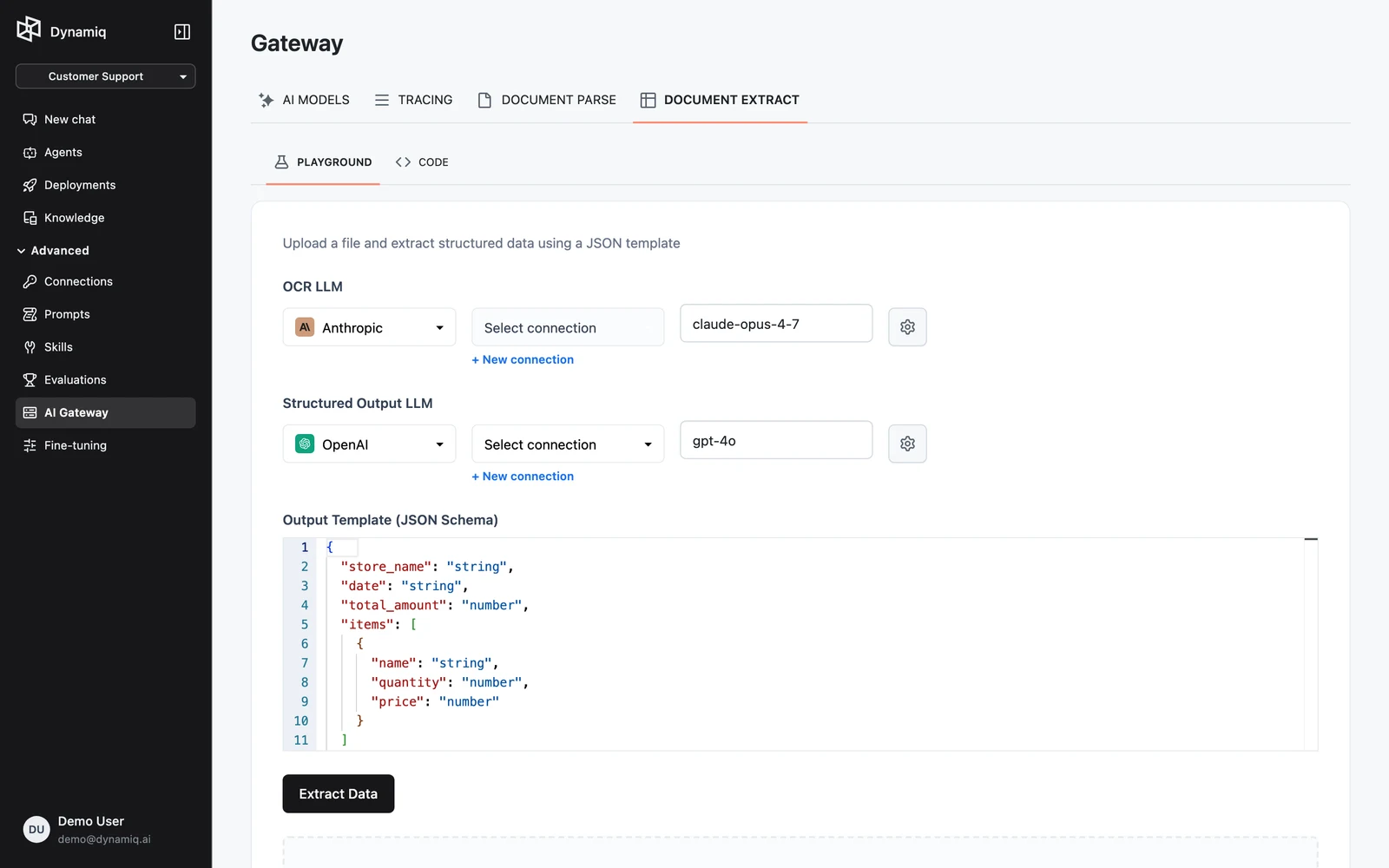
Configure the two LLMs
- OCR LLM — reads the document pages; pick a vision-capable model, its Connection, and settings (temperature, max tokens, reasoning effort where supported).
- Structured Output LLM — turns the OCR text into JSON; any strong text model works, and it can be a different provider than the OCR LLM.
Define the output template
Edit Output Template (JSON Schema) — a JSON object whose keys are the fields you want and whose values describe their types. The default template extracts receipt data:
{
  "store_name": "string",
  "date": "string",
  "total_amount": "number",
  "items": [{ "name": "string", "quantity": "number", "price": "number" }]
}
Upload and extract
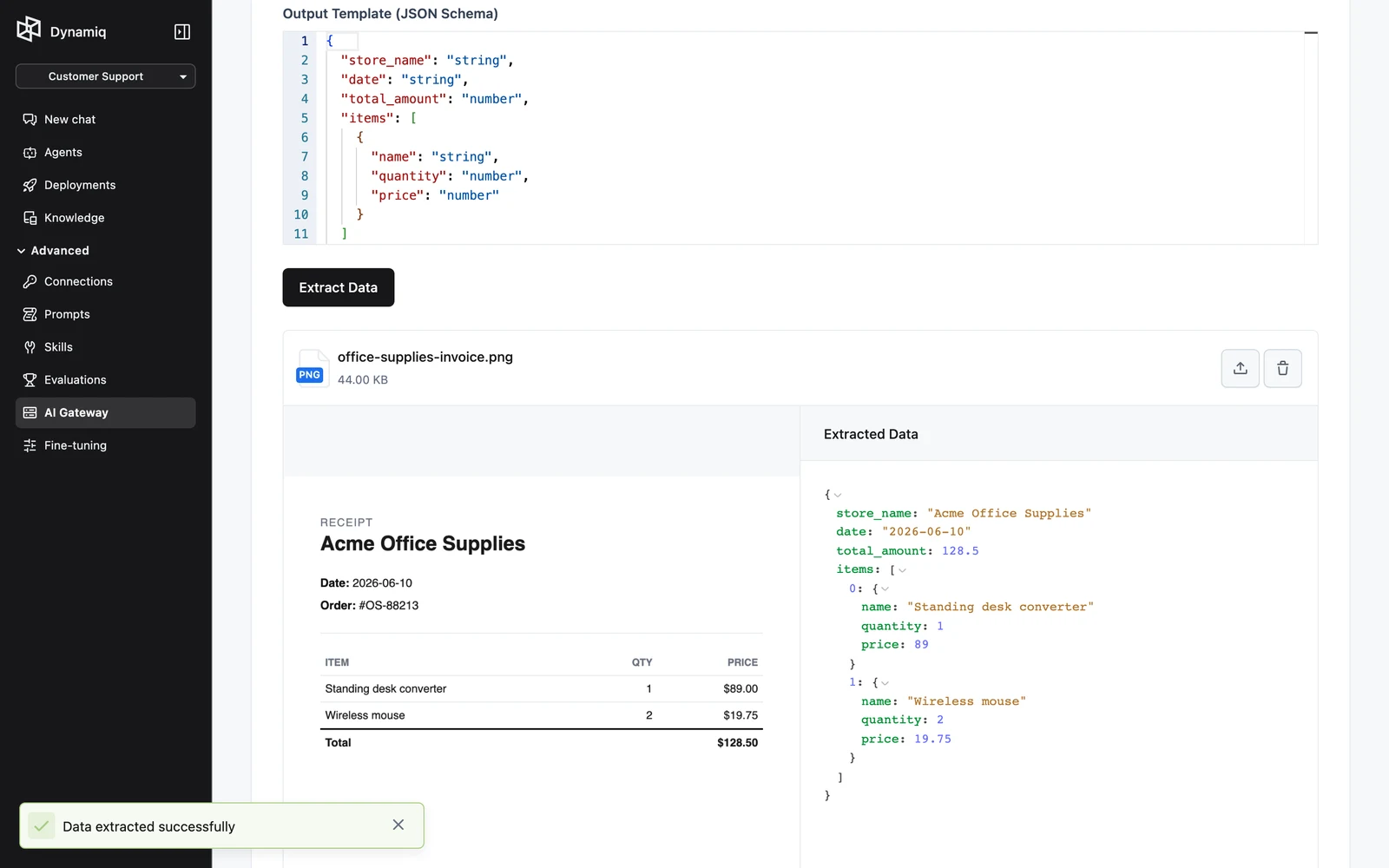
Drop a PDF or image into the dropzone and click Extract Data. The extracted JSON appears next to the file preview.
Call the API
POST https://api.getdynamiq.ai/v1/ocr/extract is a multipart/form-data request with two fields:
filefilerequiredoptionsstring (JSON)requiredThe options JSON:
ocr_llmobjectrequiredstructured_output_llmobjectrequiredtemplatestringrequiredstreambooleanimport json
import os
import requests
template = {
"invoice_number": "string",
"date": "string",
"total_amount": "number",
"items": [
{"description": "string", "quantity": "number", "price": "number"}
],
}
llm = {
"type": "openai",
"model": "gpt-4o",
"connection_id": os.getenv("DYNAMIQ_CONNECTION_ID"),
"temperature": 0.0,
"max_tokens": 4096,
}
response = requests.post(
"https://api.getdynamiq.ai/v1/ocr/extract",
headers={"Authorization": f"Bearer {os.getenv('DYNAMIQ_PAT')}"},
files={"file": open("invoice.pdf", "rb")},
data={
"options": json.dumps(
{
"ocr_llm": llm,
"structured_output_llm": llm,
"template": json.dumps(template),
"stream": False,
}
)
},
)
response.raise_for_status()
print(json.dumps(response.json()["data"], indent=2))curl https://api.getdynamiq.ai/v1/ocr/extract \
-H "Authorization: Bearer $DYNAMIQ_PAT" \
-F "file=@invoice.pdf" \
-F 'options={
"ocr_llm": {"type": "openai", "model": "gpt-4o", "connection_id": "'"$DYNAMIQ_CONNECTION_ID"'", "temperature": 0.0, "max_tokens": 4096},
"structured_output_llm": {"type": "openai", "model": "gpt-4o", "connection_id": "'"$DYNAMIQ_CONNECTION_ID"'", "temperature": 0.0, "max_tokens": 4096},
"template": "{\"invoice_number\": \"string\", \"date\": \"string\", \"total_amount\": \"number\"}",
"stream": false
}'Both options and the template inside it are JSON strings: serialize the template first, then serialize the options object that contains it (double encoding, as in the Python sample).
Response
{
  "data": {
    "invoice_number": "4812",
    "date": "2026-06-01",
    "total_amount": 98.0,
    "items": [
      { "description": "Pro plan (June)", "quantity": 2, "price": 49.0 }
    ]
  }
}
data is shaped by your template. Under the hood, the structured-output pass instructs the model to return a JSON object under an extracted_data key; the endpoint parses it and returns the contents as data. With "stream": true the response is an SSE stream instead.
Errors
| Status | Cause |
|---|---|
422 | The options field is not valid JSON or fails validation |
400 | OCR failed, the extraction LLM returned no output, or its output couldn't be parsed as JSON |
401 | Missing or invalid credentials |