Deploy & Integrate
Deploy a voice agent, manage its deployments, and connect it to your own application over WebRTC.
Deploying a voice agent provisions a hosted worker that runs its calls. Once deployed, the agent is reachable from a browser or mobile app over WebRTC, from a phone over SIP, or from your own backend over a WebSocket.
Deploying
The primary button in the agent page header changes with status:
| Status | Button | What it does |
|---|---|---|
draft | Deploy | Builds and starts a hosted worker for this agent. Takes a few minutes. |
deploying | Deploying… | Disabled while the build runs. |
failed | Retry deploy | Try again. The failure reason is shown in a banner. |
deployed | Undeploy | Removes the hosted worker and deactivates phone routing. |
Undeploying returns the agent to draft. It stays editable and testable, and its calls, transcripts, and deployment history are kept — only the live runtime goes away. It also disconnects telephony; if that teardown only partly succeeds, the trunk is left marked failed with its numbers still reserved to this agent.
Undeploy is available from failed as well as deployed, which makes it the way to clear a broken agent. It is not repeatable, though: undeploying an agent that is already back to draft is rejected with a 400.
There is no in-place redeploy. Deploying an agent that is already deployed is rejected — undeploy it first, then deploy again. Expect a short outage in between: the worker is gone and phone numbers do not route until the new deploy finishes.
If a deploy doesn't finish within 15 minutes it is marked failed, and an agent stuck in deploying is swept rather than staying stuck forever. If a retry can't clean up the previous worker it fails rather than leaving one orphaned — retrying again is the right response.
You do not redeploy to change configuration. Instructions, models, tools, and advanced settings are read at the start of every call, so edits apply to the next call immediately. The only reason to redeploy is to pick up a new platform worker version.
The Deployments tab records every attempt — who deployed, when it started and ended, the worker version, and any error. See Calls & observability.
Choosing a transport
WebRTC
For browsers and mobile apps. The client SDK handles the microphone, the speakers, and the network.
WebSocket
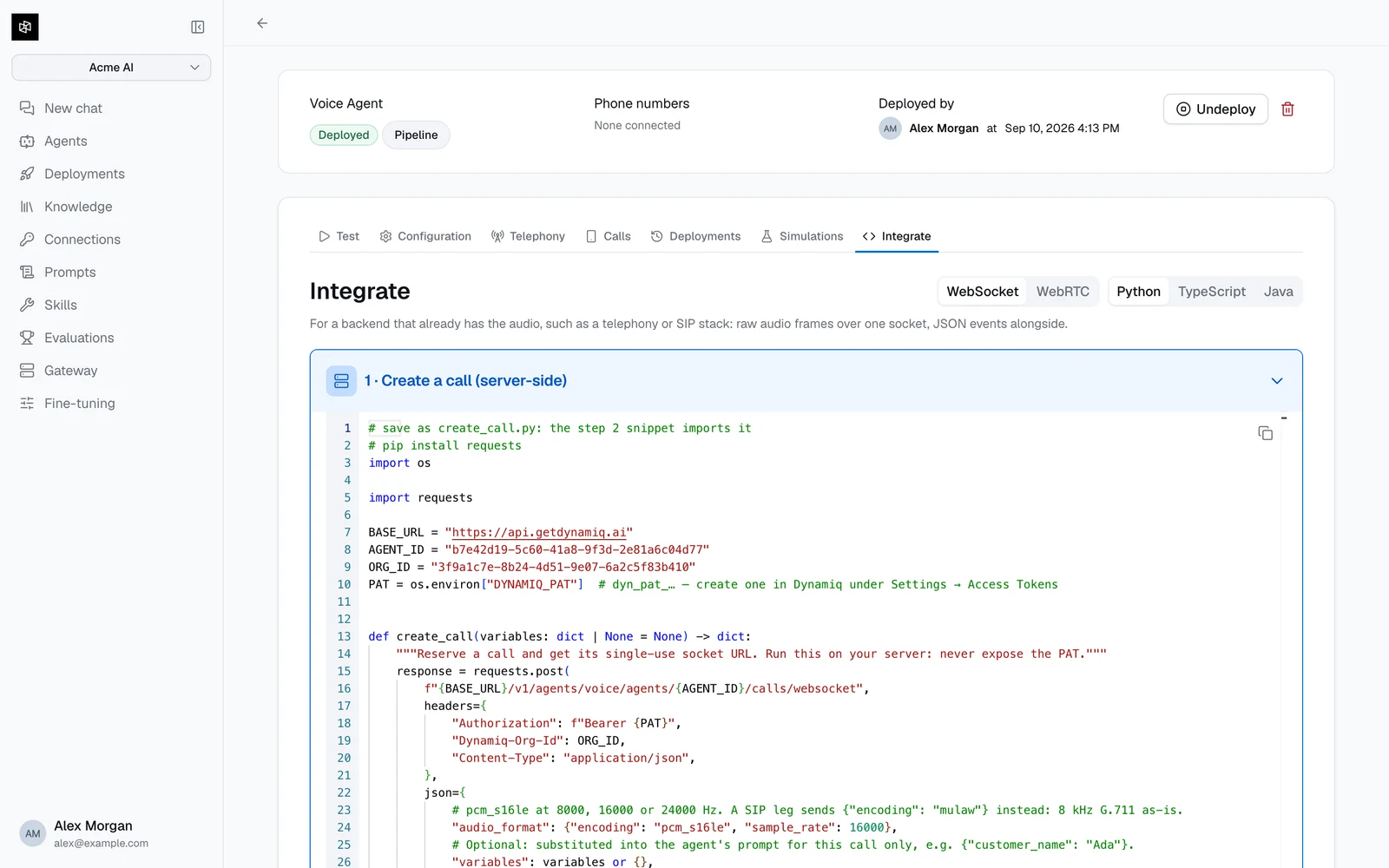
For a backend that already has the audio, such as a telephony or SIP stack: raw audio frames over one socket.
SIP
For phone calls. Connect numbers you own and point your trunk at Dynamiq.
The Integrate tab generates ready-to-run code for the first two, filled in with your agent's id and organization id, in Python, TypeScript, or Java. It opens on the WebSocket transport; pick WebRTC for browser and mobile clients. Integrations are only offered once the agent is deployed, because every session targets the live deployment.
WebRTC, for browsers and mobile apps
Two steps: your server mints a session, your client connects with it.
The Personal Access Token is a server-side secret. Mint the session on your backend and hand the client only the url and token that come back — never ship a dyn_pat_… token to a browser or mobile app.
Create one under Settings → Access Tokens, or ask your administrator if that tab isn't available to you.
The Dynamiq-Org-Id header in these samples is what the Integrate tab emits. These endpoints authorize from the token plus the project or agent in the request, so it is not required — it is harmless to keep, and safe to drop.
1. Mint a session on your server
POST /v1/agents/voice/agents/{agent_id}/rooms returns a bare payload — no data envelope:
curl -X POST "https://api.getdynamiq.ai/v1/agents/voice/agents/$AGENT_ID/rooms" \
  -H "Authorization: Bearer $DYNAMIQ_PAT" \
  -H "Dynamiq-Org-Id: $DYNAMIQ_ORG_ID" \
  -H "Content-Type: application/json" \
  -d '{"participant_name": "Jane", "variables": {"customer_name": "Jane"}}'
{
"token": "eyJhbGciOi...",
"room_name": "agent-1757845200-9f2c1ab4d7e0",
"url": "wss://voice.getdynamiq.ai"
}# pip install requests
import os
import requests
BASE_URL = "https://api.getdynamiq.ai"
AGENT_ID = os.environ["DYNAMIQ_VOICE_AGENT_ID"]
ORG_ID = os.environ["DYNAMIQ_ORG_ID"]
PAT = os.environ["DYNAMIQ_PAT"] # dyn_pat_… — create one under Settings → Access Tokens
def create_session(participant_name: str = "User", variables: dict | None = None) -> dict:
"""Mint a realtime session. Run this on your server: never expose the PAT."""
response = requests.post(
f"{BASE_URL}/v1/agents/voice/agents/{AGENT_ID}/rooms",
headers={
"Authorization": f"Bearer {PAT}",
"Dynamiq-Org-Id": ORG_ID,
"Content-Type": "application/json",
},
json={"participant_name": participant_name, "variables": variables or {}},
timeout=30,
)
response.raise_for_status()
# Bare payload, no "data" envelope.
return response.json()
if __name__ == "__main__":
session = create_session()
print(session["url"], session["room_name"])const BASE_URL = 'https://api.getdynamiq.ai';
const AGENT_ID = process.env.DYNAMIQ_VOICE_AGENT_ID!;
const ORG_ID = process.env.DYNAMIQ_ORG_ID!;
const PAT = process.env.DYNAMIQ_PAT!; // dyn_pat_… — keep this server-side
export interface VoiceSession {
token: string;
room_name: string;
url: string;
}
export async function createSession(
participantName = 'User',
variables: Record<string, string> = {},
): Promise<VoiceSession> {
const response = await fetch(`${BASE_URL}/v1/agents/voice/agents/${AGENT_ID}/rooms`, {
method: 'POST',
headers: {
Authorization: `Bearer ${PAT}`,
'Dynamiq-Org-Id': ORG_ID,
'Content-Type': 'application/json',
},
body: JSON.stringify({ participant_name: participantName, variables }),
});
if (!response.ok) {
throw new Error(`Failed to create voice session: ${response.status}`);
}
// Bare payload, no "data" envelope.
return (await response.json()) as VoiceSession;
}The optional variables object is substituted into the agent's instructions and welcome message for this call only — see Build a voice agent.
A minted session expires after 15 minutes. Create it when the caller is ready to connect, not in advance.
2. Connect from the client
Fetch url and token from your own backend, then connect and publish the microphone. The agent joins the session and starts talking.
import { Room, RoomEvent } from 'livekit-client';

const session = await fetch('/api/voice-session').then((r) => r.json());

const room = new Room({ adaptiveStream: true });

room.on(RoomEvent.TrackSubscribed, (track) => {
  if (track.kind === 'audio') {
    track.attach(); // plays the agent's voice
  }
});

await room.connect(session.url, session.token);
await room.localParticipant.setMicrophoneEnabled(true);
To hang up, call room.disconnect().
Handling client tools over WebRTC
If your agent has client tools, register a handler for the RPC method dynamiq.tool before connecting. The value you return is what the agent hears.
room.registerRpcMethod('dynamiq.tool', async (data) => {
  const { name, arguments: args } = JSON.parse(data.payload);

  if (name === 'check_account_balance') {
    const balance = await getBalanceForSignedInUser();
    return JSON.stringify({ balance_usd: balance });
  }

  throw new Error(`Unknown tool: ${name}`);
});
Throwing turns into a tool error the agent hears and explains to the caller — use the message to say why. A tool with Wait for a result off is a notification: handle it and return nothing meaningful.
In Python, register the handler after connecting:
@room.local_participant.register_rpc_method("dynamiq.tool")
async def handle_tool(data):
    payload = json.loads(data.payload)
    if payload["name"] == "check_account_balance":
        return json.dumps({"balance_usd": await get_balance()})
    raise RuntimeError(f"Unknown tool: {payload['name']}")
Java
The Integrate tab also emits a Java pair, and the two transports are not equally easy.
The server half is straightforward on both: Java 17+, no dependencies, java.net.http against the same endpoint shown above.
The WebRTC client half is the hard path, because there is no JVM client SDK. The generated snippet drives the native liblivekit_ffi library through the foreign-function API, which means:
- JDK 22 or newer (
java.lang.foreign). - The
liblivekit_ffibuild for your platform, downloaded from the LiveKitrust-sdksreleases. - Protobuf classes generated from the FFI
.protodefinitions, pluscom.google.protobuf:protobuf-java.
If you are integrating from the JVM and don't need WebRTC specifically, the WebSocket transport is far simpler — its Java client is JDK-only, with no native library and no protobuf.
Echo cancellation
If your client plays the agent through speakers rather than headphones, enable echo cancellation. Without it the agent hears itself, reads that as the caller interrupting, and talks over itself. Browsers do this for you when you request the microphone with echoCancellation: true; native clients need an explicit echo canceller fed with both the microphone stream and the audio about to be played.