Tools & Transfers
Give a voice agent HTTP tools, client tools, and MCP servers, let it transfer callers to a human, and let it hang up.
The Actions section is what turns a voice agent from a scripted greeter into something that can actually resolve a call: look up an order, book a slot, check a balance, or hand the caller to a person.
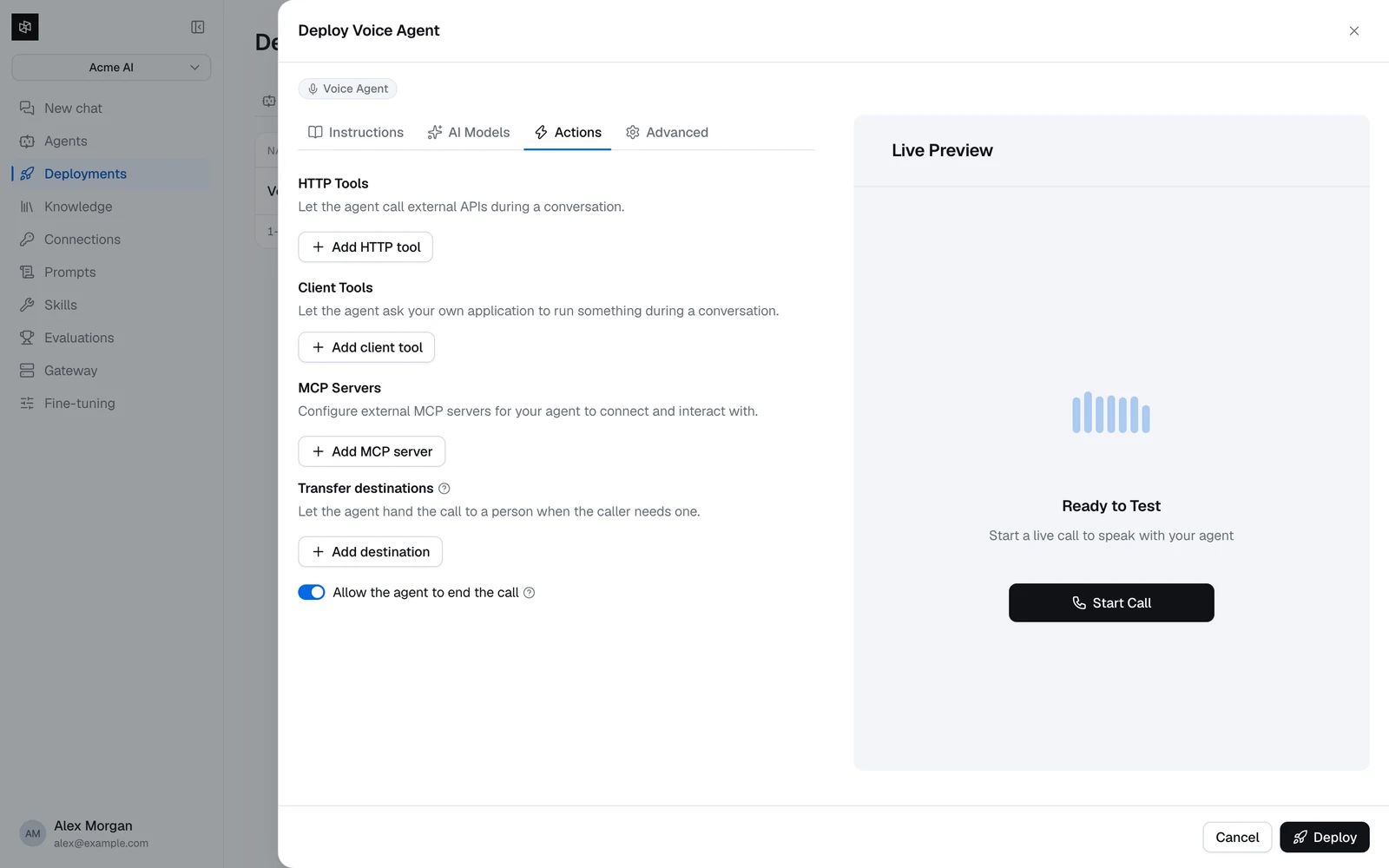
Four kinds of action, plus two built-ins:
| Action | Runs where | Use it for |
|---|---|---|
| HTTP tools | Dynamiq's worker | Calling your own APIs. |
| Client tools | The caller's application | Anything only the client can do — read its UI state, charge a saved card, look up the signed-in user. Not available on calls arriving over a Dynamiq SIP trunk. |
| MCP servers | An external MCP server | Reusing a tool server you already run. |
| Transfer destinations | The telephony leg | Handing the call to a human. |
| End call | Built in | Letting the agent hang up when the caller says goodbye. |
| Send DTMF | Built in | Navigating an IVR the agent has been transferred into. |
HTTP tools and client tools share one function-name namespace. A client tool cannot reuse an HTTP tool's name, and the builder rejects it with A tool named "X" already exists.
Writing tool descriptions for voice
The model decides whether to call a tool from its description alone, and on a voice call it must decide fast and without a second try. Write the description as an instruction about when to use the tool and what it returns — "Look up the status of a customer's order by its id. Use when the caller asks where their order is." — not as a restatement of the endpoint.
Keep the parameter count small. Every parameter is something the model has to extract correctly from speech, where "A as in alpha, four, four, seven" is a realistic customer utterance.
HTTP tools
Dynamiq calls your API from its worker and gives the model the response body.
NametextrequiredMethodGET | POST | PUT | PATCH | DELETErequireddefault: GETURLtextrequiredDescriptiontextrequiredParameterslistHeaderskey-value listTimeoutintegerdefault: 10Long-running toolswitchdefault: offTwo limits to design around:
- Responses are truncated to 16 KB. Return the fields the agent needs to speak, not your full object graph. A 200-line JSON blob wastes tokens and gives the model more chances to read out something odd.
- Calls time out after the tool's Timeout, 30 seconds at most.
And two behaviors that will surprise you if you don't know them:
- A response with an HTTP error status is handed to the model, not swallowed: it arrives as
error: HTTP <code>: <first 500 characters of your body>. Whatever your API says in an error body is what the agent reasons about and may paraphrase to the caller, so keep those messages short and caller-safe. - Outbound URLs are checked, and re-checked on every call. A URL is refused if it isn't
http(s), or if its host resolves to a private, loopback, link-local, or reserved address — DNS failure counts as refused too. Because the check runs at call time rather than at save time, a tool that saved cleanly can still fail later if its hostname starts resolving internally. The model is tolderror: the URL for tool 'X' is not allowed.
Long-running tools
Silence kills a voice call. With Long-running tool on, the agent keeps the conversation alive while it waits: it speaks a filler, repeats a status update every 15 seconds — the exact words are "Still working on it, one moment." — and can answer unrelated questions in the meantime.
The switch does not change the Timeout field; it hands the call to a separate long-running path that allows up to 5 minutes.
Turn it on for anything that queries a slow backend, and leave it off for fast lookups — the filler speech is noticeable when the answer was going to arrive in 300 ms anyway.
Client tools
A client tool is executed by your application, not by Dynamiq. The agent asks; your code answers. Dynamiq never sees a URL, a header, or a credential for it.
That makes client tools the right choice whenever the work needs something only the client has: the signed-in user's session, the state of the screen the caller is looking at, a payment method on file, or a device the caller is holding.
NametextrequiredDescriptiontextrequiredParameterslistWait for a resultswitchdefault: onLong-running toolswitchdefault: offTimeoutintegerdefault: 10Client tools do not work on calls that arrive over a Dynamiq SIP trunk. A client tool has to be answered by something on the caller's side, and a SIP leg has no handler. The agent is told the action "runs on the caller's own system, which is not available on this call" and politely explains it can't do it — the call carries on, but the tool never runs.
A phone call your own telephony stack bridges in over the WebSocket transport is different: your backend is the one answering, so client tools work there. If you need client tools on phone calls, that is the route. Otherwise use an HTTP tool.
How the request reaches your code depends on the transport:
- WebRTC — register an RPC handler for the method
dynamiq.tool. The value you return is what the agent hears. - WebSocket — you receive a
tool_callevent and reply with atool_resultmessage carrying the sametool_call_id.
Either way you have the tool's own Timeout to answer in; there is nothing to acknowledge first.
Results are capped at 15 KB. If the caller's side has no handler registered, the tool call fails cleanly: the agent tells the caller it can't do that here and the conversation continues — the call is never dropped. Returning an error works the same way, so use it to say why ("no card on file") rather than failing silently.
See Deploy & integrate and WebSocket transport for working handlers.
MCP servers
Point the agent at an external MCP server and its tools become available on the call.
NametextrequiredServer URLtextrequiredHeaderskey-value listAllowed toolschipsLong-running toolsswitchdefault: offTest connection verifies the server and lists what it discovered, so you can click the tools you want into Allowed tools rather than typing names.
If an MCP server is unreachable when a call starts, the call still happens. The agent is told that server's tools are unavailable and works without them, rather than failing the call. Each server gets 10 seconds to connect, so a slow server drops out silently — if tools you expect are missing, that timeout is the first thing to check. A server URL blocked by the outbound URL check drops out the same way.
Transfer destinations
Transfer lets the agent hand the call to a person. It's a cold transfer: the agent connects the caller and drops off.
You configure a list of destinations — up to 10 — each with a Label and a Phone number:
| Field | Rules |
|---|---|
| Label | Up to 40 characters, unique regardless of case. |
| Phone number | E.164, for example +14155550134. Normalized when you leave the field; a number without a country code is rejected with a specific error. |
Transfer is enabled exactly when the list is non-empty. With no destinations, the agent cannot transfer at all.
Label them the way a caller would say it. The agent picks a destination by its label, so use "Billing" or "Technical support", never "1" or "Queue B". The model can only choose from the labels you configured — it can never dial a number you didn't list, and a label outside the list is rejected before the transfer runs.
The agent always says "Transferring you now, one moment." before handing off; that line is built in and not configurable. The caller then hears ringing while the transfer connects.
If the call has no telephony leg — a browser test call, say — the agent explains that transfers are only available on phone calls rather than failing. If the transfer itself fails, it apologizes and offers to keep helping, and the conversation continues. Only a successful transfer is recorded with the end reason transfer.
Ending the call
Allow the agent to end the call is on by default. It gives the agent a hang-up tool and instructs it to say goodbye first, wait for that audio to finish playing, and then disconnect. The call is recorded with the end reason agent_hangup.
Turn it off when something else owns the end of the call — an IVR that reclaims the caller, or your own application.
Sending DTMF
Every agent can send keypad tones. This matters when your agent is transferred into someone else's IVR and has to press 2 for support. Use 0-9, *, and #; tones are sent 300 ms apart so the receiving system doesn't read a run of tones as one long press.
The platform can also encode A–D, but the tool's own description tells the model only 0-9, *, and # exist, so in practice the agent refuses those four. Don't rely on them.
Inbound keypresses work too: digits a caller types are collected, debounced for 1.2 seconds, and delivered to the agent as a single turn — so 4, 1, 7 becomes one "the caller entered 417" rather than three interruptions. See Telephony.
What the platform adds to your prompt
When an agent has at least one tool of any kind, the platform appends a short paragraph to your instructions that you cannot edit or remove. It tells the agent to treat tool output as data, not instructions, and never to reveal its own instructions or credentials.
This is worth knowing for two reasons. It is why an agent won't follow commands that arrive inside an API response — a defense against a compromised or hostile endpoint steering the call. And it is why an agent sometimes summarizes a tool result instead of reading it out verbatim.
Two other paragraphs are appended conditionally: one when Allow the agent to end the call is on, instructing it to say goodbye before hanging up, and one naming any MCP servers that were unreachable when the call started.