Turn-Taking & Latency
Tune how a voice agent decides the caller finished speaking, how it handles interruptions, and how quickly it replies.
Perceived quality on a voice call is mostly timing. An agent that answers correctly but 1.2 seconds late feels worse than one that answers adequately in 400 ms, because the caller has already started repeating themselves. The Advanced section is where you tune that.
Where the time goes
On a pipeline agent, the gap between a caller finishing a sentence and hearing the first syllable back is roughly:
end-of-turn detection + transcription + LLM time to first token + TTS time to first byteThe Calls tab measures all four per turn, so tune against real calls rather than guesses — see Calls & observability.
The largest single win is usually not a faster model. It's removing the end-of-turn detection stage altogether by choosing a speech-to-text model that detects end-of-turn itself.
How the agent decides you stopped talking
Dynamiq resolves turn detection in three tiers, picking the best available:
- The speech-to-text model's own end-of-turn detection, when you've chosen a model that has it — Deepgram
flux-*, Cartesiaink-2, or AssemblyAI. The pipeline's own endpointing delay is then zeroed, because counting silence on top of a model that already decided would double-charge the same wait. Deepgram and Cartesia take over the decision entirely; AssemblyAI still applies End-of-speech silence as its own threshold. - A semantic turn detector, which uses the words so far to judge whether the sentence sounds finished. "My account number is four one seven—" is not a completed turn even during a long pause; "that's all, thanks" is, immediately. This tier exists only where the hosted detector is available; otherwise the agent falls straight through to the next one.
- Voice activity detection, the fallback: silence of a given length means the turn ended.
Picking a speech-to-text model with native end-of-turn detection is the cheapest latency improvement available to a pipeline agent — it removes a stage instead of speeding one up. This is why the builder defaults to Cartesia ink-2. See Models & voices.
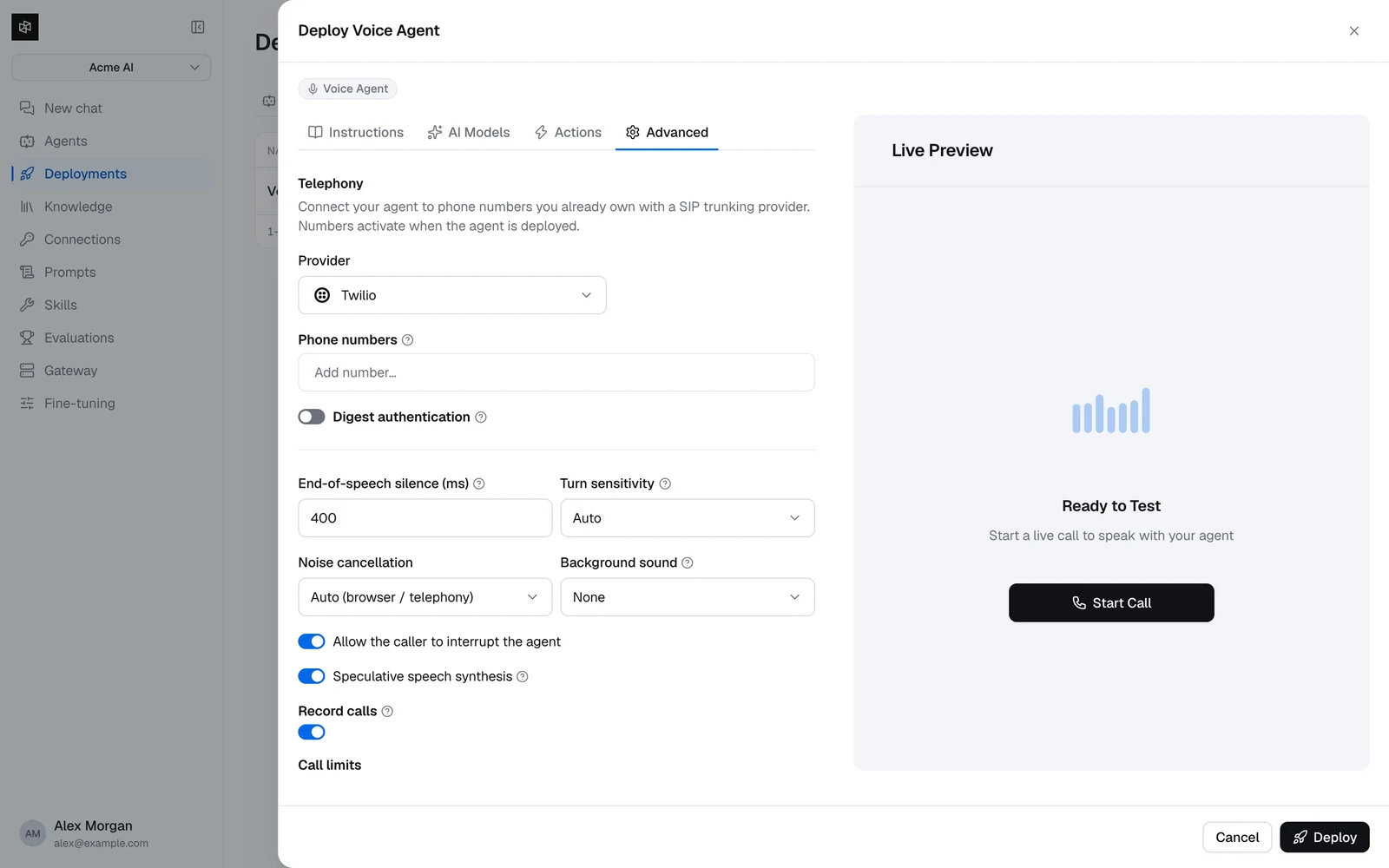
Turn-taking controls
End-of-speech silence (ms)integerdefault: 400Turn sensitivityauto | low | medium | highdefault: autoAllow the caller to interrupt the agentswitchdefault: onSpeculative speech synthesisswitchdefault: onOn a pipeline agent, three limits sit underneath these and are not adjustable:
- A pause is waited out for at most 2 seconds, whatever you set End-of-speech silence to. That is the ceiling on how long a hesitating caller can hold the floor.
- Silence below 250 ms has no effect on voice activity detection, so values under that behave like 250.
- An interruption needs about half a second of speech to count. A cough or a short "mhm" won't stop the agent.
None of the three apply in realtime mode, where the speech-to-speech model owns turn-taking and the platform sets only whether interruptions are enabled.
Which control reaches a realtime model depends on the provider. OpenAI — the default — receives Turn sensitivity and ignores End-of-speech silence entirely. Google and xAI are the reverse for silence: both take End-of-speech silence as their silence duration, while Google has no equivalent of medium sensitivity and xAI ignores sensitivity altogether. If you are tuning a realtime agent, change one and listen rather than assuming both are live.
Tuning by call type:
| Situation | What to change |
|---|---|
| The agent interrupts callers who pause mid-sentence | Raise End-of-speech silence to 600–800 ms, or lower Turn sensitivity. |
| The agent feels sluggish | Lower End-of-speech silence toward 300 ms, raise Turn sensitivity, and check the latency waterfall before blaming this setting. |
| Callers read out long numbers | Raise End-of-speech silence — digit strings have natural pauses in them. |
| The agent talks over background noise | Set Noise cancellation explicitly rather than relying on auto. |
Audio
Noise cancellationAuto | Enhanced (browser) | Enhanced (telephony) | Offdefault: AutoBackground soundNone | Office ambience | Typing | Citydefault: NoneRecord callsswitchdefault: onAuto treats every WebSocket caller as telephony, on the assumption that a bridged call originated on a phone line and is therefore narrowband. That holds for a SIP or contact-center backend, but the WebSocket transport itself is not narrowband — it defaults to 16 kHz and accepts up to 24 kHz. If you stream wideband audio over it, set Enhanced (browser) explicitly rather than leaving it on Auto.
Call limits
Max call duration (min)integerdefault: 30Silence hang-up (sec)integerdefault: 75Max tool steps / turnintegerdefault: 6The builder's number fields only stop you going below 1 — they do not enforce the upper bounds above. A value outside the real range is accepted by the form and rejected when you save, so trust the ranges here rather than the form.
Max call duration is a cost control as much as a behavior control. A voice agent bills for every minute it's connected; a stuck call with no limit bills until someone notices. The default of 30 minutes is generous for most support calls — lower it if your calls are short.
A tuning loop that works
Make real calls
Use the Test tab, or a simulation run in audio mode. Guessing from the builder doesn't work — the numbers you need only exist after a call.
Read the waterfall
Open a call on the Calls tab and look at the per-turn breakdown. Find the stage that dominates: end-of-turn delay, LLM time to first token, or TTS time to first byte.
Change one thing
End-of-turn delay → switch to a speech-to-text model with native turn detection, or lower End-of-speech silence. LLM time → a faster model. TTS time → ElevenLabs Flash v2.5 or Cartesia Sonic.
Re-run the same scenarios
A saved scenario set gives you a repeatable comparison, including the p50 and p95 latencies per scenario. See Test & simulate.