Platform Connections & Gateway
Call the Dynamiq AI Gateway from SDK code and use the Dynamiq connection to reach platform-managed memory and skills.
SDK code doesn't have to run in isolation. Two bridges connect it to the platform at runtime: the AI Gateway, an OpenAI-compatible router for LLM traffic, and the Dynamiq connection, which lets SDK components such as agent memory and skills read from resources managed in your Dynamiq project.
The AI Gateway
The gateway at https://router.getdynamiq.ai/v1 exposes a single OpenAI-compatible chat-completions endpoint in front of every model enabled for your organization, with authentication by Access Key, centralized usage tracking, and tracing. Browse available model IDs under Gateway → AI MODELS in the platform.
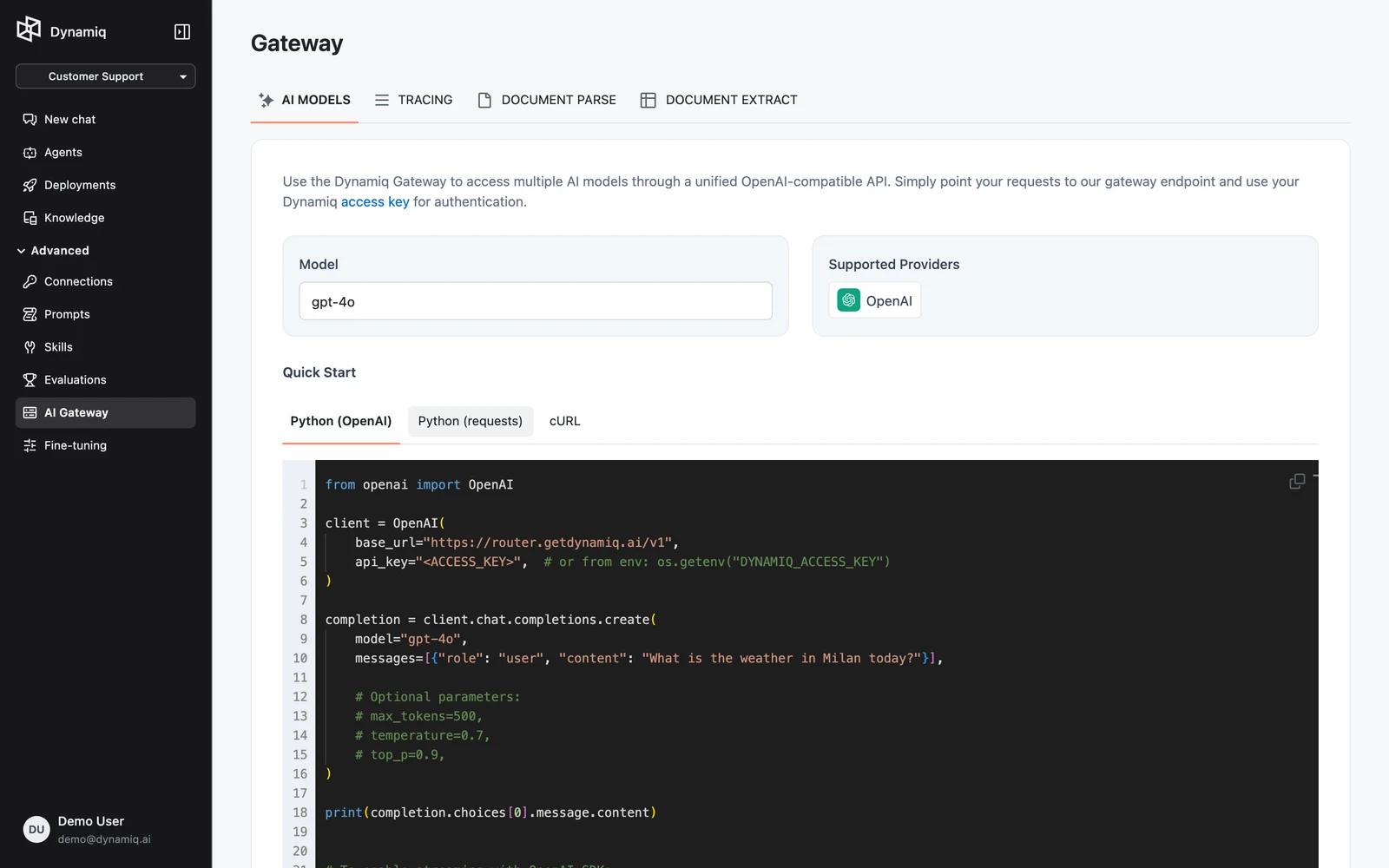
Because the endpoint speaks the OpenAI protocol, anything that accepts a custom OpenAI base URL works — including Dynamiq's own LLM nodes:
import os

from dynamiq.connections import HttpApiKey
from dynamiq.nodes.llms import CustomLLM
from dynamiq.prompts import Message, Prompt

gateway = HttpApiKey(
    url="https://router.getdynamiq.ai/v1",
    api_key=os.environ["DYNAMIQ_ACCESS_KEY"],
)

llm = CustomLLM(
    connection=gateway,
    model="gpt-4o-mini",        # any model id from Gateway → AI MODELS
    provider_prefix="openai",   # route as an OpenAI-compatible endpoint
    prompt=Prompt(messages=[Message(role="user", content="{{question}}")]),
)

result = llm.run(input_data={"question": "What is the weather in Milan today?"})
print(result.output["content"])
import os
from openai import OpenAI
client = OpenAI(
base_url="https://router.getdynamiq.ai/v1",
api_key=os.environ["DYNAMIQ_ACCESS_KEY"],
)
completion = client.chat.completions.create(
model="gpt-4o-mini",
messages=[{"role": "user", "content": "What is the weather in Milan today?"}],
)
print(completion.choices[0].message.content)curl https://router.getdynamiq.ai/v1/chat/completions \
-H "Content-Type: application/json" \
-H "Authorization: Bearer $DYNAMIQ_ACCESS_KEY" \
-d '{
"model": "gpt-4o-mini",
"messages": [{"role": "user", "content": "What is the weather in Milan today?"}],
"stream": false
}'Routing SDK traffic through the gateway means one credential (your Access Key) instead of one key per provider, and every call shows up in the platform's usage and tracing views. See AI Models Router for the gateway's own documentation and the chat completions API reference for the full request contract.
The Dynamiq connection
dynamiq.connections.Dynamiq is an HTTP connection to the platform's management API. It reads its configuration from environment variables and sends your key as a Bearer token:
urlstringapi_keystringSDK components that work with platform-managed resources take this connection. Two ship today: the Dynamiq memory backend and the Dynamiq skill registry.
Platform-managed agent memory
Store agent conversation history in a Memory resource managed in your project, instead of running your own database:
import os

from dynamiq import connections
from dynamiq.memory import Memory
from dynamiq.memory.backends import Dynamiq as DynamiqMemoryBackend
from dynamiq.nodes.agents import Agent
from dynamiq.nodes.llms import OpenAI

dynamiq_conn = connections.Dynamiq(
    url=os.getenv("DYNAMIQ_URL", "https://api.getdynamiq.ai"),
    api_key=os.environ["DYNAMIQ_API_KEY"],
)

memory = Memory(
    backend=DynamiqMemoryBackend(
        connection=dynamiq_conn,
        memory_id=os.environ["DYNAMIQ_MEMORY_ID"],  # id of the Memory resource
    )
)

agent = Agent(
    name="Support Agent",
    llm=OpenAI(connection=connections.OpenAI(), model="gpt-4o-mini"),
    role="You are a helpful support assistant.",
    memory=memory,
)

result = agent.run(
    input_data={
        "input": "My name is Alex.",
        "user_id": "user-1",
        "session_id": "session-1",
    }
)
print(result.output["content"])
The backend reads and writes through /v1/memories/{memory_id}/items, scoping items by user_id and session_id. See Agent Memory for memory behavior and save modes.
Platform-managed skills
Agents can pull Skills — versioned instruction packages — from your project's skill library at runtime:
import os

from dynamiq import connections
from dynamiq.nodes.agents import Agent
from dynamiq.nodes.llms import OpenAI
from dynamiq.skills.config import SkillsConfig
from dynamiq.skills.registries import Dynamiq as DynamiqSkillRegistry
from dynamiq.skills.registries import DynamiqSkillEntry

registry = DynamiqSkillRegistry(
    connection=connections.Dynamiq(api_key=os.environ["DYNAMIQ_API_KEY"]),
    skills=[
        DynamiqSkillEntry(
            id="<skill-id>",
            version_id="<skill-version-id>",
            name="humanizer",
            description="Remove signs of AI-generated writing from text.",
        )
    ],
)

agent = Agent(
    name="Writer",
    llm=OpenAI(connection=connections.OpenAI(), model="gpt-4o"),
    role="You are an editor. Load the humanizer skill and apply its guidelines.",
    skills=SkillsConfig(enabled=True, source=registry),
)
The registry fetches instructions from /v1/skills/{skill_id}/versions/{version_id}/instructions on demand, so agents always run the pinned skill version. Find skill and version IDs on the skill's page in the platform.
Credentials differ by surface: the gateway and trace collector take an Access Key (DYNAMIQ_ACCESS_KEY), while the Dynamiq connection targets the management API and takes a Personal Access Token (DYNAMIQ_API_KEY). They are not interchangeable.