Error Handling
What happens when a node fails — Raise vs. Return semantics, retries with backoff, timeouts, and fallback paths that keep the run alive.
Every node carries its own error-handling policy: what to do when it fails (Raise or Return), how many times to retry, how long to wait between attempts, and an execution timeout. This page explains the runtime semantics of those settings and the workflow-level patterns — fallback branches, error-aware outputs — that they enable. For a field-by-field tour of the inspector tab itself, see Node configuration.
The ERROR HANDLING tab
Select any standard node and open its ERROR HANDLING tab:
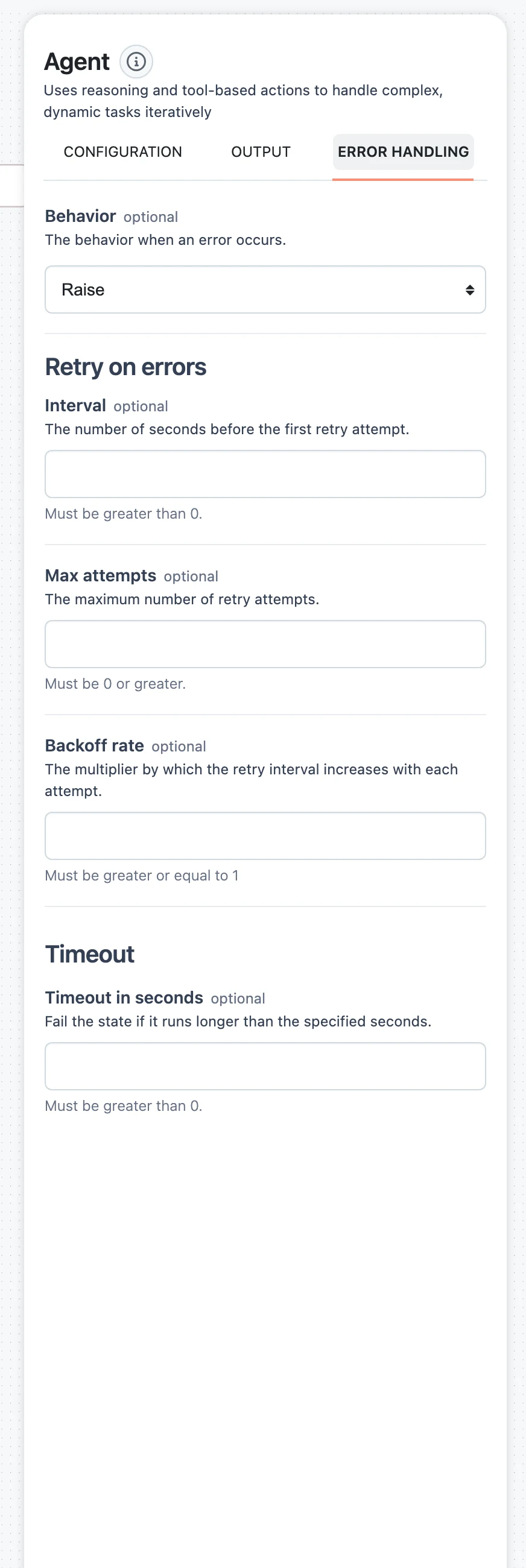
BehaviorRaise | ReturnIntervalnumberMax attemptsnumberBackoff ratenumberTimeout in secondsnumberWhat a failure actually produces
When a node exhausts its attempts, it finishes with a failure result instead of an output:
{
  "status": "failure",
  "output": null,
  "error": {
    "type": "TimeoutError",
    "message": "..."
  }
}
Every node's result — success or failure — has this same envelope (status, output, and error when one occurred), and downstream nodes can address any part of it with selectors like $.<node-name>.status or $.<node-name>.error.message. What happens next depends on the failed node's Behavior.
Raise vs. Return
Raise (default)
A failure is fatal for everything downstream of the node. Each dependent node checks its dependencies before running; if a dependency finished with failure (or was itself skipped) and that dependency's behavior is Raise, the dependent node does not execute — it finishes as skip, and the skip cascades through the rest of the path. The run surfaces the error.
Use Raise when a missing result makes the rest of the workflow meaningless — there is no point running an answer-composing LLM if retrieval failed.
Return
The error becomes the node's result, and execution continues. Downstream nodes run normally, with the failed node's full result — status: "failure", output: null, and the error object — available in their input context. This is the building block for every fallback pattern below.
With Return, downstream mappings that point at the failed node's output (for example $.scraper.output.content) resolve to nothing — design the downstream node to check $.scraper.status or handle an empty value, or it will fail in turn for a less obvious reason.
Retries and timeouts
A node attempts execution Max attempts + 1 times in total. Between attempts it waits:
Interval × Backoff rate ^ attemptSo with Interval 2 and Backoff rate 3, the waits are 2 s, 6 s, 18 s, … With the default Backoff rate of 1 the interval is constant. Timeout in seconds applies to each attempt: a timed-out attempt counts as a failure and is retried like any other. Only after the final attempt fails does Behavior come into play.
Retries are most useful on nodes that call external services — LLM providers, HTTP APIs, scrapers — where transient rate limits and network errors are routine. Leave Max attempts at 0 for deterministic nodes (converters, validators) where a failure will not fix itself.
Fallback paths in flows
Combine Return with a Choice node to route around failures instead of aborting:
Set the risky node's Behavior to Return
Open the node (an HTTP API Call, a scraper, an LLM with a flaky provider), switch Behavior to Return, and optionally add retries so the fallback only triggers after transient errors are exhausted.
Branch on the result status
Add a Choice node after it with a condition on the node's status — for example, a condition that matches when $.scraper.status equals success, and a second option for everything else. Each option gets its own labeled source handle on the canvas.
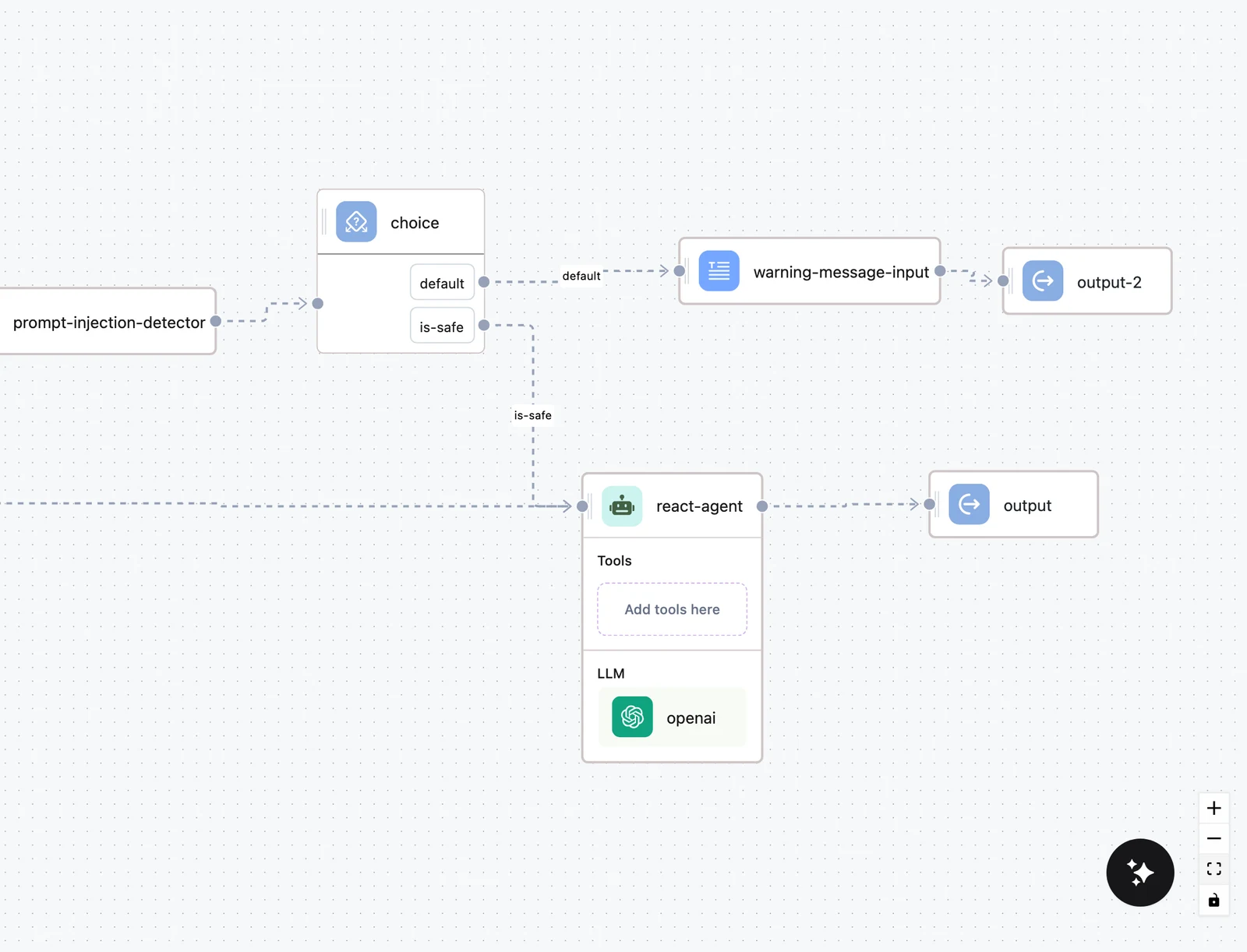
Wire each branch
Connect the success option to the normal path, and the failure option to your fallback — a second provider, a cached answer, or an LLM that apologizes gracefully. Map the Output node from whichever branch ran.
Two lighter-weight variants of the same idea:
- Error-aware prompt — skip the Choice node and feed both
$.scraper.output.contentand$.scraper.error.messageinto a downstream LLM prompt, instructing it to work with whatever it received. - Error in the response — map an Output field to
$.<node>.error.messageso callers get a structured reason instead of a generic failure.
Agent loop limits
The Agent node has a second, agent-specific failure mode: running out of reasoning loops before reaching a final answer. It is controlled separately from the ERROR HANDLING tab, under Advanced configuration on the agent's CONFIGURATION tab:
- Max loop — the maximum number of reason–act cycles.
- Behaviour on max loops — Raise (default) fails the node with an error like "Agent … has reached the maximum loop limit of 15 without finding a final answer"; Return asks the agent to produce a best-effort final answer from the work done so far and returns that as a normal output.
See Agent node for the rest of the agent's advanced settings.
Configuring error handling in the SDK
The same model exists on every SDK node as error_handling:
from dynamiq import Workflow
from dynamiq.connections import OpenAI as OpenAIConnection
from dynamiq.nodes.llms import OpenAI
from dynamiq.nodes.node import ErrorHandling
from dynamiq.nodes.types import Behavior
from dynamiq.prompts import Message, Prompt

llm = OpenAI(
    id="summarizer",
    connection=OpenAIConnection(),  # reads OPENAI_API_KEY from the environment
    model="gpt-4o-mini",
    prompt=Prompt(messages=[
        Message(role="user", content="Summarize in one sentence: {{ text }}"),
    ]),
    error_handling=ErrorHandling(
        behavior=Behavior.RETURN,     # don't kill the run on failure
        max_retries=3,                # 4 attempts in total
        retry_interval_seconds=2,
        backoff_rate=2,               # waits: 2s, 4s, 8s
        timeout_seconds=60,           # per attempt
    ),
)

workflow = Workflow()
workflow.flow.add_nodes(llm)

result = workflow.run(input_data={"text": "Dynamiq is an operating platform for agentic AI."})
print(result.output)
ErrorHandling defaults match the UI: behavior="raise", max_retries=0, retry_interval_seconds=1, backoff_rate=1, no timeout.
Next steps
Input Transformers & Jinja
How data moves into a node — JSONPath selectors over upstream results, the literal-fallback rules, and Jinja templating inside prompts.
Testing & Debugging
Run a workflow straight from the editor — the Test panel's Request, Chat and Test cases tabs, per-node trace inspection, dry runs, and the iterate loop.