How Nodes Connect
The rules behind every edge — flow handles, typed inputs and outputs, type compatibility, agent slots vs. edges, and the wiring mistakes to avoid.
Connecting nodes in Dynamiq involves two separate mechanisms that beginners often conflate: edges between flow handles, which define execution order and visibility, and input mappings, which actually move data into a node's typed input fields. Get both right and data flows; get either wrong and a node runs with empty inputs — or never runs at all.
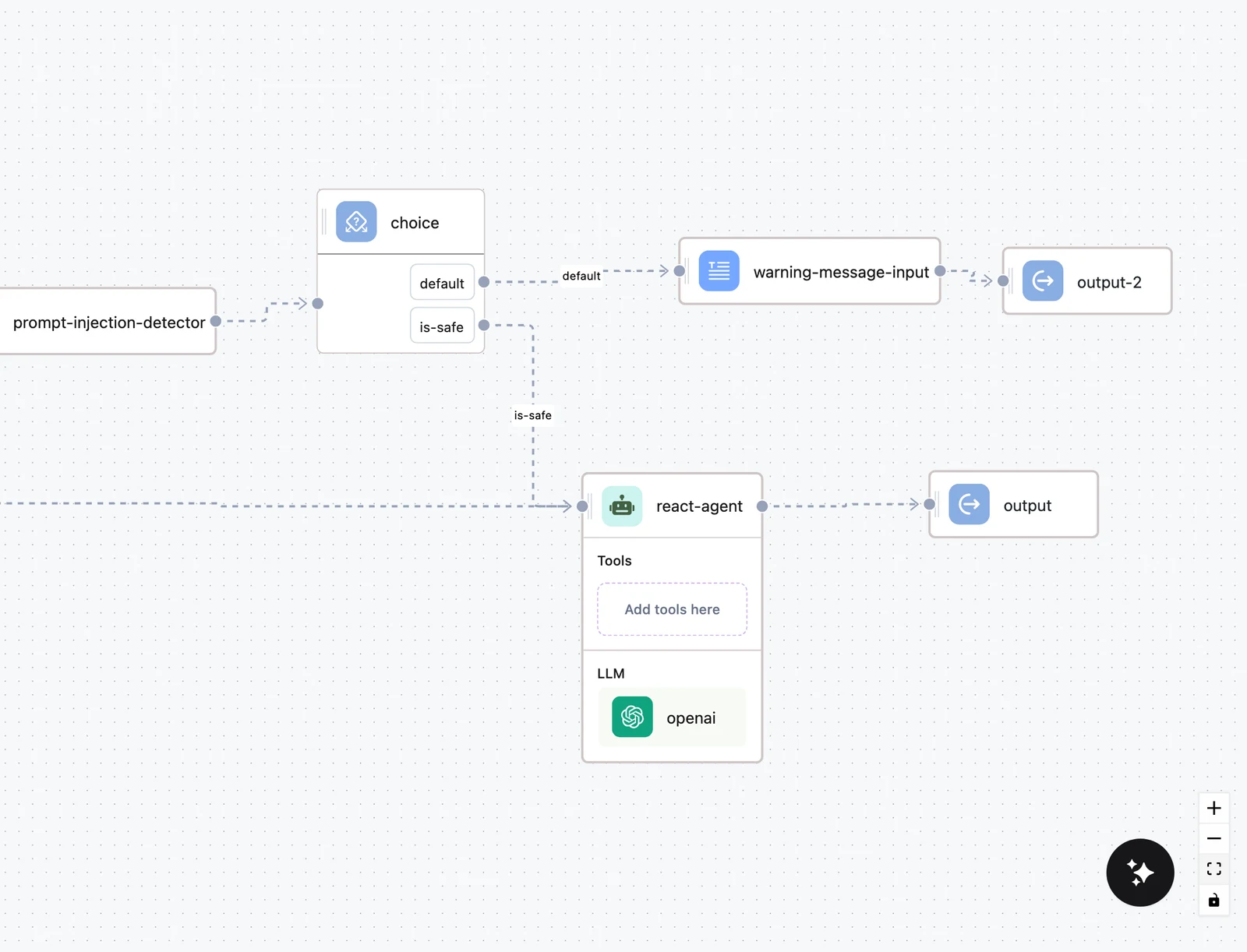
Flow handles: order and visibility
Every standard node has exactly two flow handles:
- a target handle on its left edge — incoming edges arrive here;
- a source handle on its right edge — outgoing edges leave from here.
An edge from node A's source to node B's target means two things:
- Order — B runs after A (B depends on A).
- Visibility — A's outputs become available in B's variable picker. The picker walks all ancestors of B (not just direct parents), so anything upstream along any path can be referenced.
The Choice node is the exception to "one source handle": it has one source handle per condition option, and the edge you draw from an option is labeled with that option's name on the canvas. See Choice node.
Input mappings: where data actually moves
An edge alone does not put data into a node. Each node declares named, typed input fields, and you fill each one on the node's CONFIGURATION tab — either with literal text or with a variable selected from an upstream node (press / in the field). A variable is stored as a JSONPath selector:
$.<node-name>.output.<output-key>For example, an Agent's answer is $.agent.output.content, and the Input node's input field is $.input.output.input. See Input transformers for advanced selectors.
What each node category accepts and produces
Every node's inputs and outputs are typed. The OUTPUT tab of any node lists its output keys and types — these are exactly the names you reference downstream. The core categories:
| Category | Inputs (required in bold) | Outputs |
|---|---|---|
| LLMs | — (prompt configured on the node) | content (string) |
| Agent | input (string), files (list[file]) | content (string), files (list[file]) |
| Orchestrators | input (string) | content (string); Graph Orchestrator also context (dict[string, Any]) |
| Converters (PDF, DOCX, …) | files (list[file]), metadata (dict or list[dict]) | documents (list[Document]) |
| Document Splitter | documents (list[Document]) | documents (list[Document]) |
| Document Embedders | documents (list[Document]) | documents (list[Document]) |
| Text Embedders | query (string) | embedding (list[float]), query (string) |
| Vector store Retrievers | embedding (list[float]) — named query_embedding on the Elasticsearch and OpenSearch retrievers, which also take an optional filters | documents (list[Document]) |
| Knowledge Base Search | query (string) | content, documents (list[Document]) |
| Vector store Writers | documents (list[Document]) | upserted_count (int) |
| Validators (Valid JSON, Regex Match, …) | content (string) | content, valid (bool) |
| Detectors (PII, LlamaGuard, Prompt Injection) | message (string) | is_detected / is_safe / prompt_detected (bool) plus details |
| Web search tools (Tavily, Exa, …) | query (string) | content dict with keys like content.result, content.sources_with_url |
| Scraping tools (Firecrawl, ZenRows, Jina) | url (string) | content dict (content.markdown / content.content, …) |
| HTTP API Call | url (string) | content (Any), status_code (int) |
| Map | input (list[dict[string, Any]]) | output (list[Any]) |
| Decision Table | the input columns you define, typed Any / String / Number / Boolean (Any, string, int, bool on the wire; a Number column reads any number, 96.5 included, and the SDK also accepts float) | the output columns you define, plus matched_rules (list[Any]) |
| Rules | the inputs you name (Any), read by path in the checks, and an optional as_of date | status (string), summary (dict), findings (list[dict]) and derived (dict), plus each derived value as derived.<name> (Any) |
| Expression | the inputs you define (Any) | one key per expression (Any), plus the inputs when they are passed through |
| Sub-workflow | the target version's Input fields, with their types and required flags | the target version's Output fields |
An Agent with a Response format also exposes the schema's properties as content.<field> outputs, typed from the JSON schema — extract.content.fico next to extract.content — which is how an extraction agent feeds a Decision Table column by column or hands a Rules node the record it checks. An LLM node in structured-output mode keeps content as text, because the runtime hands its JSON back unparsed.
The chain implied by these types is why a RAG inference path is always Text Embedder → Retriever — a retriever requires a list[float] embedding, which only an embedder produces — and why an indexing path is Converter → Splitter → Document Embedder → Writer.
Type compatibility
The variable picker enforces types: when you open it on an input field, it only lists upstream outputs whose type is compatible with that field. Incompatible outputs are hidden, and if nothing upstream fits you see "No variables available" — that message is the editor telling you the wiring is wrong, not that your data is missing.
Compatibility is permissive in only a few directions:
- Any accepts everything, and every field accepts an upstream Any output.
- string also accepts int (numbers are stringified).
- dict[string, Any] also accepts dict[string, string].
- list[Any] accepts any list type (list[Document], list[float], list[file], …).
- Specific types — list[Document], list[float], file, bool — accept only themselves (or Any).
So you cannot, for example, feed an Agent's content (string) into a Writer's documents (list[Document]) — the picker simply won't offer it.
Agent slots are not edges
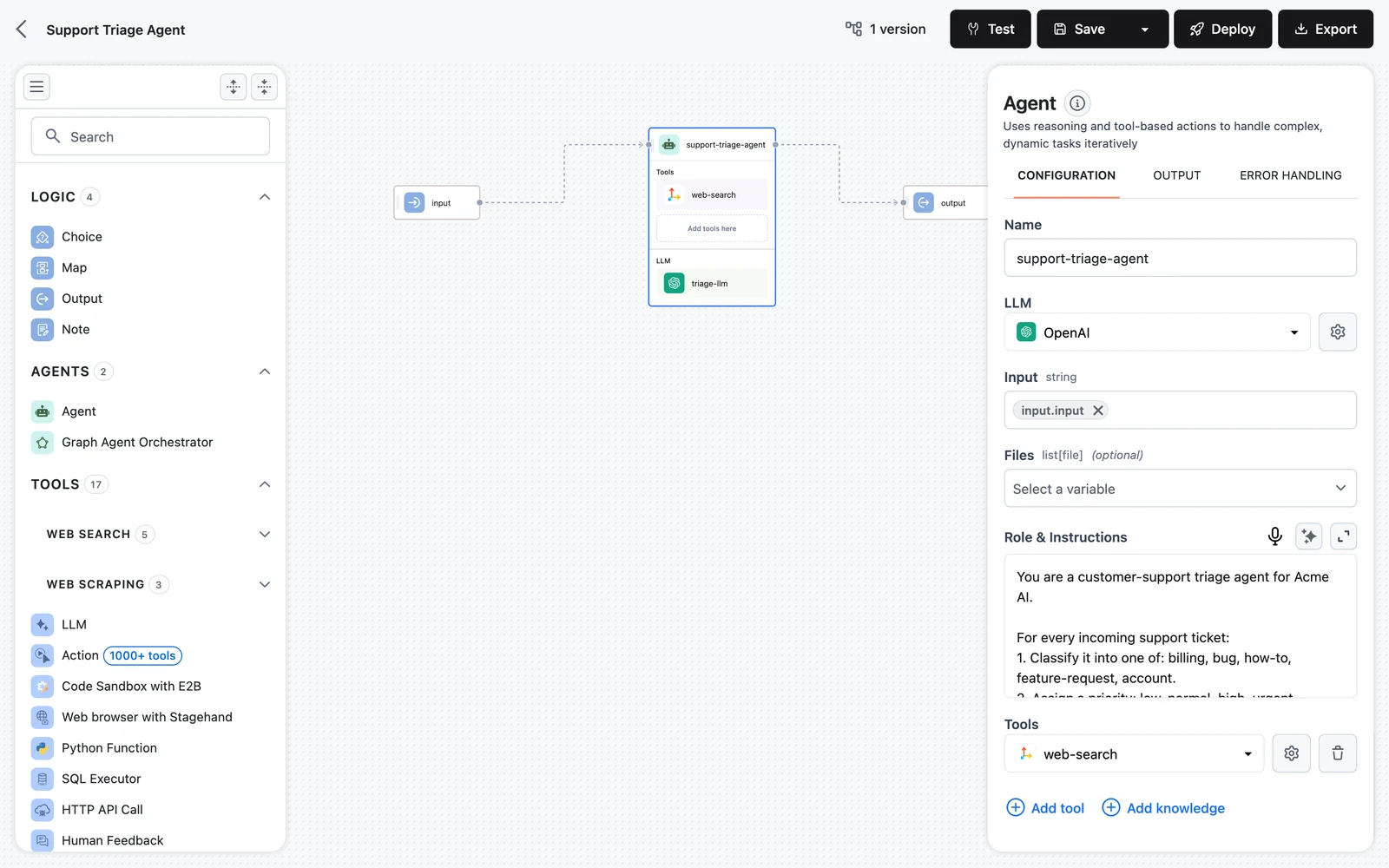
The Agent node is a container with two drop slots, and these follow different rules from canvas edges:
- Add LLM here — accepts only LLM nodes. Anything else is rejected with "Only LLMs are allowed to be added here".
- Add tools here — accepts only tool nodes. Anything else is rejected with "Only tools are allowed to be added here".
A tool dropped inside an agent is called by the agent's own reasoning loop — the agent decides when to invoke it and supplies its arguments. The same tool dropped on the canvas is an ordinary node: it runs exactly once per workflow run, in dependency order, with inputs you map by hand. Use the slot when the agent should decide; use a canvas node when the call is a fixed pipeline step.
Connections (credentials) are a third thing
Many nodes also require a Connection — stored credentials for an external service — chosen on the CONFIGURATION tab. This is unrelated to canvas edges. Each node type accepts specific connection types, for example:
- LLM nodes take their provider's connection (OpenAI, Anthropic, AWS for Bedrock, …).
- SQL Executor accepts PostgreSQL, MySQL, Snowflake, or Amazon Redshift connections.
- MCP Server accepts MCP Streamable HTTP or MCP SSE connections.
- Vector store retrievers/writers take the matching store's connection (Weaviate, Pinecone, PostgreSQL for pgvector, …).
See Connections.
Common wiring mistakes
Next steps
Workflow Canvas
Find your way around the editor — the node palette and its categories, adding and connecting nodes, sticky notes, groups, and canvas controls.
Node Configuration
The node inspector explained tab by tab — Configuration, Output, and Error Handling — plus the special Input/Output node panels and retry semantics.