Conversations & Sessions
Build multi-turn conversations with memory-enabled agents using user_id and session_id, and inspect session history in the UI or via API.
When the Agent node in your workflow has memory enabled, the App groups runs into sessions: every run that shares the same user_id and session_id sees the conversation history of the runs before it. This page shows how to drive multi-turn conversations from your code, browse them on the app's Sessions tab, and read them programmatically through the sessions endpoints of the management API.
How sessions work
Two identifiers tie runs together:
user_idstringsession_idstring (UUID)The memory-enabled Agent node loads prior messages for the pair and appends each new exchange, so the second request can reference the first without you resending the chat history. Start a fresh conversation by generating a new session_id.
userId and sessionId through its params option, so widget conversations show up on the Sessions tab.Multi-turn over the Runs API
POST https://<your-app-hostname>/v1/runs accepts top-level user_id and session_id fields next to input. Send two turns with the same ids and the agent remembers the first turn:
SESSION_ID=$(uuidgen | tr '[:upper:]' '[:lower:]')

# Turn 1
curl "https://<your-app-hostname>/v1/runs" \
  -H "Content-Type: application/json" \
  -H "Authorization: Bearer $DYNAMIQ_ACCESS_KEY" \
  -d "{
    \"input\": { \"question\": \"Hi, my name is Ada.\" },
    \"user_id\": \"user-42\",
    \"session_id\": \"$SESSION_ID\"
  }"

# Turn 2 — same session_id, the agent remembers turn 1
curl "https://<your-app-hostname>/v1/runs" \
  -H "Content-Type: application/json" \
  -H "Authorization: Bearer $DYNAMIQ_ACCESS_KEY" \
  -d "{
    \"input\": { \"question\": \"What is my name?\" },
    \"user_id\": \"user-42\",
    \"session_id\": \"$SESSION_ID\"
  }"
import os
import uuid
import requests
endpoint = "https://<your-app-hostname>/v1/runs"
token = os.getenv("DYNAMIQ_ACCESS_KEY")
headers = {
"Content-Type": "application/json",
"Authorization": f"Bearer {token}",
}
user_id = "user-42"
session_id = str(uuid.uuid4())
def ask(question: str) -> dict:
response = requests.post(
endpoint,
json={
"input": {"question": question},
"user_id": user_id,
"session_id": session_id,
},
headers=headers,
)
response.raise_for_status()
return response.json()["data"]
print(ask("Hi, my name is Ada."))
print(ask("What is my name?")) # the agent remembers the previous turnimport { randomUUID } from "node:crypto";
const endpoint = "https://<your-app-hostname>/v1/runs";
const token = process.env.DYNAMIQ_ACCESS_KEY;
const userId = "user-42";
const sessionId = randomUUID();
async function ask(question: string) {
const response = await fetch(endpoint, {
method: "POST",
headers: {
"Content-Type": "application/json",
Authorization: `Bearer ${token}`,
},
body: JSON.stringify({
input: { question },
user_id: userId,
session_id: sessionId,
}),
});
if (!response.ok) {
throw new Error(`Run failed: ${response.status} ${await response.text()}`);
}
const { data } = await response.json();
return data;
}
console.log(await ask("Hi, my name is Ada."));
console.log(await ask("What is my name?")); // the agent remembers the previous turnMulti-turn works with every execution mode — combine user_id/session_id with "stream": true or "background": true exactly as described in Streaming & Async Jobs.
When you call the classic app endpoint (POST https://<your-app-hostname>/) instead of the Runs API, pass user_id and session_id as fields inside the input object, next to your schema fields.
Filtering runs by user or session
The Runs API can list a single conversation's runs:
curl "https://<your-app-hostname>/v1/runs?user_id=user-42&session_id=$SESSION_ID" \
  -H "Authorization: Bearer $DYNAMIQ_ACCESS_KEY"
Each run record echoes its user_id and session_id, so you can reconcile results with your own data model. See The Runs API for the full run object.
The management API lists a session's traces the same way, each with the run's token usage and cost:
curl "https://api.getdynamiq.ai/v1/apps/$APP_ID/traces?session_id=$SESSION_ID" \
  -H "Authorization: Bearer $DYNAMIQ_PAT"
Browsing sessions in the UI
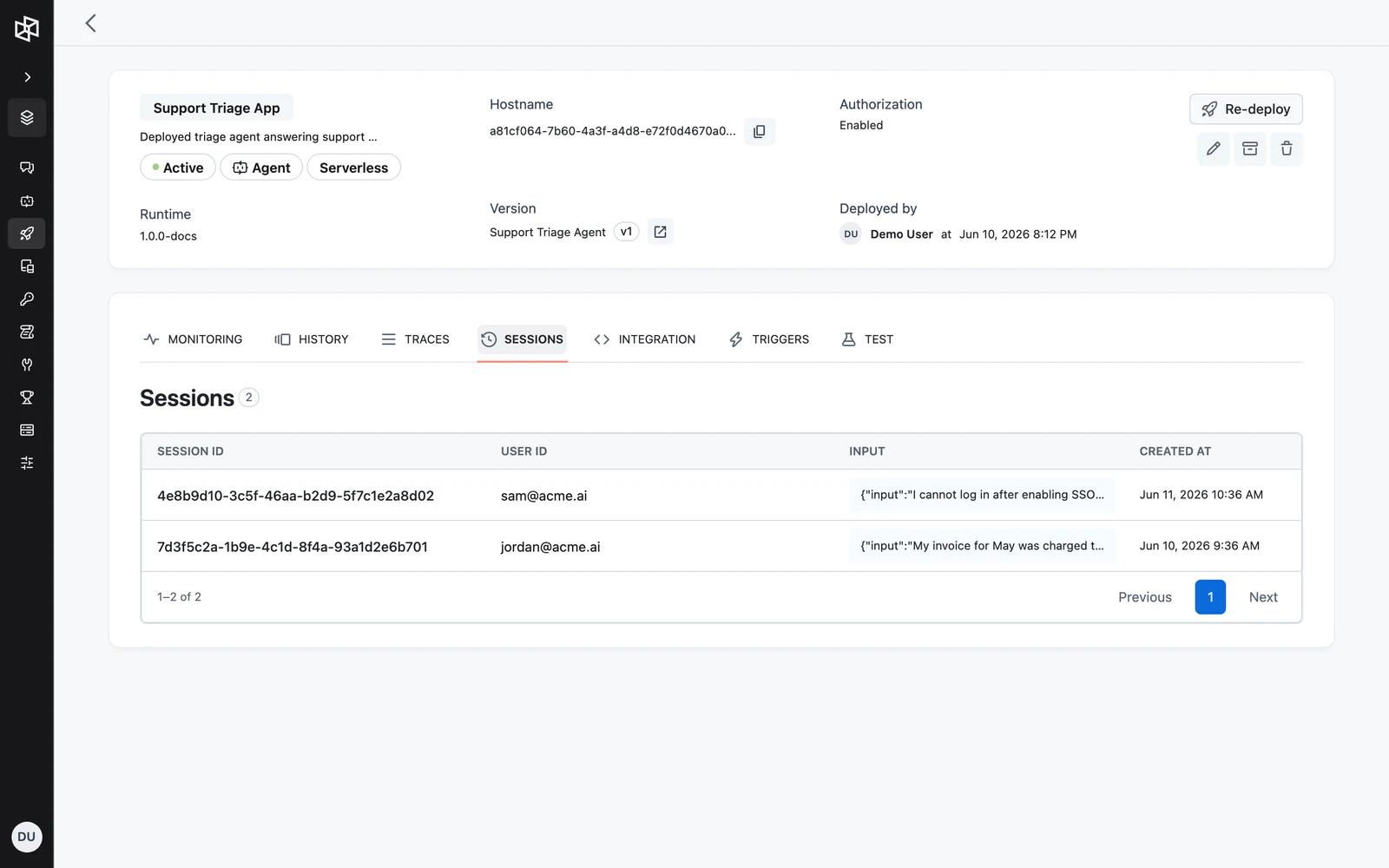
The Sessions tab on the app page lists every conversation the App has recorded.
Open the Sessions tab
Go to Deployments, open your App, and select the Sessions tab. The table shows one row per session with SESSION ID, USER ID, INPUT (the first input, with user_id, session_id, and chat_history hidden), and CREATED AT.
Open a session
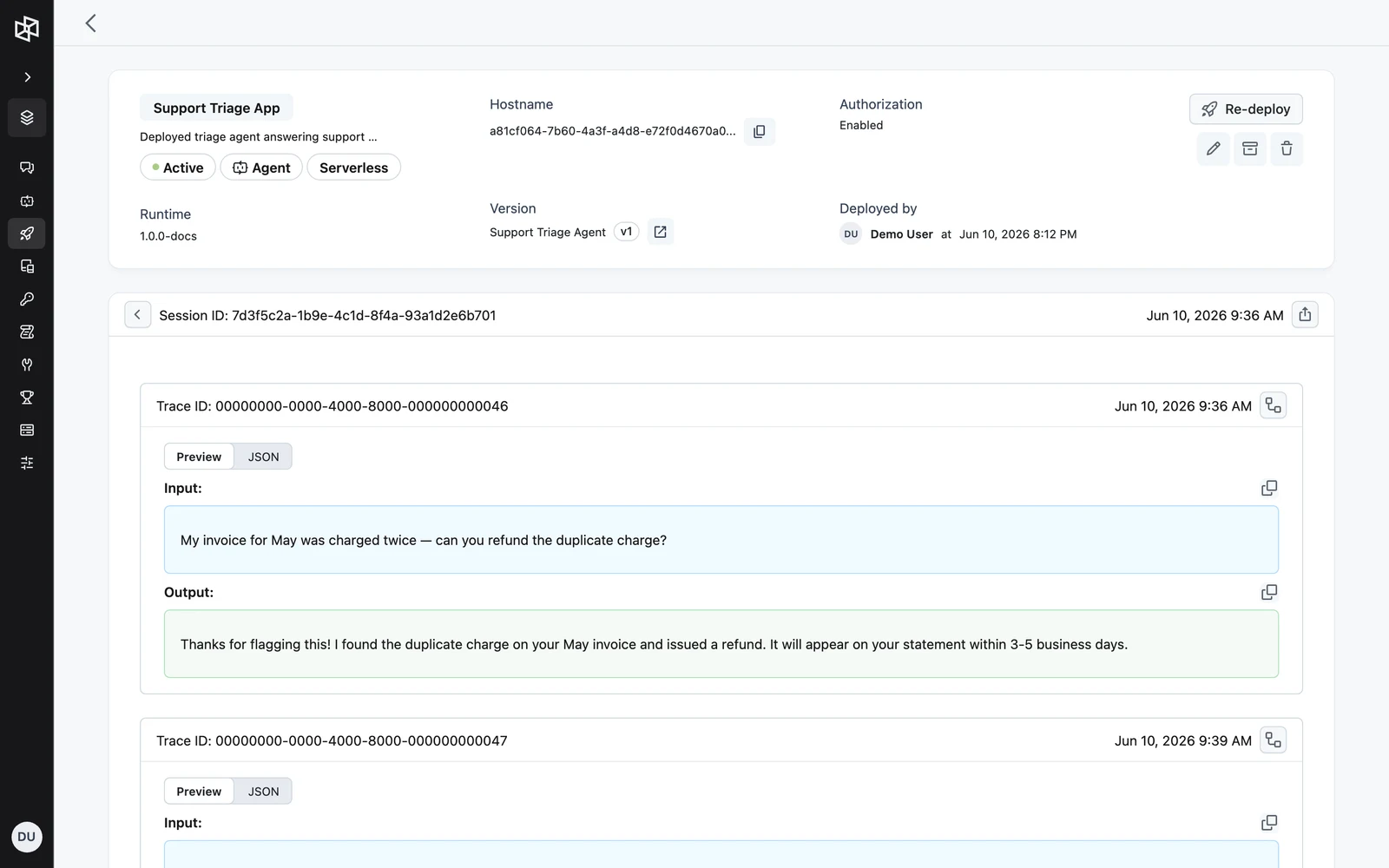
Click a SESSION ID to open the session detail view with the full message exchange — each message pairs the user input with the agent output.
The sessions API
The same data is available from the management API at https://api.getdynamiq.ai. These endpoints authenticate with a Personal Access Token (not an Access Key):
| Method | Path | Returns |
|---|---|---|
GET | /v1/apps/{app_id}/sessions | Paginated list of sessions |
GET | /v1/apps/{app_id}/sessions/{session_id} | One session |
GET | /v1/apps/{app_id}/sessions/{session_id}/messages | Paginated messages, oldest first |
List endpoints take page and page_size query parameters and return a pagination object with page, page_size, page_count, and total_count.
APP_ID="<your-app-id>"

# List sessions
curl "https://api.getdynamiq.ai/v1/apps/$APP_ID/sessions?page=1&page_size=25" \
  -H "Authorization: Bearer $DYNAMIQ_PERSONAL_ACCESS_TOKEN"

# List messages of one session, oldest first
curl "https://api.getdynamiq.ai/v1/apps/$APP_ID/sessions/$SESSION_ID/messages" \
  -H "Authorization: Bearer $DYNAMIQ_PERSONAL_ACCESS_TOKEN"
import os
import requests
base_url = "https://api.getdynamiq.ai"
app_id = "<your-app-id>"
headers = {"Authorization": f"Bearer {os.getenv('DYNAMIQ_PERSONAL_ACCESS_TOKEN')}"}
# List sessions
sessions = requests.get(
f"{base_url}/v1/apps/{app_id}/sessions",
params={"page": 1, "page_size": 25},
headers=headers,
).json()
for session in sessions["data"]:
print(session["id"], session["created_at"])
# List messages of the session, oldest first
messages = requests.get(
f"{base_url}/v1/apps/{app_id}/sessions/{session['id']}/messages",
headers=headers,
).json()
for message in messages["data"]:
print(" in: ", message["input"])
print(" out:", message["output"])const baseUrl = "https://api.getdynamiq.ai";
const appId = "<your-app-id>";
const headers = {
Authorization: `Bearer ${process.env.DYNAMIQ_PERSONAL_ACCESS_TOKEN}`,
};
// List sessions
const sessionsResponse = await fetch(
`${baseUrl}/v1/apps/${appId}/sessions?page=1&page_size=25`,
{ headers },
);
const sessions = await sessionsResponse.json();
for (const session of sessions.data) {
console.log(session.id, session.created_at);
// List messages of the session, oldest first
const messagesResponse = await fetch(
`${baseUrl}/v1/apps/${appId}/sessions/${session.id}/messages`,
{ headers },
);
const messages = await messagesResponse.json();
for (const message of messages.data) {
console.log(" in: ", message.input);
console.log(" out:", message.output);
}
}Session object
idstringrequiredcreated_atstring (RFC 3339)requiredinputobjectrequiredMessage object
idstringrequiredinputobjectrequiredoutputobjectrequiredcreated_atstring (RFC 3339)requiredtrace_idstringrequiredMessages are sorted by created_at ascending by default, so the list reads top-to-bottom as the conversation happened.
Next steps
Streaming & Async Jobs
Stream app output over SSE or WebSocket, run jobs asynchronously with callbacks, and resume paused runs with human feedback.
End-User Connection Requirements
Let each end user of a deployed App link their own account or credentials — define requirements at build time, detect unmet ones at run time, and fulfill them via the hosted connect page or the connect API.