Triggers
Invoke a deployed App automatically on a cron schedule, at a one-off time, or when an event arrives from a connected app such as Slack or email.
A Trigger invokes your deployed App without anyone calling its endpoint. Dynamiq supports exactly two trigger types: Schedule triggers (recurring cron, or a one-off run at a fixed time) and App event triggers, which fire when an event arrives from an external app — Slack messages, incoming emails, and hundreds of other sources delivered through the action connector infrastructure.
Trigger types
| Type | Provider value | Fires when |
|---|---|---|
| Schedule | schedule | A cron expression matches (minute precision), or once at a fixed run_at time |
| App event | pipedream | A configured app-event source emits an event (e.g. "New message in channel" for Slack) |
A schedule's cron expression is evaluated once per minute in the trigger's timezone. Recurring schedules can carry an optional expiration time, after which they stop firing.
Create a trigger in the UI
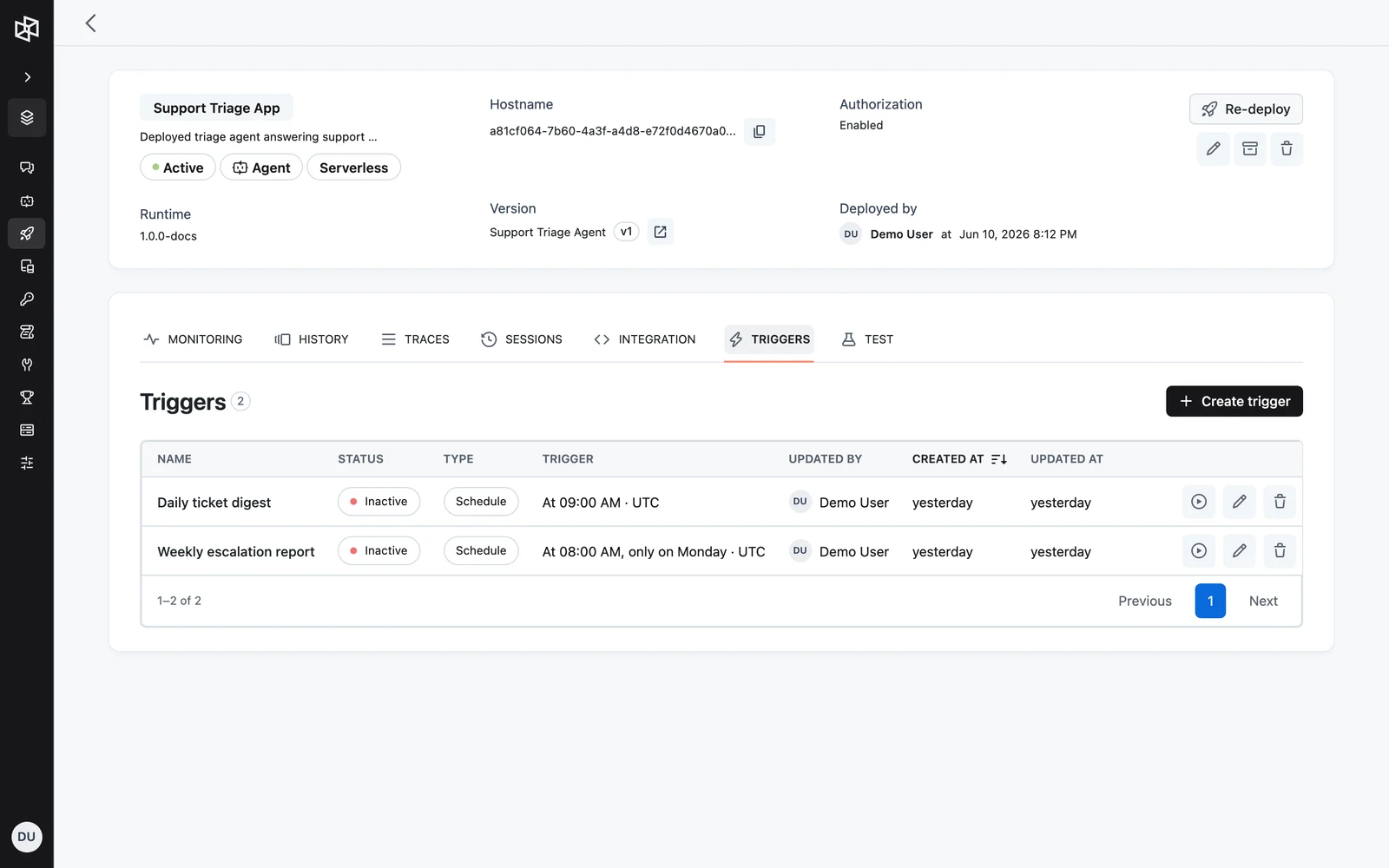
Name it and pick a type
Enter a Name and choose a Trigger type:
- App event — "Trigger from a connected app's event"
- Schedule — "Run on a recurring schedule or once"
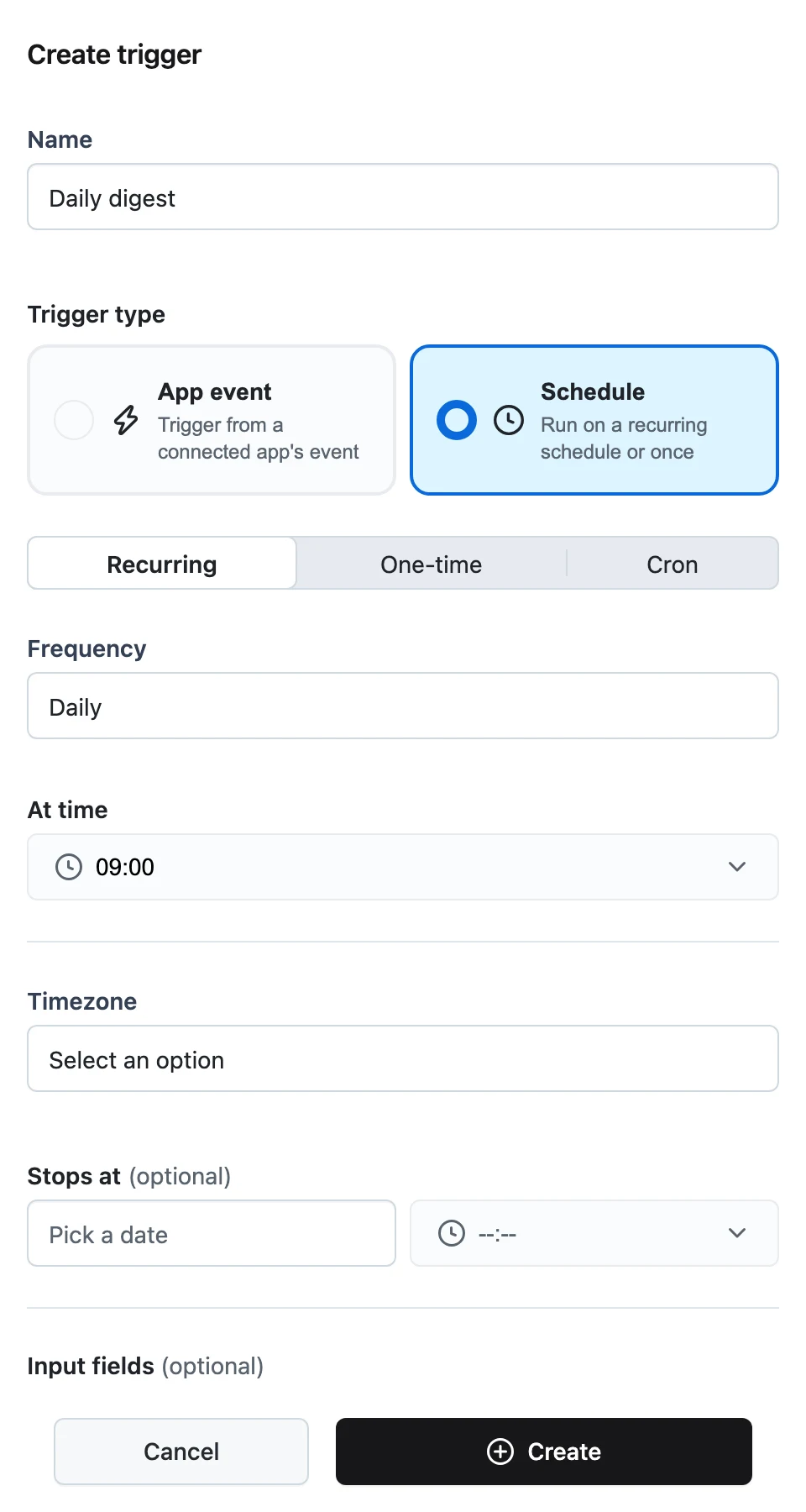
Configure a Schedule trigger
The schedule editor has three modes — Recurring, One-time, and Cron:
- Recurring builds the cron expression for you from a frequency: Every N minutes, Hourly (pick a minute), Daily, Weekly (pick weekdays), or Monthly (pick a day of month), plus a time of day for daily, weekly, and monthly schedules.
- One-time takes a single run date/time, which must be in the future.
- Cron accepts a raw cron expression directly.
Below the schedule, pick the Timezone (an IANA timezone name; defaults to your browser's timezone) and, for recurring and cron modes, an optional Stops at expiration. One-time triggers cannot have an expiration.
Or configure an App event trigger
Pick the source app and event (for example a Slack "new message" trigger), connect the account it should listen with, and fill in the event's configuration fields. After creation, use the Input mappings action on the trigger row to map fields from the incoming event payload onto your App's input.
Create
Click Create. The trigger appears in the table with its Name, Status, Type (Schedule or App event), Trigger summary, Updated by, and created/updated timestamps.
Activate, deactivate, edit, delete
Each row has inline actions:
- Activate / Deactivate — toggles whether the trigger fires; both ask for confirmation. Deactivating keeps the configuration so you can re-activate later.
- Edit — opens the schedule editor for Schedule triggers, or the Input mappings modal for App event triggers.
- Delete — removes the trigger permanently.
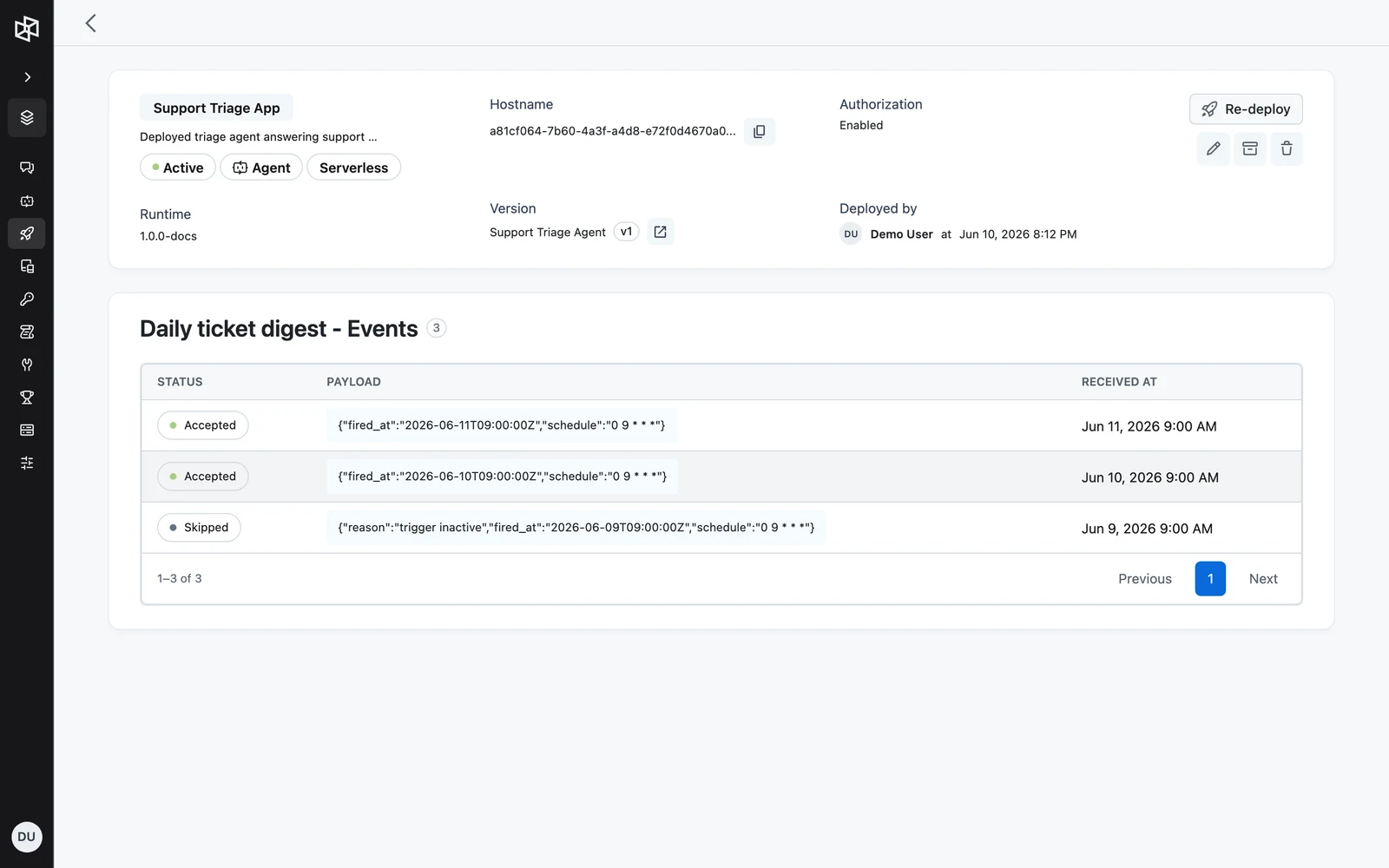
Trigger events log
Click a trigger's name to open its events page (Triggers › <name> - Events). Each received event shows its Status, the raw Payload (click to open the full payload in a side sheet), and Received at time, newest first. This is the first place to look when a trigger fired but the run didn't behave as expected — you can see exactly what payload arrived.
Manage triggers via the API
All trigger management lives under the App:
| Method | Path | Purpose |
|---|---|---|
GET | /v1/apps/{app_id}/triggers | List triggers |
POST | /v1/apps/{app_id}/triggers | Create a trigger |
GET | /v1/apps/{app_id}/triggers/{trigger_id} | Get one trigger |
PUT | /v1/apps/{app_id}/triggers/{trigger_id} | Update config / input transformer |
POST | /v1/apps/{app_id}/triggers/{trigger_id}/activate | Activate |
POST | /v1/apps/{app_id}/triggers/{trigger_id}/deactivate | Deactivate |
POST | /v1/apps/{app_id}/triggers/{trigger_id}/run | Run the trigger manually, now |
DELETE | /v1/apps/{app_id}/triggers/{trigger_id} | Delete |
GET | /v1/apps/{app_id}/triggers/{trigger_id}/events | List received events (newest first) |
GET | /v1/apps/{app_id}/triggers/{trigger_id}/events/{event_id} | Get one event |
Create payload
namestringrequiredproviderstringconfigobjectrequiredinput_transformerobjectSchedule config fields — exactly one of schedule or run_at must be set:
schedulestringrun_atstring (RFC 3339)timezonestringrequiredexpires_atstring (RFC 3339)config fields for app-event triggers:
trigger_idstringrequiredconfigured_propsobjectdynamic_props_idstringExamples
# Create a recurring schedule trigger: weekdays at 09:00 Berlin time
curl -X POST "https://api.getdynamiq.ai/v1/apps/$APP_ID/triggers" \
  -H "Authorization: Bearer $DYNAMIQ_PAT" \
  -H "Content-Type: application/json" \
  -d '{
    "name": "daily-digest",
    "provider": "schedule",
    "config": {
      "schedule": "0 9 * * 1-5",
      "timezone": "Europe/Berlin",
      "expires_at": "2026-12-31T23:59:00Z"
    }
  }'

# Run it manually right now
curl -X POST "https://api.getdynamiq.ai/v1/apps/$APP_ID/triggers/$TRIGGER_ID/run" \
  -H "Authorization: Bearer $DYNAMIQ_PAT"

# Deactivate it
curl -X POST "https://api.getdynamiq.ai/v1/apps/$APP_ID/triggers/$TRIGGER_ID/deactivate" \
  -H "Authorization: Bearer $DYNAMIQ_PAT"
import os
import requests
API = "https://api.getdynamiq.ai"
headers = {"Authorization": f"Bearer {os.environ['DYNAMIQ_PAT']}"}
app_id = os.environ["APP_ID"]
# Create a one-off schedule trigger
resp = requests.post(
f"{API}/v1/apps/{app_id}/triggers",
headers=headers,
json={
"name": "one-off-import",
"provider": "schedule",
"config": {
"run_at": "2026-06-15T08:00:00Z",
"timezone": "UTC",
},
},
)
resp.raise_for_status()
trigger = resp.json()["data"]
# List the events it has received
events = requests.get(
f"{API}/v1/apps/{app_id}/triggers/{trigger['id']}/events",
headers=headers,
).json()["data"]
print(events)const API = 'https://api.getdynamiq.ai';
const headers = {
Authorization: `Bearer ${process.env.DYNAMIQ_PAT}`,
'Content-Type': 'application/json',
};
const appId = process.env.APP_ID;
// Create a recurring schedule trigger
const created = await fetch(`${API}/v1/apps/${appId}/triggers`, {
method: 'POST',
headers,
body: JSON.stringify({
name: 'hourly-sync',
provider: 'schedule',
config: { schedule: '0 * * * *', timezone: 'UTC' },
}),
});
const { data: trigger } = await created.json();
// Activate it
await fetch(`${API}/v1/apps/${appId}/triggers/${trigger.id}/activate`, {
method: 'POST',
headers,
});Invalid schedules are rejected at create time: a malformed cron expression, a run_at in the past, an expires_at in the past, or an expires_at combined with run_at all return a validation error.
Next steps
Chat Widget & Assistant
Embed the Dynamiq chat widget in your site or share a standalone Chat Assistant URL — no custom frontend required.
Webhooks & Events
How deployed Apps push results to your systems — the async callback delivery contract, receiver requirements, and the event surfaces you can stream or poll.