Streaming & Async Jobs
Stream app output over SSE or WebSocket, run jobs asynchronously with callbacks, and resume paused runs with human feedback.
A deployed App can return its result in one shot, but agentic workflows often run for seconds or minutes. This page covers the four integration patterns for long-running work: Server-Sent Events (SSE) streaming, WebSocket connections, async execution with callback URLs, and human-feedback round trips that pause and resume a run.
All requests go to your App's own hostname (shown on the app page and on the Integration tab) and authenticate with an Access Key: Authorization: Bearer $DYNAMIQ_ACCESS_KEY.
Choosing a pattern
| Pattern | Transport | Use when |
|---|---|---|
| SSE streaming | POST https://<your-app-hostname>/ with "stream": true | You want token-by-token output in a UI |
| Runs API streaming | POST https://<your-app-hostname>/v1/runs with "stream": true | You want typed lifecycle events (tool calls, reasoning, human feedback) |
| WebSocket | wss://<your-app-hostname> | You need bi-directional messaging on one connection |
| Async callback | POST https://<your-app-hostname>/ with "execution_mode": "async" | Fire-and-forget; your server receives the result via webhook |
| Background run | POST https://<your-app-hostname>/v1/runs with "background": true | Fire-and-forget; you poll the Runs API for the result |
The Integration tab on the app page generates ready-to-run Python and TypeScript snippets for every pattern, pre-filled with your hostname and input schema.
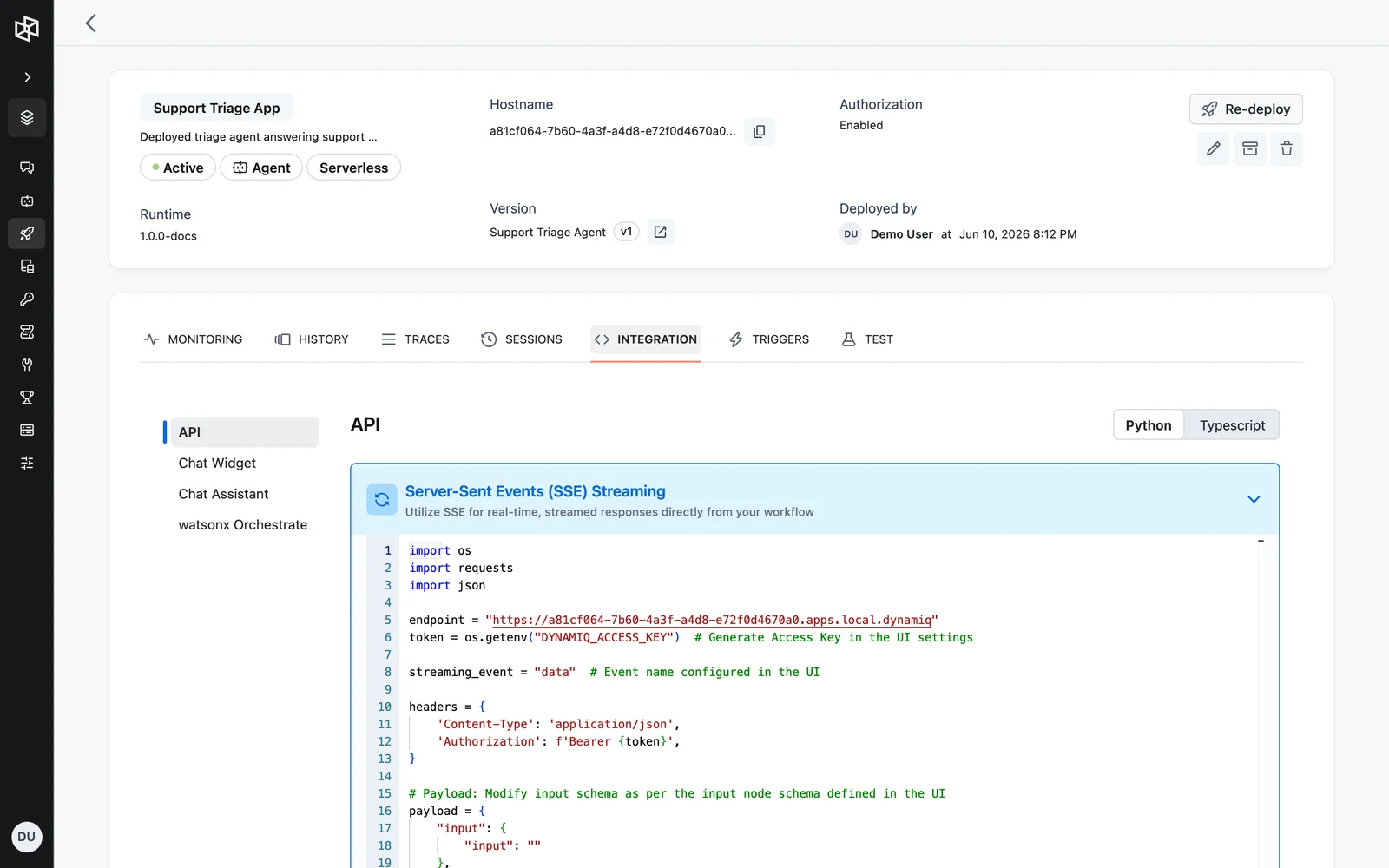
SSE streaming on the app endpoint
Send a regular POST to the app root with "stream": true. The response is a text/event-stream; each data: line carries a JSON message with an event name and an OpenAI-style delta under data.choices[0].delta.content.
The event name is whatever you configured on the streaming-enabled node in the workflow builder — data by default. Filter on it so you only render content chunks.
curl -N "https://<your-app-hostname>/" \
  -H "Content-Type: application/json" \
  -H "Authorization: Bearer $DYNAMIQ_ACCESS_KEY" \
  -d '{
    "input": { "question": "What can this app do?" },
    "stream": true
  }'
import os
import requests
import json
endpoint = "https://<your-app-hostname>"
token = os.getenv("DYNAMIQ_ACCESS_KEY")
streaming_event = "data" # Event name configured in the UI
headers = {
"Content-Type": "application/json",
"Authorization": f"Bearer {token}",
}
# Payload: keys of "input" must match the input node schema defined in the UI
payload = {
"input": {"question": "What can this app do?"},
"stream": True,
}
response = requests.post(endpoint, json=payload, headers=headers, stream=True)
response.raise_for_status()
for line in response.iter_lines(decode_unicode=True):
if line.startswith("data:"):
data = line[len("data:"):].strip()
try:
json_data = json.loads(data)
if json_data.get("event") == streaming_event:
content = json_data.get("data", {}).get("choices", [{}])[0].get("delta", {}).get("content")
if content:
print(content, end="")
except json.JSONDecodeError as e:
print(f"Invalid JSON format: {data} - Error: {e}")const endpoint = "https://<your-app-hostname>";
const token = process.env.DYNAMIQ_ACCESS_KEY;
const streamingEvent = "data"; // Event name configured in the UI
const response = await fetch(endpoint, {
method: "POST",
headers: {
"Content-Type": "application/json",
Authorization: `Bearer ${token}`,
},
body: JSON.stringify({
input: { question: "What can this app do?" },
stream: true,
}),
});
if (!response.ok || !response.body) {
throw new Error(`Failed to connect: ${response.status}`);
}
const reader = response.body.getReader();
const decoder = new TextDecoder();
let buffer = "";
while (true) {
const { done, value } = await reader.read();
if (done) break;
buffer += decoder.decode(value, { stream: true });
const lines = buffer.split("\n");
buffer = lines.pop() || "";
for (const line of lines) {
if (!line.startsWith("data:")) continue;
const jsonData = JSON.parse(line.substring(5).trim());
if (jsonData.event === streamingEvent) {
const content = jsonData.data?.choices?.[0]?.delta?.content;
if (content) process.stdout.write(content);
}
}
}"stream": false (or omit it) to get a single JSON response instead. See Call Your App over HTTP.Typed event stream with the Runs API
POST https://<your-app-hostname>/v1/runs with "stream": true returns a richer, typed event stream. Each SSE frame has an event: line with the event type and a data: line with the event envelope:
event: run.created
data: {"id":"...","type":"run.created","sequence":1,"timestamp":"2026-03-26T08:34:27Z","data":{"id":"<run-id>","object":"run","status":"created"}}
The server writes a : heartbeat comment line every 15 seconds of inactivity to keep the connection alive — ignore lines starting with :.
Event envelope
idstringrequiredtypestringrequiredsequenceintegerrequiredtimestampstring (RFC 3339)requiredcheckpoint_idstringdataobjectsourceobjectEvent types
| Type | data payload |
|---|---|
run.created | id, object: "run", status: "created" |
run.started | id, status: "started" |
run.paused | id, status: "paused" — the run checkpointed and is waiting (e.g. for input) |
run.resumed | id, status, from_checkpoint_id |
run.completed | id, status: "completed", output — the final workflow output |
run.failed | id, status: "failed", error with code and message |
run.canceled | id, status: "canceled", reason |
agent.reasoning.delta | delta, iteration — streamed agent thoughts |
agent.response.delta | delta — streamed final-answer tokens |
agent.tool_call.initiated | id, iteration, tool (name, type) — agent announced a tool call |
agent.tool_call.input.delta | id, delta — tool input arguments being streamed |
agent.tool_call.invoked | id, thought, input, iteration, tool — tool invoked with assembled arguments |
agent.tool_call.completed | id, result, input, iteration, tool |
agent.info | message — informational note from the agent |
agent.human_feedback.requested | id (request id), prompt — run is waiting for your reply |
agent.human_feedback.received | id, feedback |
approval_request.created | id, prompt, params, editable_params — run is waiting for an approval decision |
approval_request.confirmed | id, params |
approval_request.rejected | id, feedback |
llm.chat_completion.chunk | Raw OpenAI-style chat.completion.chunk object |
run.completed, run.failed, and run.canceled are terminal — the stream closes after one of them.
Reconnecting
If the connection drops mid-run, the run keeps executing. Re-attach with:
curl -N "https://<your-app-hostname>/v1/runs/<run-id>/stream?after_sequence=42" \
  -H "Authorization: Bearer $DYNAMIQ_ACCESS_KEY"
after_sequence replays everything after the last event you processed. GET /v1/runs/{run_id}/events returns the same events as a paginated list instead of a stream.
WebSocket connection
Connect to wss://<your-app-hostname> for bi-directional messaging on a single connection: send the run payload as a StreamingEventMessage, receive streaming events, and answer approval prompts on the same socket.
import os
import asyncio
import json
import logging
import websockets
from dynamiq.types.feedback import APPROVAL_EVENT
from dynamiq.types.streaming import StreamingEventMessage

logger = logging.getLogger(__name__)

WS_URI = "wss://<your-app-hostname>"
token = os.getenv("DYNAMIQ_ACCESS_KEY")

streaming_event = "data"  # Event name configured in the UI

headers = {
    "Content-Type": "application/json",
    "Authorization": f"Bearer {token}",
}

payload = {
    "input": {"question": "What can this app do?"},
    "stream": True,
}


async def websocket_client():
    async with websockets.connect(WS_URI, extra_headers=headers) as websocket:
        wf_run_event = StreamingEventMessage(entity_id=None, data=payload)
        await websocket.send(wf_run_event.to_json())

        try:
            while True:
                data = await websocket.recv()
                json_data = json.loads(data)
                event = StreamingEventMessage(**json_data)

                if event.event == "approval":
                    feedback = input(event.data["template"])
                    feedback_message = StreamingEventMessage(
                        entity_id=event.entity_id,
                        wf_run_id=event.wf_run_id,
                        data={"feedback": feedback},
                        event=APPROVAL_EVENT,
                    )
                    await websocket.send(feedback_message.to_json())

                if json_data.get("event") == streaming_event:
                    content = json_data.get("data", {}).get("choices", [{}])[0].get("delta", {}).get("content")
                    if content:
                        print(content, end="")

                # The final message comes from the Workflow itself.
                if event.source.name == "Workflow":
                    break

        except websockets.ConnectionClosed:
            logger.error("WebSocket connection closed by the server")


if __name__ == "__main__":
    asyncio.run(websocket_client())
const WS_URI = "wss://<your-app-hostname>";
const streamingEvent = "data"; // Event name configured in the UI
const APPROVAL_EVENT = "approval";
const payload = {
input: { question: "What can this app do?" },
stream: true,
};
const websocket = new WebSocket(WS_URI);
websocket.onopen = () => {
websocket.send(JSON.stringify({ entity_id: null, data: payload }));
};
websocket.onmessage = (event) => {
const jsonData = JSON.parse(event.data);
if (jsonData.event === "approval") {
const userFeedback = prompt(jsonData.data.template);
websocket.send(
JSON.stringify({
entity_id: jsonData.entity_id,
wf_run_id: jsonData.wf_run_id,
data: { feedback: userFeedback },
event: APPROVAL_EVENT,
}),
);
}
if (jsonData.event === streamingEvent) {
const content = jsonData.data?.choices?.[0]?.delta?.content;
if (content) console.log(content);
}
// The final message comes from the Workflow itself.
if (jsonData.source?.name === "Workflow") {
websocket.close();
}
};Authorization header. Open browser WebSocket connections only to Apps with public access, or proxy the connection through your backend where you can attach the Access Key.Async execution with a callback URL
Set "execution_mode": "async" and provide one or more callbacks (up to 5). The endpoint returns immediately; when the run finishes, Dynamiq POSTs the result to each callback URL.
urlstringrequiredauthobjectmetadataobjectcurl "https://<your-app-hostname>/" \
-H "Content-Type: application/json" \
-H "Authorization: Bearer $DYNAMIQ_ACCESS_KEY" \
-d '{
"input": { "question": "Generate the weekly report" },
"execution_mode": "async",
"callbacks": [
{
"url": "https://your-callback-url.example.com/webhook",
"auth": { "type": "bearer", "token": "your-callback-auth-token" },
"metadata": { "key": "value" }
}
]
}'import os
import requests
import json
endpoint = "https://<your-app-hostname>"
token = os.getenv("DYNAMIQ_ACCESS_KEY")
headers = {
"Content-Type": "application/json",
"Authorization": f"Bearer {token}",
}
payload = {
"input": {"question": "Generate the weekly report"},
"execution_mode": "async",
"callbacks": [
{
"url": "https://your-callback-url.example.com/webhook",
"auth": {"type": "bearer", "token": "your-callback-auth-token"},
"metadata": {"key": "value"},
}
],
}
response = requests.post(endpoint, json=payload, headers=headers)
response.raise_for_status()
print("Accepted:", json.dumps(response.json(), indent=4))const endpoint = "https://<your-app-hostname>";
const token = process.env.DYNAMIQ_ACCESS_KEY;
const response = await fetch(endpoint, {
method: "POST",
headers: {
"Content-Type": "application/json",
Authorization: `Bearer ${token}`,
},
body: JSON.stringify({
input: { question: "Generate the weekly report" },
execution_mode: "async",
callbacks: [
{
url: "https://your-callback-url.example.com/webhook",
auth: { type: "bearer", token: "your-callback-auth-token" },
metadata: { key: "value" },
},
],
}),
});
console.log("Accepted:", await response.json());Your callback URL receives a POST with the run result:
{
  "id": "f7c7bb61-4f9f-4fd0-940b-98ebd5bd2777",
  "status": "succeeded",
  "timestamp": "2026-03-26T08:34:27.337615881Z",
  "output": {
    "output": "How are you?"
  },
  "metadata": {
    "one": "two"
  }
}
Prefer polling over webhooks? POST /v1/runs with "background": true returns 202 Accepted with the run record immediately; fetch the result later with GET /v1/runs/{run_id}. A run cannot set both stream and background to true. See The Runs API.
Human-feedback round trips
Workflows with human-feedback or approval nodes pause mid-run and wait for your reply. Over the Runs API this is a clean two-call pattern:
- Start a streaming run and capture the run id from
run.created(data.id). - When you receive
agent.human_feedback.requested(orapproval_request.created), capture the request id (data.id). - POST the reply to
POST /v1/runs/{run_id}/input— the stream continues with the agent's next steps.
The input payload takes a type and a matching data object:
type | data fields |
|---|---|
human_feedback | request_id, feedback |
approval_request.confirmed | request_id, data (optionally with edited params) |
approval_request.rejected | request_id, feedback |
If your reply doesn't arrive within the node's streaming timeout, the workflow pauses with a checkpoint (run.paused) and resumes automatically once the input POST is received (run.resumed). That checkpoint is what makes the wait survive a dropped connection or a restarted process: the run's state is snapshotted so it can restart from exactly where it paused. See How pauses persist for the full lifecycle and Checkpoints for the underlying mechanism.
import asyncio
import json
import os

import httpx

endpoint = "https://<your-app-hostname>"
token = os.getenv("DYNAMIQ_ACCESS_KEY")
headers = {"Authorization": f"Bearer {token}"}

payload = {
    "input": {"question": "Draft and send the renewal email"},
    "stream": True,
}

run_id: str | None = None
hitl_request_id: str | None = None
hitl_ready = asyncio.Event()


async def stream_events(client: httpx.AsyncClient) -> None:
    global run_id, hitl_request_id
    async with client.stream(
        "POST",
        f"{endpoint}/v1/runs",
        json=payload,
        headers=headers,
        timeout=None,
    ) as response:
        async for raw in response.aiter_lines():
            if not raw.startswith("data: "):
                continue
            event = json.loads(raw.removeprefix("data: "))
            print(event)
            if event["type"] == "run.created":
                run_id = event["data"]["id"]
            elif event["type"] == "agent.human_feedback.requested":
                hitl_request_id = event["data"]["id"]
                hitl_ready.set()


async def main() -> None:
    async with httpx.AsyncClient() as client:
        stream_task = asyncio.create_task(stream_events(client))

        # Wait for the pause event, then post the reply.
        await hitl_ready.wait()
        await client.post(
            f"{endpoint}/v1/runs/{run_id}/input",
            json={
                "type": "human_feedback",
                "data": {"request_id": hitl_request_id, "feedback": "approve"},
            },
            headers=headers,
        )

        await stream_task


asyncio.run(main())
const endpoint = "https://<your-app-hostname>";
const token = process.env.DYNAMIQ_ACCESS_KEY;
const headers = {
"Content-Type": "application/json",
Authorization: `Bearer ${token}`,
};
const payload = {
input: { question: "Draft and send the renewal email" },
stream: true,
};
let runId: string | null = null;
let hitlRequestId: string | null = null;
let signalHitlReady!: () => void;
const hitlReady = new Promise<void>((resolve) => (signalHitlReady = resolve));
async function streamEvents() {
const response = await fetch(`${endpoint}/v1/runs`, {
method: "POST",
headers,
body: JSON.stringify(payload),
});
const reader = response.body!.getReader();
const decoder = new TextDecoder();
let buffer = "";
while (true) {
const { done, value } = await reader.read();
if (done) break;
buffer += decoder.decode(value, { stream: true });
let idx: number;
while ((idx = buffer.indexOf("\n")) !== -1) {
const raw = buffer.slice(0, idx).trim();
buffer = buffer.slice(idx + 1);
if (!raw.startsWith("data: ")) continue;
const event = JSON.parse(raw.slice("data: ".length));
console.log(event);
if (event.type === "run.created") runId = event.data.id;
else if (event.type === "agent.human_feedback.requested") {
hitlRequestId = event.data.id;
signalHitlReady();
}
}
}
}
async function main() {
const streamTask = streamEvents();
// Wait for the pause event, then post the reply.
await hitlReady;
await fetch(`${endpoint}/v1/runs/${runId}/input`, {
method: "POST",
headers,
body: JSON.stringify({
type: "human_feedback",
data: { request_id: hitlRequestId, feedback: "approve" },
}),
});
await streamTask;
}
main();GET /v1/runs?status=awaiting_input; each pending request appears under the run's input_requests array with its id, type, and prompt.Next steps
The Runs API
Manage App executions on your App's hostname — upload files, create sync/streaming/background runs, list and inspect runs, cancel, send mid-run input, and replay events.
Conversations & Sessions
Build multi-turn conversations with memory-enabled agents using user_id and session_id, and inspect session history in the UI or via API.