Graph Orchestrator
Build agentic state machines — states, tasks, edges, conditional routing, and shared context — on the canvas and in the Python SDK, with a complete worked example.
The Graph Agent Orchestrator runs your agents as an explicit state machine: you define states that do the work, connect them with edges, and decide transitions with code, with conditions, or with a manager LLM — only where you choose to. If you have used LangGraph, the mental model transfers directly: states are graph nodes, the shared context is your graph state, and conditional edges are your routers. This page covers the concepts, then builds one complete workflow twice — on the canvas and in the Python SDK.
Core concepts
| Concept | What it is |
|---|---|
| State | A step in the process. Each state runs one or more tasks and then hands off along its outgoing edge(s). |
| Task | The work inside a state — an Agent or a Python function. A state with several tasks runs them all and merges their results. |
START / END | Two built-in states every graph has. Execution begins at START (it runs nothing itself) and finishes when it reaches END. |
| Edge | A fixed transition: when the source state finishes, the destination state runs next. |
| Conditional edge | A transition with multiple possible destinations. A Python function (or the manager LLM) inspects the run so far and returns the name of the next state. |
| Context | A dictionary shared by all states. Python tasks read it and write to it; it is your typed, structured state object — the equivalent of LangGraph's graph state. |
| Chat history | A message log shared by all states. The user input is the first message; every task's result is appended as an assistant message. The final answer is the last message when the graph reaches END. |
| Agent Manager | The Graph Agent Manager, an LLM-backed managing agent. It generates inputs for agent tasks and routes multi-way transitions that have no condition. |
Execution is a loop: run the current state's tasks, append results to history, merge context updates, pick the next state, repeat — up to a maximum of 15 transitions. Reaching END returns the final answer.
Worked example: a draft-and-review loop
We'll build an email writer with a quality gate:
START → generate_draft → review_draft ──(approved)──→ END
              ↑                  │
└────(needs work)──┘generate_draft— an Agent writes the email.review_draft— a Python task checks the draft and records the verdict in context.- A conditional edge on
review_draftloops back for another attempt or finishes.
Build it on the canvas
Add the orchestrator and its manager LLM
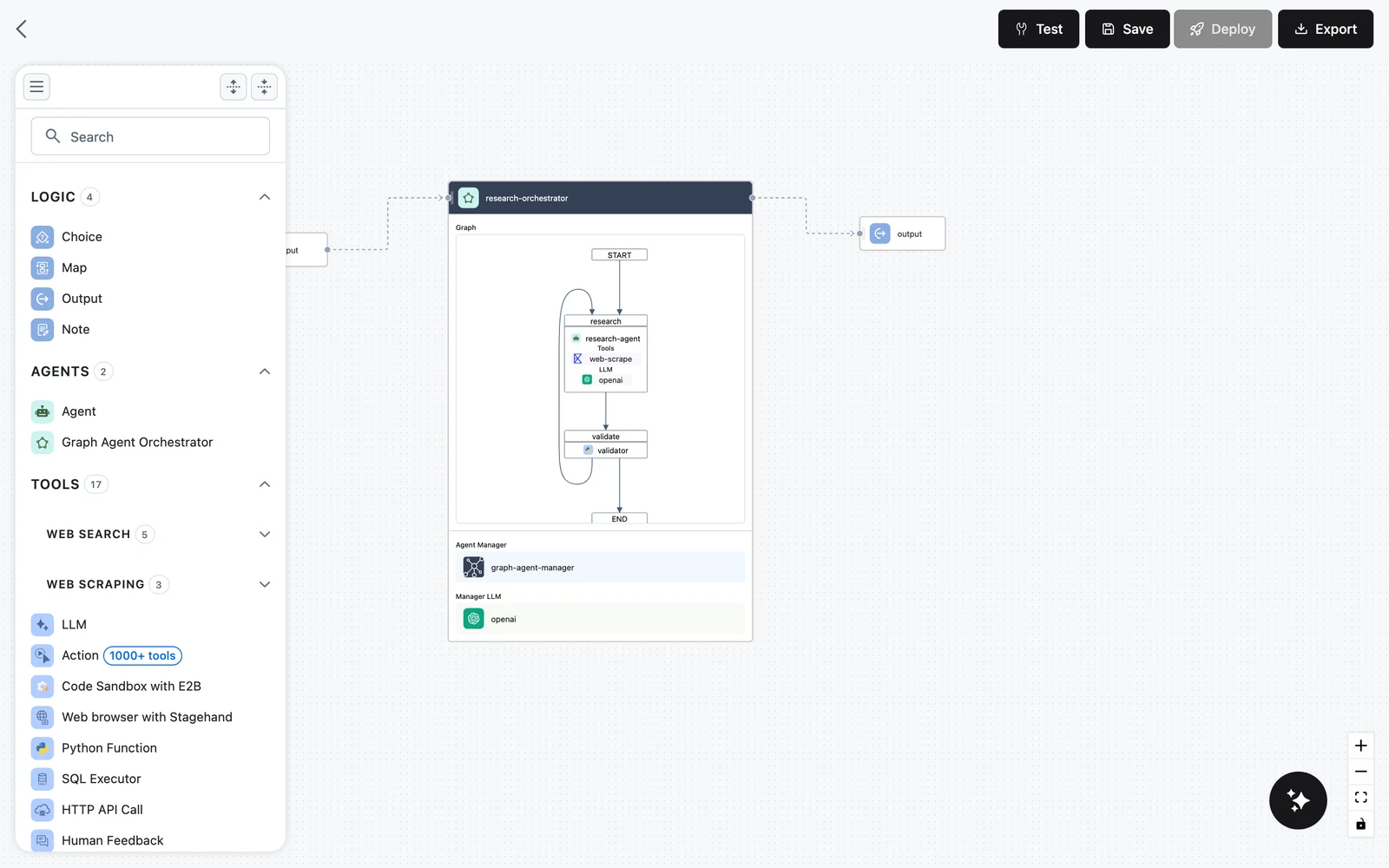
Drag Graph Agent Orchestrator from the AGENTS section of the node palette onto the canvas. The node card shows three slots: Graph (a live preview of your states and edges, starting as START → END), Agent Manager, and Manager LLM.
Drop an LLM node onto the Add LLM here placeholder to set the manager's model — only LLM nodes are accepted there. A fast, cheap model is usually right: the manager makes small structured decisions, not the creative work.
Create the states
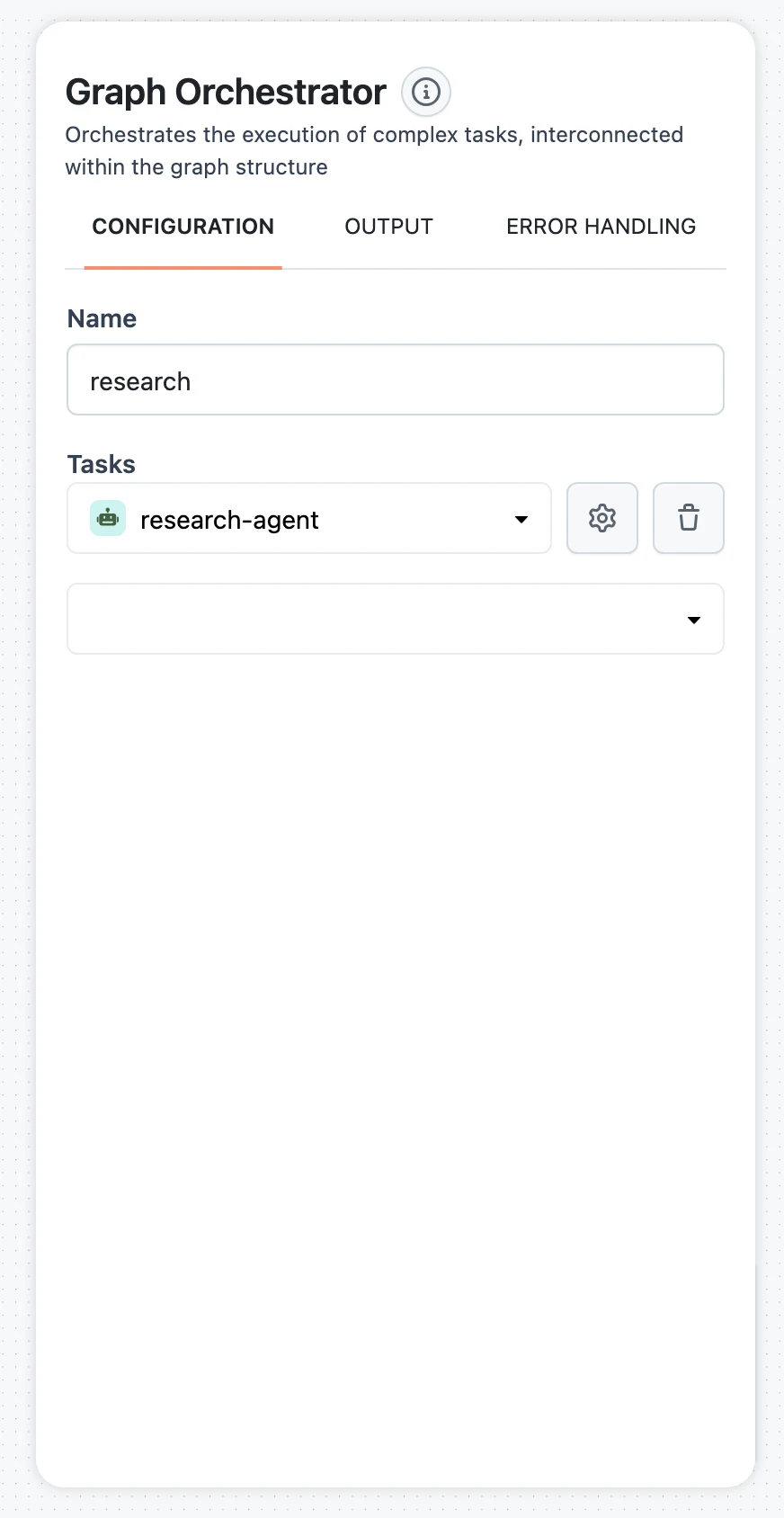
Select the orchestrator to open its configuration panel. Under Nodes, click Add node twice to create two states, then use each state's gear icon to open it and rename it: generate_draft and review_draft.
Inside each state, the Tasks section defines what it runs — a task is either an Agent or a Python node:
- In
generate_draft, add an Agent task. Configure its LLM and set its role, for example: "Write personalized emails taking into account feedback." - In
review_draft, add a Python task with code like:
def run(history, revisions=0, **kwargs):
    draft = history[-1]["content"] if history else ""

    # Replace with your real review logic (length checks,
    # required sections, a validator, an LLM-as-judge call, ...)
    approved = len(draft) > 200 or revisions >= 2

    return {
        "result": "approved" if approved else "needs work",
        "approved": approved,
        "revisions": revisions + 1,
    }
A Python task receives the shared chat history as history and every context variable as a keyword argument. It must return a dictionary with a result key (appended to the history); every other key — here approved and revisions — is merged into the shared context.
Connect the states with edges
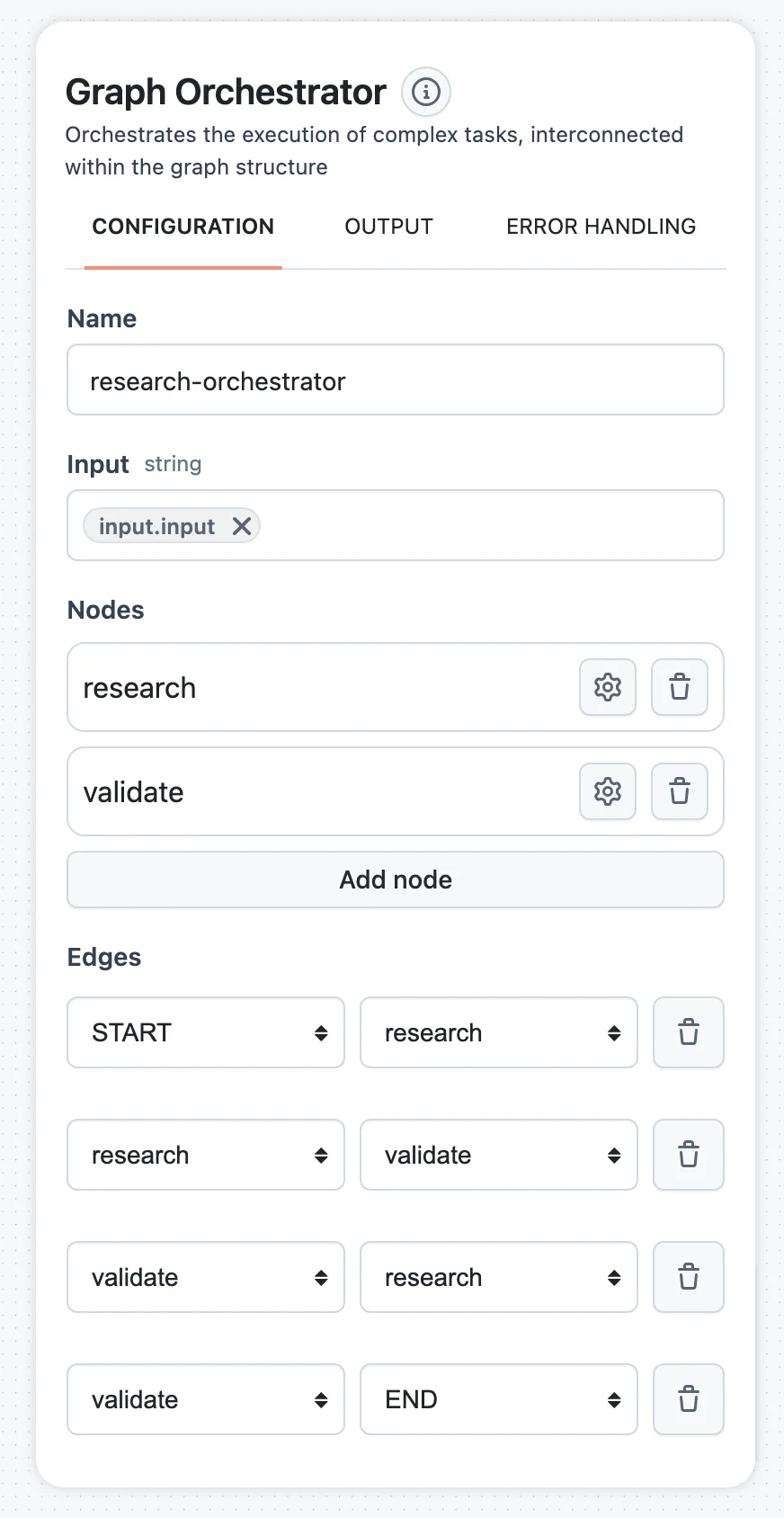
Back on the orchestrator panel, the Edges section lists transitions as from/to dropdown pairs; the options are your states plus START and END. Replace the default START → END edge and click Add edge until you have:
| from | to |
|---|---|
START | generate_draft |
generate_draft | review_draft |
review_draft | generate_draft |
review_draft | END |
The Graph preview on the node card redraws as you go — use it to confirm the shape matches the diagram above.
Write the conditional edge
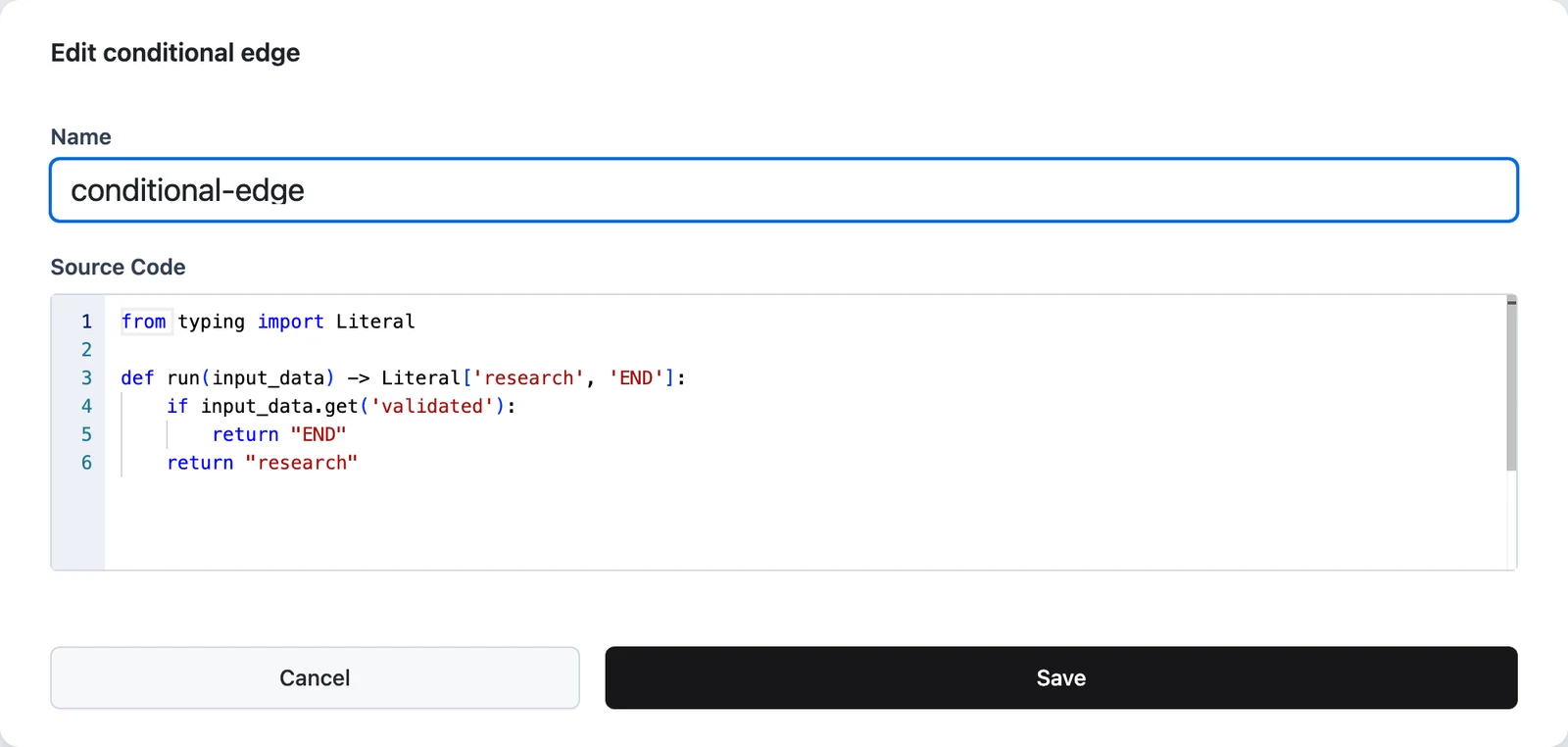
Because review_draft now has two outgoing edges, a conditional edge is created for it automatically under Conditional edges. Click its edit icon to open the Edit conditional edge modal, which contains a name field and a Python Source Code editor pre-filled with a stub:
from typing import Literal

def run(input_data) -> Literal['generate_draft', 'END']:
    pass
input_data is a dictionary holding every context variable plus history. Return the name of the next state — exactly as it appears in the graph — as a string:
from typing import Literal

def run(input_data) -> Literal['generate_draft', 'END']:
    if input_data.get("approved"):
        return "END"
    return "generate_draft"
Click Save. If you delete the condition instead, a multi-way transition is routed by the Agent Manager LLM, which picks the next state from the state descriptions and the chat history — useful for judgment calls, but slower and nondeterministic, so prefer code when objective criteria exist.
Wire it into the workflow and test
Connect your Input node to the orchestrator and the orchestrator to Output, and map the orchestrator's Input field to your input variable (for example $.input.output.question — see How nodes connect). The orchestrator outputs two fields: content (the final answer — the last history message when END is reached) and context (the final shared context object).
Optionally check Enable input analysis on the orchestrator panel: the manager then pre-screens each input and answers trivial or off-topic requests directly instead of running the graph.
Run it from the Test tab and open the trace: you'll see each state transition, every task, and the manager's calls as separate spans, which makes routing mistakes easy to spot (see Testing and debugging).
Build it in the SDK
The same workflow in the Python SDK, complete and runnable. add_state_by_tasks accepts Agent nodes and plain Python callables; callables are wrapped as function tools automatically.
from typing import Any

from dynamiq.connections import OpenAI as OpenAIConnection
from dynamiq.nodes import InputTransformer
from dynamiq.nodes.agents import Agent
from dynamiq.nodes.agents.orchestrators.graph import END, START, GraphOrchestrator
from dynamiq.nodes.agents.orchestrators.graph_manager import GraphAgentManager
from dynamiq.nodes.llms import OpenAI

llm = OpenAI(connection=OpenAIConnection(), model="gpt-4o", temperature=0.1)

email_writer = Agent(
    name="email-writer-agent",
    llm=llm,
    role="Write personalized emails taking into account feedback.",
    # Feed the agent from context instead of letting the manager
    # generate its input on every visit:
    input_transformer=InputTransformer(
        selector={"input": "$.context.agent_input"},
    ),
)


def review_draft(context: dict[str, Any], **kwargs):
    """Review the latest draft and record the verdict in context."""
    history = context.get("history", [])
    draft = history[-1]["content"] if history else ""
    revisions = context.get("revisions", 0) + 1

    approved = len(draft) > 200 or revisions >= 2

    return {
        "result": "approved" if approved else "needs work",
        "approved": approved,
        "revisions": revisions,
        "agent_input": None if approved else f"Revise this draft:\n{draft}",
    }


def router(context: dict[str, Any], **kwargs):
    """Conditional edge: return the id of the next state."""
    if context.get("approved"):
        return END
    return "generate_draft"


orchestrator = GraphOrchestrator(
    name="email-orchestrator",
    manager=GraphAgentManager(llm=llm),
)

orchestrator.add_state_by_tasks("generate_draft", [email_writer])
orchestrator.add_state_by_tasks("review_draft", [review_draft])

orchestrator.add_edge(START, "generate_draft")
orchestrator.add_edge("generate_draft", "review_draft")
orchestrator.add_conditional_edge("review_draft", ["generate_draft", END], router)

result = orchestrator.run(
    input_data={"input": "Write a welcome email for a new Dynamiq workspace admin."}
)
print(result.output["content"])
The SDK mirrors the canvas one-to-one: add_state_by_tasks ↔ Add node + Tasks, add_edge ↔ an Edges row, add_conditional_edge ↔ a conditional edge, and initial_state (default START) lets you start somewhere else. A condition can also be a Python node instead of a callable; either way it must return a string naming an existing state.
How context flows between states
The orchestrator carries two shared structures, and tasks interact with them differently:
- Python tasks (and callables) get the full picture — context plus
history— and are the only tasks that write to context: every key in their returned dict exceptresultis merged in. Keep context values JSON-serializable. - Agent tasks return text, which goes into the chat history — they do not write context. To feed an agent, either let the manager compose its input from the chat history (the default — one extra manager LLM call per visit), or set an input transformer on the agent with a selector like
$.context.agent_inputto pass context directly, as in the example above. The transformer path is faster, cheaper, and deterministic. - States with multiple tasks run each task against a copy of the context, then merge the results. If two tasks in the same state write different values to the same key, the merge fails the run — write to distinct keys.
A reliable pattern: agents produce prose into history; a small Python task after each agent extracts what matters into typed context keys; conditions route on context only.
Routing rules
When a state finishes, the next state is chosen in this order:
- One outgoing edge — follow it. No LLM involved.
- Multiple edges with a condition — run the condition with the context and history; it must return the name of an existing state (or
END). - Multiple edges, no condition — ask the Agent Manager. The manager LLM sees each candidate state's name and description and the chat history, and replies with its choice. Give states meaningful descriptions if you rely on this.
Common pitfalls
Orchestration overview
When to use the Graph Orchestrator versus a single agent or operators.
The Agent Node
Configure the agents you place inside graph states.
How nodes connect
Input mappings and JSONPath selectors used throughout this tutorial.
Graph Orchestrator node reference
The node's type identifier, inputs, and outputs at a glance.
Orchestration Overview
Choose the right coordination pattern — a single Agent, the Graph Orchestrator, or the deterministic operators: Choice, Map, Decision Table, Rules, Expression and Sub-workflow.
Map Node
Run one node once per item of a list — fan-out with optional concurrency, failure behavior, and a predictable list output.