Expression Node
Compute derived values without code — named inputs, Jinja2 expressions for each output, typed results, and an optional pass-through of the inputs.
The Expression node computes new fields from upstream values with formulas: a ratio, a rounded total, a tier label, a flag. Each output is a Jinja2 expression — the same syntax template variables use, without the braces — evaluated with the node's inputs as its names, and it returns the value itself, not rendered text: price * quantity is a number, 'A' if score < 0.5 else 'B' is a string. Use it where a Custom Function, the Python tool under Tools in the palette, would be a one-liner.
Configure an Expression on the canvas
Add the node and define its inputs
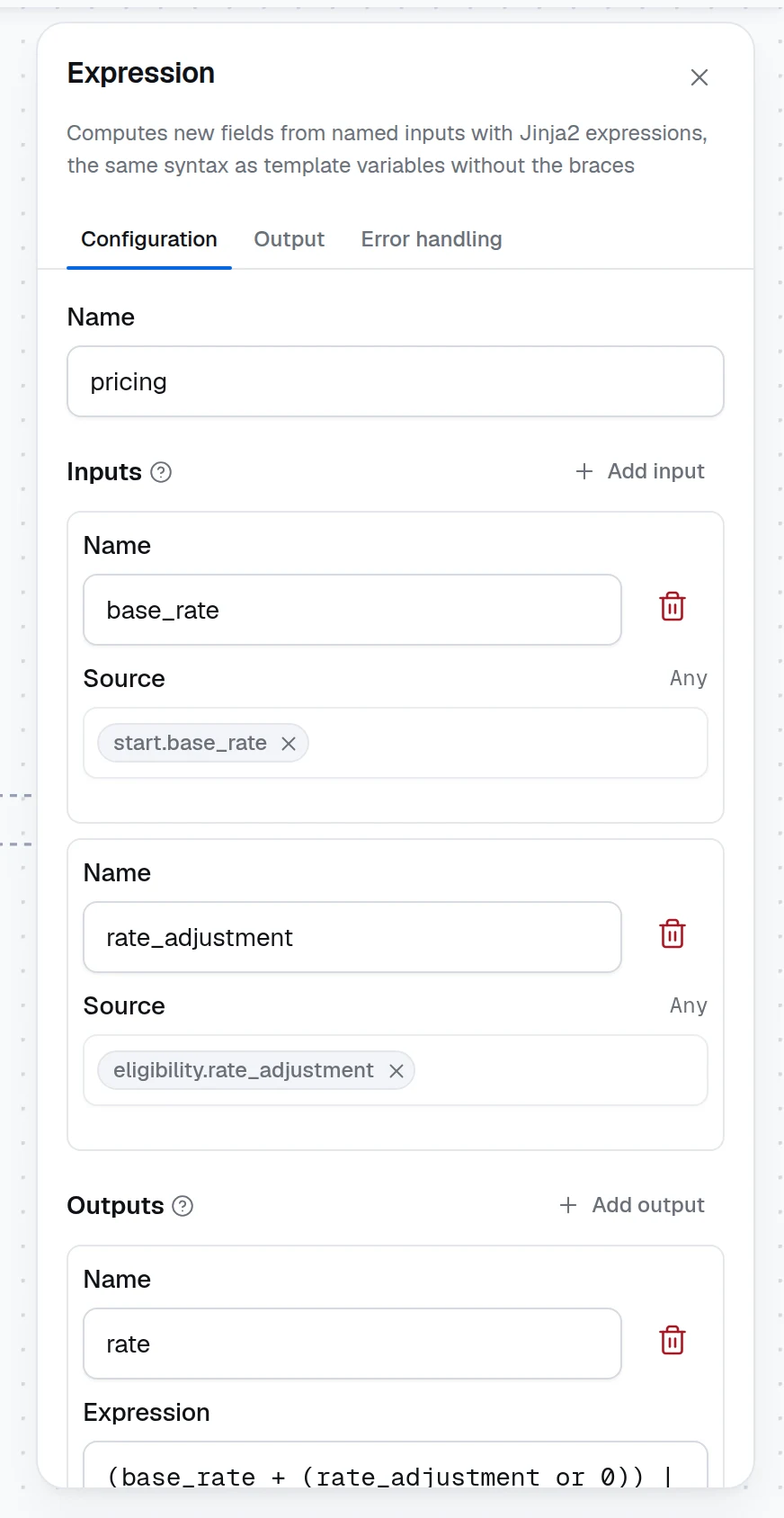
Drag Expression from the Logic group of the node palette onto the canvas and connect the nodes it reads from. Under Inputs, click Add input for each value an expression refers to, give it a Name and pick its Source with the variable picker (press /) or type a value. The name is how the expressions refer to the value.
Write the outputs
Under Outputs, click Add output, name it, and type its Expression. Names must be identifiers (letters, digits and underscores) and unique in the node. Later nodes read each output by name; the Output tab lists them. Expression syntax, under the outputs, lists the forms an expression takes, and an expression may run over several lines, since a line break reads as a space.
| Expression | Result |
|---|---|
base_rate + rate_adjustment | the sum |
(loan_amount / property_value * 100) | round(2) | a ratio rounded to two decimals |
'A' if rate_adjustment < 0.5 else 'B' | a label |
program in ['FHA', 'VA'] | a boolean |
scores | max | the largest item of a list |
discount | default(0) | a fallback for an input that is missing (a present null stays null) |
(discount or 0) | a fallback for an input that is missing or null |
Pass the inputs through, if later nodes need them
Switch on Pass inputs through to copy every input into the output next to the computed fields, so a later node reads both from this node. An expression with the same name as an input replaces it.
What an expression can do
Anything a Jinja2 expression can: arithmetic and comparisons, string and list literals, if / else, and / or / not, in, attribute and item access on the inputs (applicant.fico, scores[0]; a record's key is read before a method of the same name, so invoice.items is the record's list), and the built-in filters — round, abs, length, lower, upper, trim, default, map, select, sum, min, max, join, int, float, string, list. The full list is in the Jinja2 documentation; the same syntax is covered from the prompt side in Input transformers and Jinja.
The helpers a Rules node can call work here too: has(value) for present and not null, days_between(start, end), date(value) for an ISO or MM/DD/YYYY string, today(), and len, abs, min, max, sum, round, so an SLA due date or a customer's tenure is one expression. An input named like one of them is the input where an expression reads it and the helper where an expression calls it.
Expressions run in a sandbox: they cannot change their inputs, reach into Python internals, or loop without bound. They are formulas, not code — for anything stateful or external, use a Custom Function.
Missing inputs
An input referred to on its own that is missing evaluates to null, so a plain reference never fails, and an input missing inside a list or an object the expression builds is null there too: [price, discount] without discount gives [2.5, null], and an expression that ends in map, select or selectattr returns a list whether or not | list closes it. A missing input used inside an operation fails the run — price * quantity without quantity reports 'quantity' is undefined. So does an input that arrives as null: base_rate + rate_adjustment fails when a Decision Table under All matching rules with Sum returned null because no rule matched.
Guard such values with (value or 0), which covers both a missing input and a present null. The | default(0) filter replaces only a missing name — a present null passes through it untouched and still fails the arithmetic — unless you write | default(0, true), which also replaces null and every other falsy value.
An input named self is the one name an expression cannot read: the expression engine reserves it, so the runtime refuses such an expression when the workflow is built, naming the output. The input still passes through, and a self key inside an object (payload.self.href) reads like any other.
A duplicate name or an empty expression is flagged in the panel and blocks Save and Test. A syntax error surfaces on the first test run, since expressions compile when the workflow is built: the error names the node and the output, and no run starts.
Worked example: price a loan
An upstream Decision Table eligibility returns rate_adjustment; the Input node carries base_rate:
| Input | Source |
|---|---|
base_rate | start.base_rate |
rate_adjustment | eligibility.rate_adjustment |
| Output | Expression |
|---|---|
rate | (base_rate + (rate_adjustment or 0)) | round(3) |
tier | 'A' if (rate_adjustment or 0) < 0.5 else 'B' |
With base_rate 6.5 and rate_adjustment 0.25 the node returns {"rate": 6.75, "tier": "A"}. Map rate and tier on the Output node and the caller gets both.
Runtime and SDK
The node is dynamiq.nodes.operators.Expression. Each expression compiles once, when the workflow is built, so a malformed one fails before any node runs; evaluation takes microseconds. The SDK class, the sandbox rules and the YAML form are in Expression.
Judgement Node
Ask yes/no, choice and score questions about a record and route on calibrated answers — three judges, confidence thresholds, and review paths.
Sub-workflow Node
Run a released version of another workflow as one step — pick the workflow and version, map its Input fields, read its Output fields, and keep the pin stable across deployments.