Rules Node
Check a record against a list of rules — inputs read by path, derived values, severities, conditions and effective windows, messages that insert the record's values, CSV import and export, and findings in test cases.
The Rules node checks a record against a list of rules and reports one finding per rule. The record is whatever the upstream nodes produce — a claim with its policy, an invoice with its purchase order and receipt, a prescription with the formulary, a loan file with its documents — and each rule is a check written against it: the loss date falls inside the policy period, the invoice total is within 2% of the order, an adult member has an ID on file. Where a Decision Table picks the matching rows and returns their outputs, a Rules node evaluates every rule and says which held, which did not, and which could not be decided — the shape of a review, an audit, a pre-submission check or a compliance screen.
At run time the node returns status, the record's overall result; summary, a count per status; findings, one entry per enabled rule in list order with the values each check read (a rule switched off contributes none, so the list contracts rather than holding a placeholder); and derived, the values it computed.
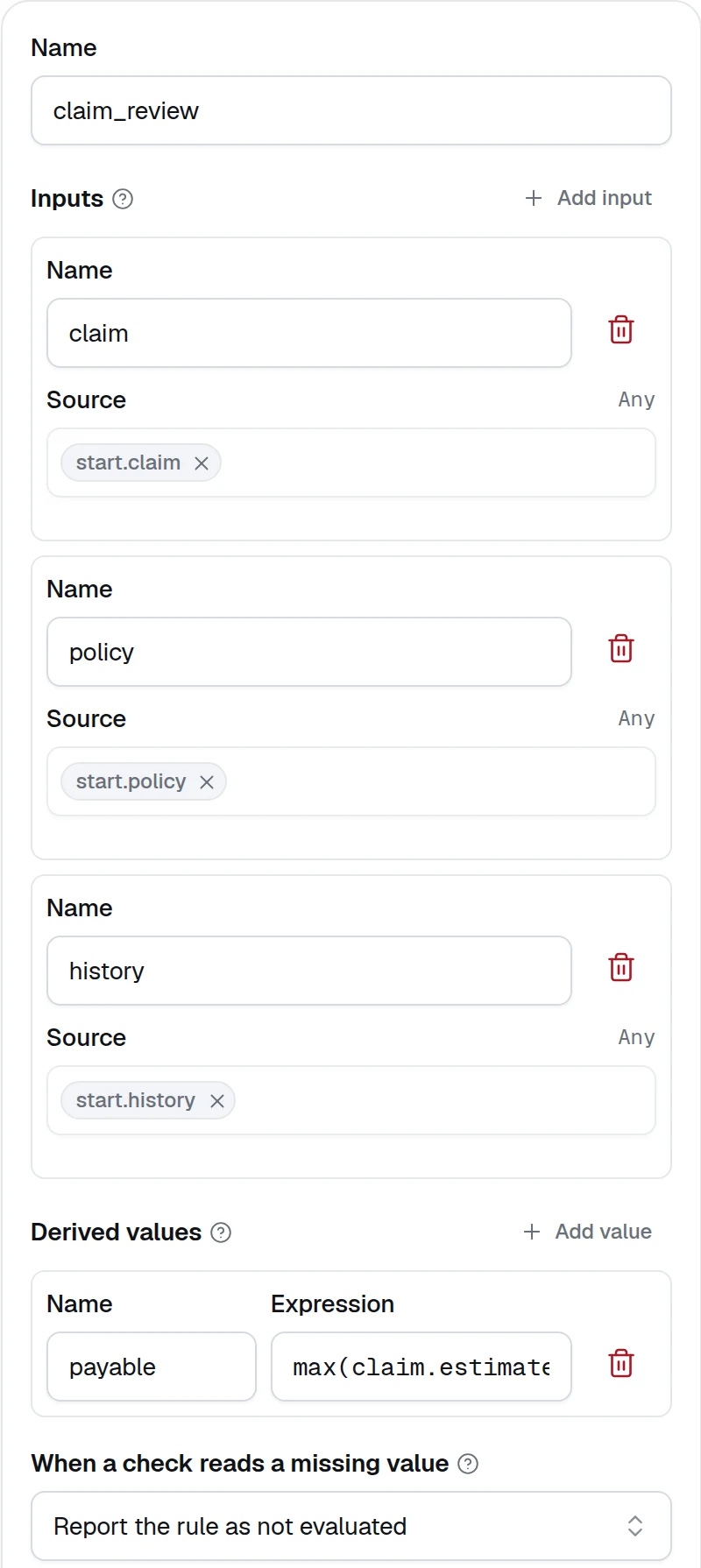
Configure a Rules node on the canvas
Add the node and name it
Drag Rules from the Logic group of the node palette onto the canvas and connect an edge from the node that produces the record it checks — the Input node, an agent with a response format, a document extraction. Give it a short Name: later nodes read its outputs as $.<name>.output.status and $.<name>.output.findings, and the By rule view of the test cases lists its rules under it.
Name the inputs
Under Inputs, click Add input for each record the rules check and give it a Name and a Source — press / to pick an upstream output. Inputs are not typed: a rule reads a value by path, so policy.limits.theft reads the theft limit of the policy and items[0].amount the first item's amount, and a record of any shape needs no mapping beyond naming it.
An input named as_of, an ISO date, fixes the date the effective windows are compared with; without it the run date is used.
Inside a Map, an input needs no source: each item of the list is the input, and an input reads the item's field of the same name, so a batch of claims or invoices is reviewed one record at a time with the same rules.
Add derived values
Under Derived values, add the values several rules share — a ratio, a variance, an amount — with a Name and an Expression. They are computed once per record, in order, before the rules run, and a rule reads them by name like an input; a later derived value can read an earlier one. A value that cannot be computed, such as a division by a missing number, is null, and a rule that reads it is reported as not evaluated rather than failed. A member the expression could not find inside a list or an object it builds is null there too, so a list of discounts over items that lack one keeps a null in its place.
Write the rules
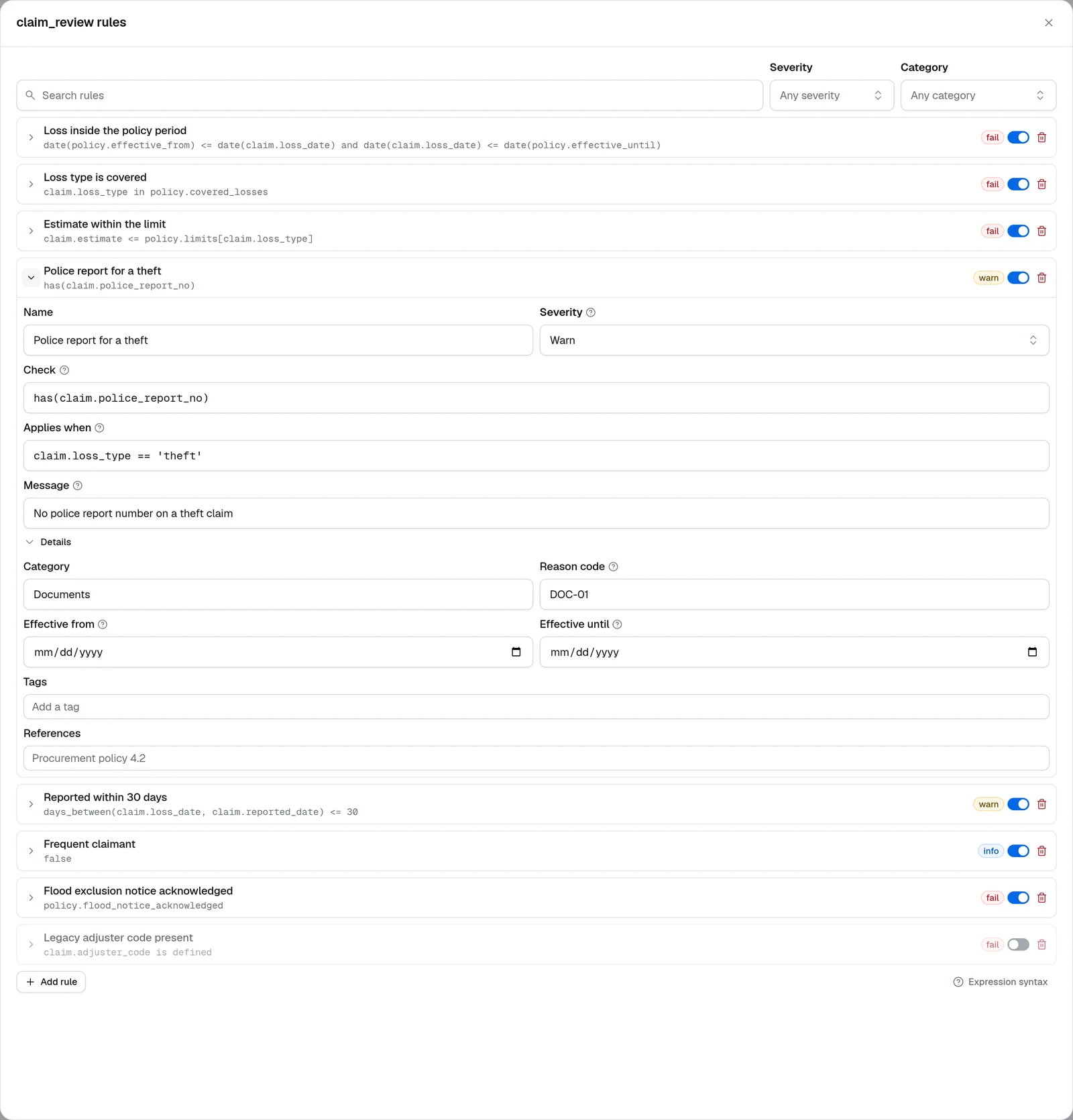
Click Add rule for each check. A rule has a Name, a Severity, a Check — the expression that must hold for the record to pass, such as claim.estimate <= policy.limits[claim.loss_type] — an optional Applies when condition, and a Message, a template rendered with the whole record when the check does not hold, every input and derived value and not only what the check read, so it can name an id or a limit the check never touched: Estimate {{ claim.estimate }} is above the {{ claim.loss_type }} limit. Details holds what a finding carries for the system that receives it: Category, Reason code, Effective from and Effective until, Tags and References.
| Severity | When the check does not hold |
|---|---|
| Fail | The finding is fail and the record's status is fail. The default. |
| Warn | The finding is warn; the record's status is warn unless another rule failed. |
| Info | The finding is info and the status is unchanged — a note, not a defect. |
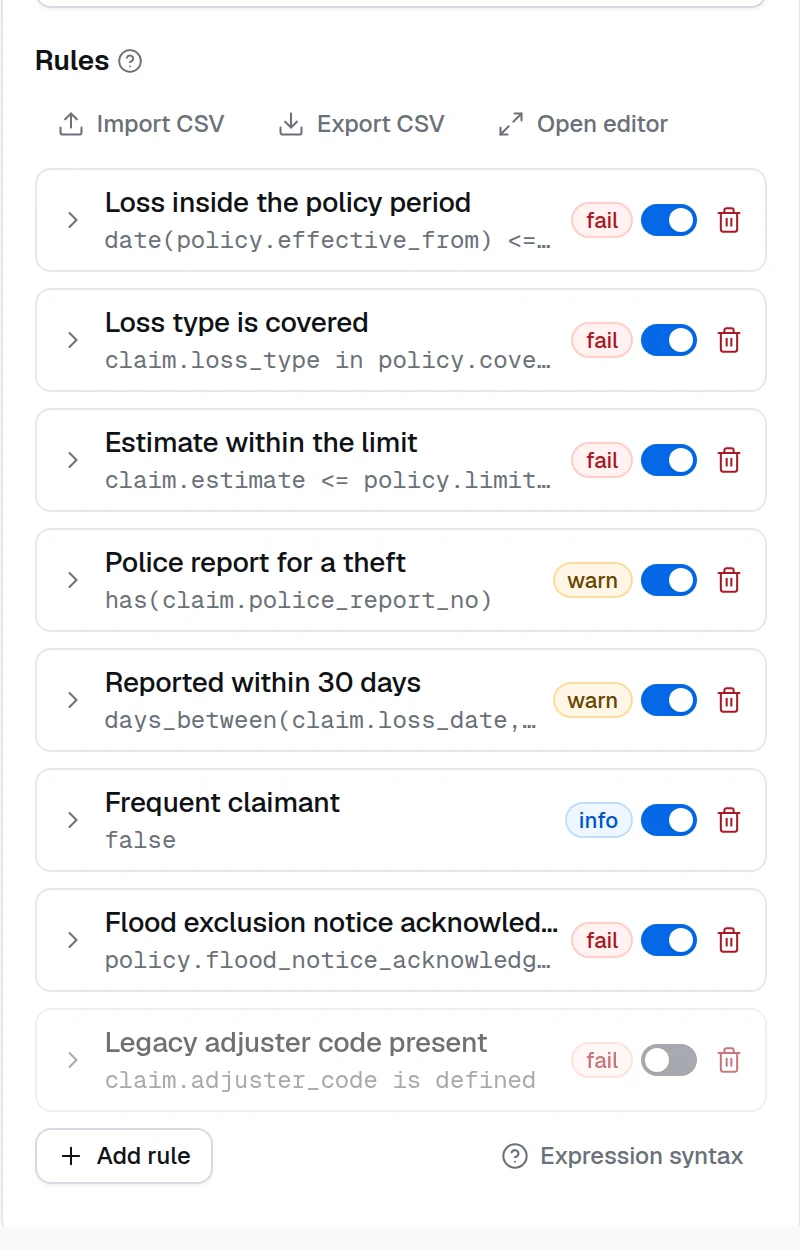
The switch on each rule takes it out without deleting it; an off rule reports nothing. The side panel lists the first 25 rules, and adding a rule past them opens the editor on it; Open editor opens the whole list in a dialog with a search box and severity and category filters, which is where a longer rule set is easier to work with.
Decide what a missing value means
When a check reads a missing value sets what a rule reports when a value it reads is absent or null — a document that was never uploaded, a field the extraction did not find. By default the rule is reported as not evaluated, for someone to review, and the record's status is not_evaluated rather than pass. Report the rule's severity is the strict policy: a missing document counts as a failed check. Either way a missing value never passes a rule silently, and the record's status is never pass while a value was missing: a rule at severity info reports info under the strict policy, and the record still reads not_evaluated.
Connect the findings
Draw an edge from the node to the nodes that act on its result. The variable picker lists status, summary, findings, derived and each derived value as derived.<name>. A Choice condition on $.<name>.output.status routes a failed record to review; an Expression collects the reason codes of the findings that fired — findings | selectattr('status', 'in', ['fail', 'warn']) | map(attribute='reason_code') | list; an agent turns the findings into a letter; the Output node returns them to the caller.
Expression syntax
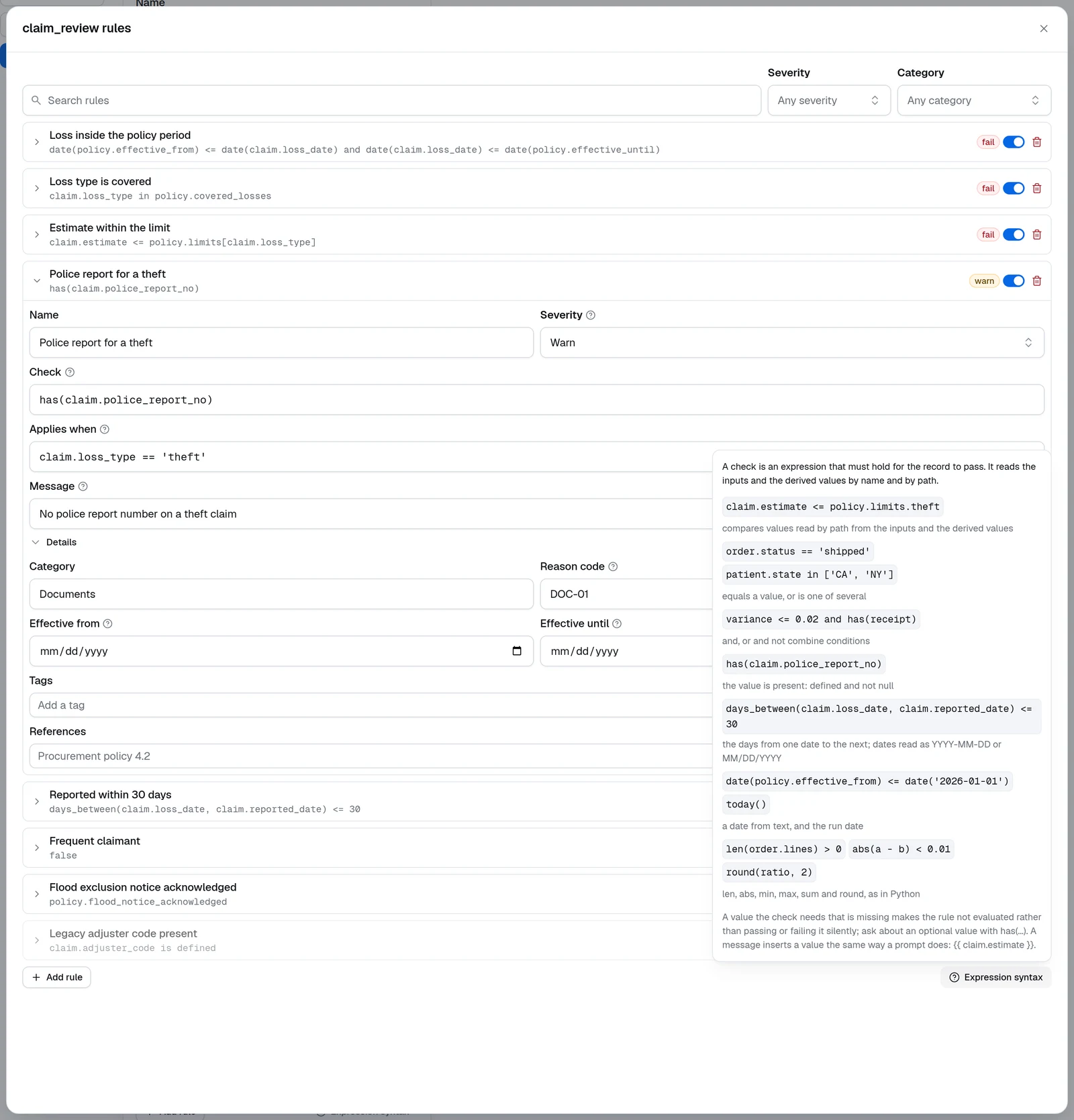
A check, an applies-when condition and a derived value use the same expression engine as the Expression node — Jinja2 expressions, without the braces — plus a few functions for records. The Expression syntax button under the rules opens the same reference in the editor. An expression may run over several lines, since a line break reads as a space, so a long condition can put one clause on each.
| Expression | Meaning |
|---|---|
invoice.total <= po.total * 1.02, min(fee, 250) | arithmetic and comparisons on values read by name or by path; min, max and abs |
620 <= fico <= 850, currency in ['USD', 'EUR'] | within a range, or one of several values |
ltv <= 0.8 and (dti <= 0.43 or has(reserves)) | and, or and not combine conditions; brackets group them |
abs(invoice.total - po.total) <= 0.01, round(amount * rate, 2) | money: compare within a tolerance, since 0.1 + 0.2 is not exactly 0.3, and round to cents |
has(guarantor) | the value is present: defined and not null |
days_between(invoice.due_date, today()) > 30, date(maturity) < date('2030-01-01') | the days from one date to the next, and a date from text as YYYY-MM-DD or MM/DD/YYYY |
len(invoice.lines) > 0, invoice.lines | sum(attribute='amount') | count a list, and total a field across it |
'prime' if fico >= 720 else 'subprime' | a value that depends on a condition |
Jinja filters work over lists too: (household.members | selectattr('age', 'ge', 18) | rejectattr('id_on_file') | list | length) == 0 holds when every adult has an ID on file. A chain that ends in map, select or selectattr reads as a list whether or not | list closes it, in a check, a condition and a derived value alike, so every rule reads the same values.
A value the check needs that is missing makes the rule not evaluated rather than passing or failing it silently — a comparison against a missing lookup is never simply false. Ask about an optional value with has(...): in has(docs.FloodCert) and docs.FloodCert.zone in ['A', 'V'] the guarded read is optional, so a missing certificate lets the check decide instead of blocking it. A method call reads the value it is called on, so invoice.get('vat_rate', 0) needs invoice and reads 0 when the key is absent. A field named like a method of the record, items or update say, is the field: the method is reached only when the record has no such key. A field named like a helper, such as date, is the field where a check uses it as a value and the helper where a check calls it. A top-level input named self is the one name a check cannot read, since the expression engine reserves it: the runtime refuses such a check when the workflow is built, naming the rule, so read a self link inside a record (payload.self.href) or rename the input. A message inserts a value the same way a prompt does: {{ claim.estimate }}.
The editor blocks Save and Test on a rule without a check, a repeated id or a malformed effective window, naming the rule. The runtime compiles every expression when the workflow is built and refuses one it cannot parse before any record runs, naming the rule as well.
How a record is scored
Every rule that is on reports a status, and the finding carries the values the check read under evaluated, so a reviewer sees why without re-running anything.
| Status | Meaning |
|---|---|
pass | The check held. |
fail, warn, info | The check did not hold; the status is the rule's severity, and the message is rendered with the whole record. |
not_applicable | Applies when did not hold for this record, or the record's date is outside the rule's effective window; the message says which. |
not_evaluated | A value the check reads is missing, or the check could not be evaluated; the message names the value. Under the strict policy the rule reports its severity instead. |
The record's status is fail if any rule failed, else warn if any warned, else not_evaluated if any check did not run, else pass. A check did not run when its finding is not_evaluated, and also when, under Report the rule's severity, the rule reported its severity for a missing value: an info finding never raises the status, so a record whose only gap sits under an info rule reads not_evaluated, not pass. A record passes only when every rule that applied was evaluated and held.
Effective windows. A rule with Effective from or Effective until applies only to records dated inside the window: a requirement that starts in January is not applicable to a file dated in December, and stays in the list with its history. The record's date is the as_of input when there is one, otherwise the day of the run.
Import and export rules as CSV
Export CSV downloads the rules with one header row — id, name, category, severity, applies_when, check, message, reason_code, references, tags, effective_from, effective_until, enabled — and one row per rule, the layout a rule owner can review in a spreadsheet and hand back. Import CSV reads it back, or any sheet whose header names the columns in any order, with spaces or underscores, in any case; only check is required. Lists are separated by semicolons, US dates are read as ISO, and a rule's own id is kept so findings and coverage keep naming the same rule after a round trip; a repeated id is refused rather than guessed. Importing into a node that already has rules asks before replacing them. Imports are capped at 10 MB and 5000 rules.
Findings in test cases
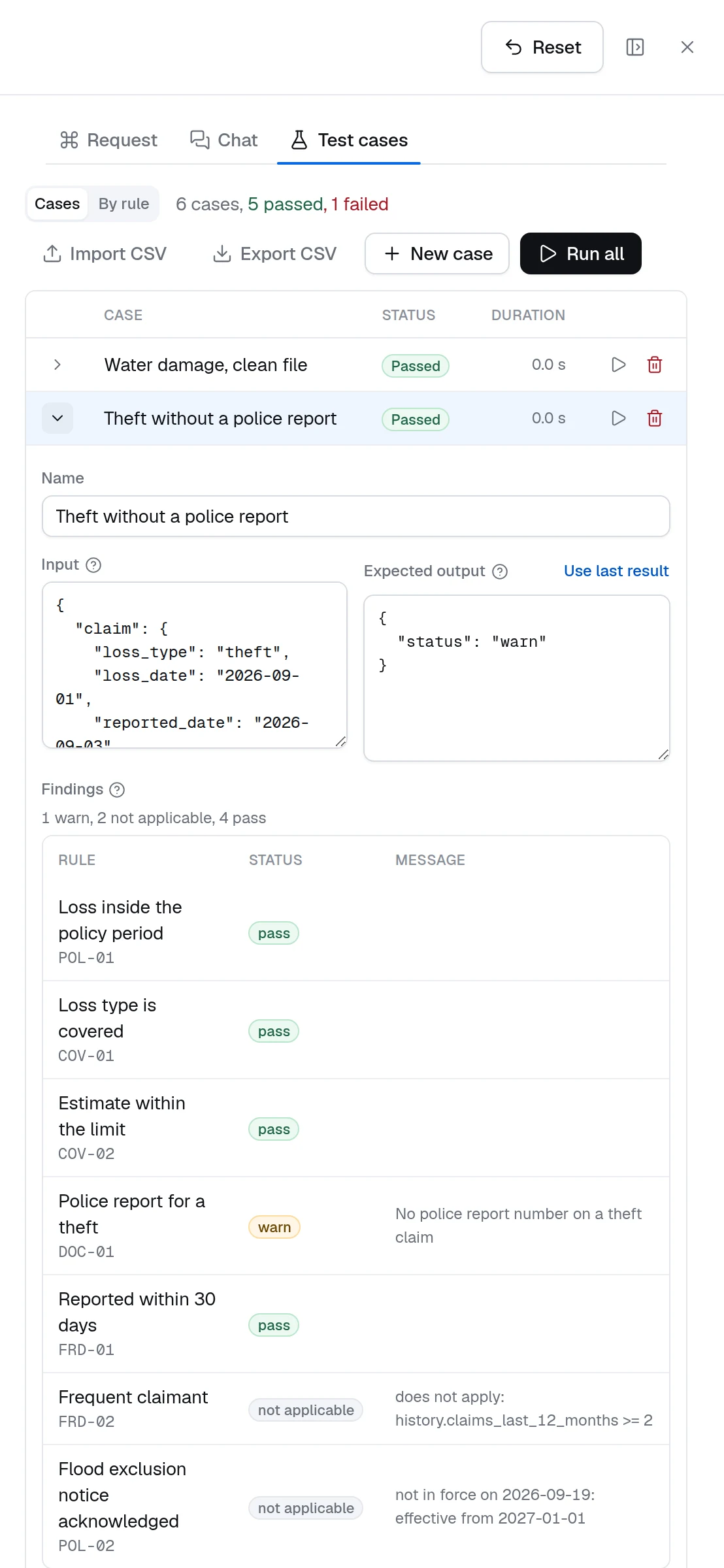
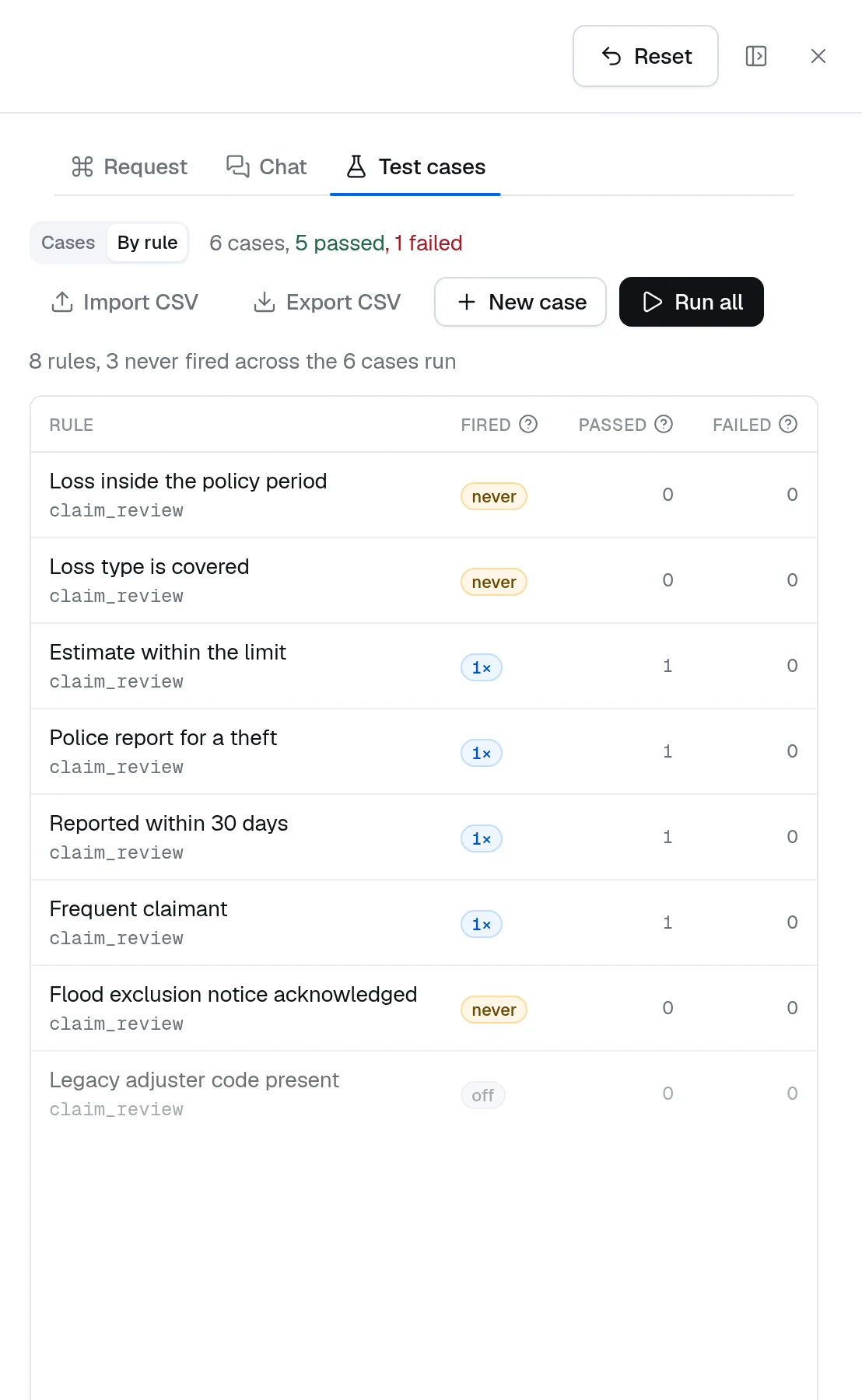
After the workflow's test cases run, a case whose output includes the node's findings shows them as a table when expanded — one row per rule, the status as a badge, the message beside it — above the raw output. The By rule view of the same tab lists every rule of every Rules node and Decision Table on the canvas with how many cases fired it — a check that did not hold, or a row that matched — and how many of those cases passed or failed. A rule that never fires across the cases is either dead or untested; a rule that fires in failing cases is the first to look at.
Worked example: claim adjudication
Inputs claim, policy and history from the Input node — the claim as filed, the policy record and the claimant's history — and a derived value payable = max(claim.estimate - policy.deductible, 0):
| # | Rule | Severity | Applies when | Check | Reason code |
|---|---|---|---|---|---|
| 1 | Loss inside the policy period | Fail | date(policy.effective_from) <= date(claim.loss_date) and date(claim.loss_date) <= date(policy.effective_until) | POL-01 | |
| 2 | Loss type is covered | Fail | claim.loss_type in policy.covered_losses | COV-01 | |
| 3 | Estimate within the limit | Fail | claim.estimate <= policy.limits[claim.loss_type] | COV-02 | |
| 4 | Police report for a theft | Warn | claim.loss_type == 'theft' | has(claim.police_report_no) | DOC-01 |
| 5 | Reported within 30 days | Warn | days_between(claim.loss_date, claim.reported_date) <= 30 | FRD-01 | |
| 6 | Frequent claimant | Info | history.claims_last_12_months >= 2 | false | FRD-02 |
A water-damage claim reported 12 days after the loss, inside the policy period, within the limit, from a claimant with one prior claim: rules 1, 2, 3 and 5 pass, rules 4 and 6 are not_applicable, the status is pass, and derived.payable is the estimate less the deductible. The same claim filed as a theft with no police report number: rule 4 reports warn, the status is warn, and a Choice after the node sends it to an adjuster with DOC-01 as the reason. Rule 6 is the info pattern: its check is false, so it fires whenever it applies and notes the history without touching the status.
Runtime and SDK
The node is dynamiq.nodes.operators.Rules. Expressions run in the same sandbox as the Expression node: they read the record and cannot reach code, and a run of hundreds of rules costs milliseconds. The rules compile when the workflow is built, so a malformed one fails before any record runs, naming the rule. The Error handling tab applies as on any node. The SDK class, the expression grammar and the YAML form are documented in Rules.
Pitfalls
Test cases
Save records with their expected status, re-run them after every rule change, and read the findings per case and per rule.
Decision Table node
Pick the matching rows of a grid and return their outputs — the decision, where Rules is the review.
Expression node
Turn the findings into a route, a list of reason codes or a score.
Rules reference
Type identifier and I/O summary for the node.
Decision Table Node
Model business rules as a table — typed input columns, output columns, a rules grid with a cell grammar, hit policies, CSV import and export, and coverage from test cases.
Judgement Node
Ask yes/no, choice and score questions about a record and route on calibrated answers — three judges, confidence thresholds, and review paths.