Agent Memory
Give agents multi-turn conversation memory — backends, user/session scoping, save modes, and retrieval strategies.
By default an Agent node is stateless: every run starts a blank conversation. Memory changes that — the agent stores the conversation at the end of each run and replays the relevant history at the start of the next one, scoped by user_id and session_id. This page covers what gets stored, the available backends, and how to configure memory in the UI and the SDK.
What memory stores
Memory persists conversation messages — role (user, assistant, tool), content, and metadata. Each message's metadata carries the user_id, session_id, a timestamp, and anything you passed in the agent's metadata input. Native function-calling fields (tool_calls, tool_call_id) are preserved too, so a replayed conversation stays valid for the model.
How much of the run is persisted depends on the Save mode:
| Save mode | UI label | What is saved |
|---|---|---|
full | Full | Every non-system message from the run — user input, intermediate assistant reasoning, tool observations, and the final answer. Maximum fidelity; inflates tokens on the next turn. |
input_output | Input / Output | Only the user input and the final assistant response. The intermediate reasoning trace is dropped — best for clean multi-turn chat. |
If a run fails or is canceled, the agent still saves what it can (at minimum the user's input), so the next turn is not missing a message.
Session scoping with user_id and session_id
Memory only activates when the run provides user_id and/or session_id — they appear as User ID and Session ID input fields on the Agent node as soon as memory is enabled. The ids are pure strings you control:
user_id— typically your application's user identifier. Filters memory to one person.session_id— one conversation thread. Two sessions of the same user do not see each other's history.
At the start of a run the agent retrieves up to Memory limit messages matching the provided ids and prepends them to the prompt (after a short system note marking them as previous history).
Retrieval strategies
Three strategies control which messages come back (memory_retrieval_strategy in the SDK; the Memory retrieval strategy selector appears in the UI for the Qdrant and Pinecone backends):
- All (
all, default) — the most recent messages, chronological. Works on every backend. - Relevant (
relevant) — semantic search for messages related to the current input. Requires a vector-store backend (Qdrant, Pinecone, Weaviate) with an embedder, since relevance is vector similarity against the embedded query. - Both (
both) — recent messages and semantically relevant ones, merged and de-duplicated by timestamp, returned in chronological order. Same backend requirement as Relevant.
Two retrieval details worth knowing: the agent over-fetches (three times the limit) before trimming to Memory limit, and the final slice is adjusted so the replayed conversation always starts with a user message, keeping the transcript valid for the model.
Sub-agents never share memory with their parent: when a parent agent delegates, the child receives derived ids (user_id and session_id suffixed with the sub-agent's name), keeping each agent's history isolated.
Configure memory in the UI
Enable memory
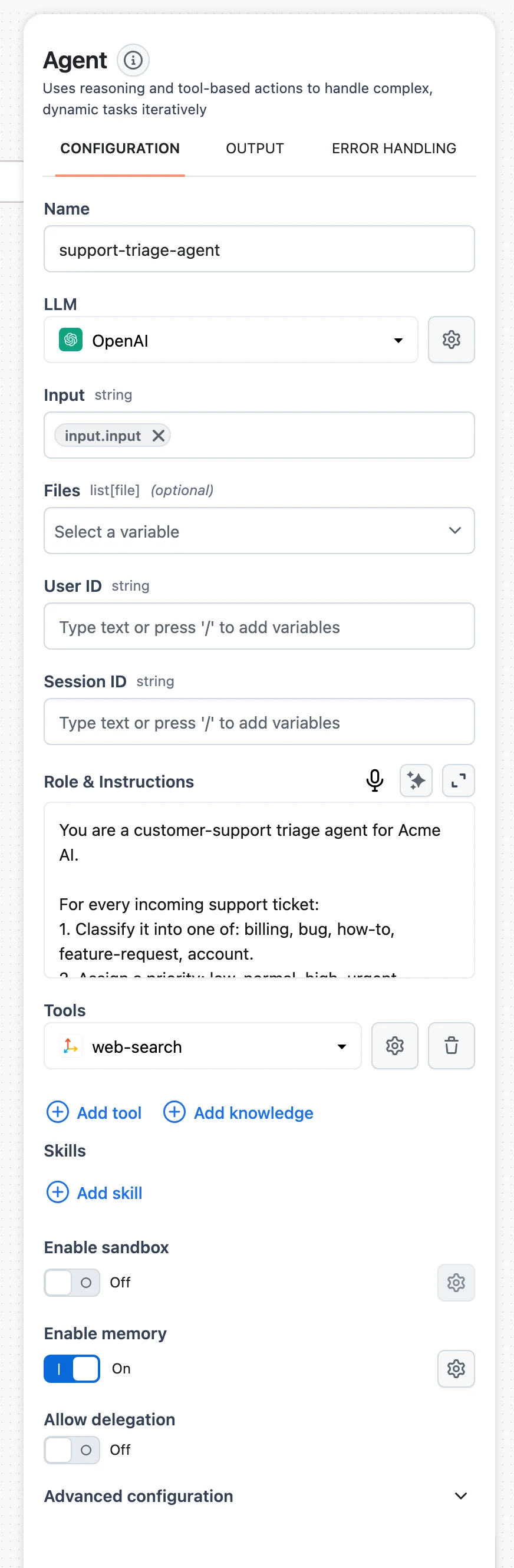
Select the Agent node and switch on Enable memory. The memory settings modal opens; the gear icon reopens it later. Once enabled, User ID and Session ID fields appear among the node's inputs — map them from your workflow input.
Pick a memory type
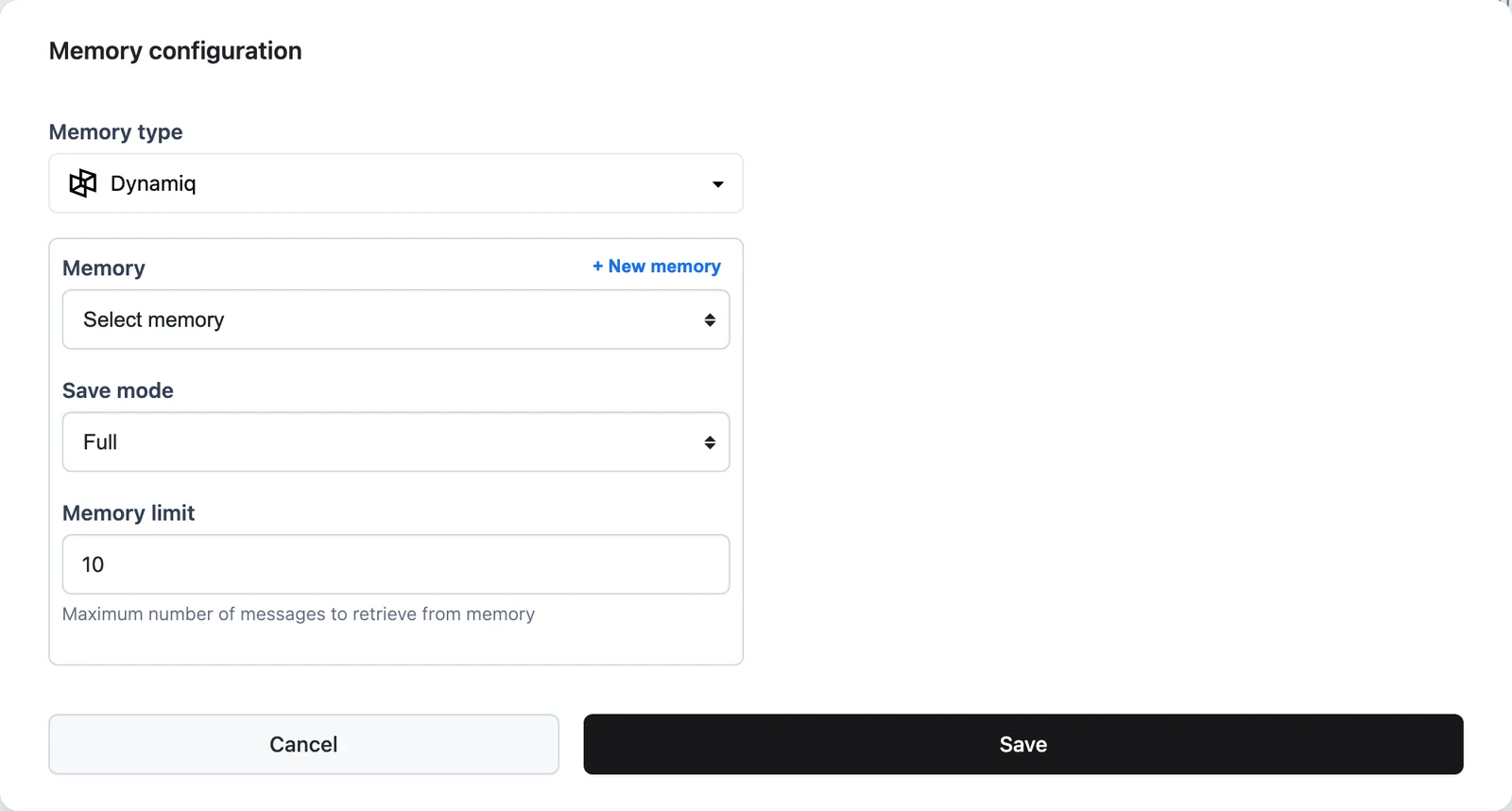
Choose a backend under Memory type: Dynamiq, Qdrant, Pinecone, Weaviate, DynamoDB, or PostgreSQL. Dynamiq is the managed platform backend — no external infrastructure or Connection needed: pick an existing memory under Memory, or click + New memory to create one in place. For the other backends, select the Connection and backend-specific settings (index, collection, or table name). Qdrant and Pinecone additionally show the Memory retrieval strategy selector (All / Relevant / Both).
Add an embedder for vector backends
Qdrant, Pinecone, and Weaviate store messages as vectors, so the modal asks for an Embedder (provider, model, connection). It is used to embed messages on write and queries on read — this is what powers the Relevant retrieval strategy. Dynamiq, DynamoDB, and PostgreSQL need no embedder.
Set Save mode and Memory limit
Pick Save mode (Full or Input / Output) and set Memory limit — the maximum number of messages retrieved from memory per run. Save and you're done; run the workflow twice with the same User ID and Session ID to verify the second run remembers the first.
Backends
All memory backends implement the same interface — add, retrieve, search, and scoped delete — so you can switch backends without changing the agent.
| Backend | Type | Notes |
|---|---|---|
| Dynamiq | Managed (platform) | Stores messages via the Dynamiq API under a memory resource (memory_id). Requires both user_id and session_id on every write, and does not support clearing the entire memory — delete by user_id/session_id instead. In the UI you pick or create a managed memory — no Connection needed. |
| PostgreSQL | SQL | Messages in a table (default conversations) with JSONB metadata for filtering; creates the table automatically by default. |
| DynamoDB | NoSQL | Messages in a DynamoDB table (default conversations); choose pay-per-request or provisioned billing. |
| Qdrant | Vector store | Embedded messages in a Qdrant collection; enables semantic (Relevant) retrieval. |
| Pinecone | Vector store | Embedded messages in a Pinecone index with namespace support. |
| Weaviate | Vector store | Embedded messages in a Weaviate collection. |
| SQLite | SQL (SDK only) | Local file database (default conversations.db) — convenient for development. |
| InMemory | Ephemeral (SDK only) | Process-local store with BM25 ranking for search; vanishes when the process exits. Default backend in the SDK. |
Configure memory in the SDK
from dynamiq.connections import OpenAI as OpenAIConnection
from dynamiq.connections import PostgreSQL as PostgreSQLConnection
from dynamiq.memory import Memory, MemoryRetrievalStrategy, MemorySaveMode
from dynamiq.memory.backends import PostgreSQL
from dynamiq.nodes.agents import Agent
from dynamiq.nodes.llms import OpenAI

memory = Memory(
    backend=PostgreSQL(
        connection=PostgreSQLConnection(),
        table_name="conversations",
    ),
    save_mode=MemorySaveMode.INPUT_OUTPUT,
)

agent = Agent(
    name="support-agent",
    llm=OpenAI(connection=OpenAIConnection(), model="gpt-4o"),
    role="You are a helpful support assistant. Use the conversation history for context.",
    memory=memory,
    memory_limit=50,
    memory_retrieval_strategy=MemoryRetrievalStrategy.ALL,
)

# Turn 1
agent.run(
    input_data={
        "input": "My name is Dana and my order number is 1234.",
        "user_id": "user-42",
        "session_id": "chat-2026-06-10",
    }
)

# Turn 2 — same ids, so the agent remembers Dana and order 1234
result = agent.run(
    input_data={
        "input": "What was my order number again?",
        "user_id": "user-42",
        "session_id": "chat-2026-06-10",
    }
)
print(result.output["content"])
Key fields, verified against the SDK:
memory.backendMemoryBackendrequiredmemory.save_modeenummemory.message_limitnumbermemory_limitnumbermemory_retrieval_strategyenumTo wipe a conversation, backends with scoped deletion support memory.delete(user_id=..., session_id=...) — passing either or both ids removes the matching slice.
Don't confuse the two limits: memory.message_limit (default 1000) caps how many messages a single backend retrieve/search call returns, while the agent's memory_limit (SDK default 100, set to 10 when you enable memory in the UI) caps how many of those actually enter the prompt. The prompt limit is the one you tune for token cost.
UI ↔ SDK field mapping
Workflows built in the canvas and agents built in code configure the same memory engine. The mapping:
| UI (Agent panel / memory modal) | SDK | Notes |
|---|---|---|
| Enable memory toggle | memory=Memory(...) on Agent | Off = no memory argument; the agent is stateless. |
| Memory type | Memory(backend=...) class (Dynamiq, Qdrant, Pinecone, Weaviate, DynamoDB, PostgreSQL) | SDK additionally offers InMemory (its default) and SQLite, which the UI does not. |
| Save mode — Full / Input / Output | Memory(save_mode=...) — "full" / "input_output" | SDK default full. |
| Memory limit | Agent(memory_limit=...) | UI sets 10 on enable; SDK default 100. |
| Memory retrieval strategy — All / Relevant / Both (Qdrant, Pinecone) | Agent(memory_retrieval_strategy=...) — "all" / "relevant" / "both" | SDK default all. |
| Embedder (vector backends) | backend=Qdrant(embedder=...) etc. | Provider, model, and connection for embedding messages and queries. |
| User ID / Session ID input fields | user_id / session_id keys in input_data | Pure strings you control; both scope storage and retrieval. |
| — | Memory(message_limit=...) | Backend-level retrieval cap, default 1000; not exposed in the UI. |
Memory vs. other state
- Memory is conversational history per user/session — what the agent "remembers" between runs.
- File store / sandbox is the agent's working file system within and across loop iterations of a single run.
- Knowledge Bases are curated, searchable document collections — reference material, not conversation. Attach them as tools instead (see Connect a Knowledge Base to Agents).
Next steps
The Agent Node
The full Agent configuration reference, including all runtime inputs.
Conversations and Sessions
How user and session ids flow through deployed Apps.
Agent Tools
Attach tools and pass runtime parameters to them.
Memory in the SDK
Configure the same memory engine in code — backends, save modes, and retrieval strategies.