Internal Knowledge Assistant
Build a company-wide Q&A assistant over Google Drive, Notion, and Confluence content — with per-team isolation, per-user memory, and measurable retrieval quality.
An internal knowledge assistant answers employees' questions from the documents your company already maintains — HR policies in Google Drive, engineering runbooks in Notion, IT procedures in Confluence — instead of making people search five systems or ping a colleague. This journey shows how to assemble one on Dynamiq from existing building blocks: a Knowledge Base synced from OAuth sources, an Agent with retrieval and memory, and a deployed App your employees reach through a chat surface or your own Slack-style bot.
Scenario and outcomes
Take a 2,000-person company — call it Meridian Group — where the HR team owns a Drive folder of policy PDFs, engineering keeps runbooks in Notion, and IT documents procedures in Confluence. Each team wants an assistant over its content, answerable in natural language, without handing every employee raw access to every folder.
Target outcomes:
- One assistant per team, each grounded only in that team's documents, reachable from a chat UI or an internal bot.
- Content stays fresh — source documents are synced from the systems of record, not copied once and forgotten.
- Conversations are personal — the assistant remembers each employee's own thread, and one user's history is never replayed to another.
- Quality is measured, not assumed — retrieval precision and recall are scored against a QA dataset before and after every change.
- Access is auditable — who can build, who can call, and what the agent looked up are all answerable questions.
Architecture
The workflow shape is deliberately small. A Knowledge Base ingests documents from OAuth-connected sources and stores embedded chunks. The deployed workflow itself is just Input → Agent → Output: an Agent node carries a Knowledge Base Retriever tool and memory scoped by user_id and session_id. The heavy lifting — chunking, embedding, sync, retrieval tuning — lives in the Knowledge Base, so the workflow stays simple and the same pattern repeats per team.
Deployed as an App, the workflow is reachable three ways: the hosted Chat Assistant page, an embedded chat widget, or your own integration (a Slack-style bot) calling the Runs API from your backend.
| Component | Role | Feature doc |
|---|---|---|
| Knowledge Base | Stores chunked, embedded documents; serves retrieval | Create a Knowledge Base |
| Sources (Google Drive, Notion, Confluence, …) | Sync content from systems of record | Data Sources |
| OAuth Connection | Authorizes the sync against the provider | OAuth Connections |
| Agent node + Knowledge Base Retriever | Answers questions grounded in retrieved chunks | Connect a KB to Agents |
| Agent memory | Multi-turn context per user_id / session_id | Agent Memory |
| Deployed App + Runs API | HTTP surface your chat UI or bot calls | The Runs API |
| Evaluations | Context precision/recall scoring on a QA dataset | Evaluation Runs |
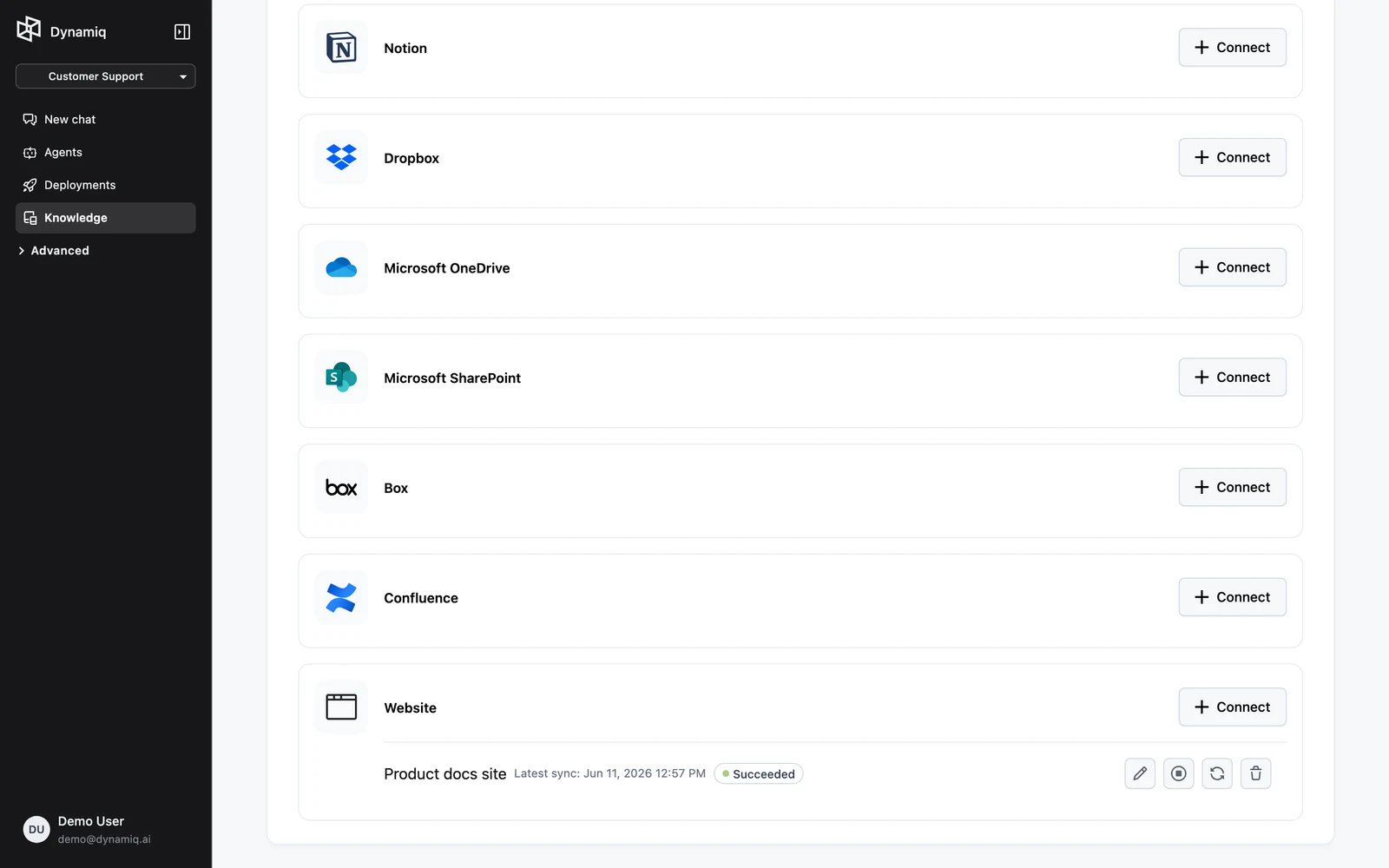
Available sync source types today: Google Drive, Notion, Dropbox, Microsoft OneDrive, Microsoft SharePoint, Box, Confluence, and Website crawls — see the full table in Data Sources. Active sources re-sync automatically in the background, and you control each one per source: Sync triggers an immediate pull, Pause stops syncing, Resume re-enables it. The same operations exist on the management API (POST /v1/knowledgebase-sources/{source_id}/sync and friends) if you want to trigger syncs from your own systems.
Build walkthrough
Create the Knowledge Base
Create one Knowledge Base per team (for example hr-policies, eng-runbooks). Pick the splitter and embedder up front: policy and documentation content suits Passage splitting, which keeps self-contained paragraphs intact. Details and trade-offs in Chunking & Embedding; the create flow itself is in Create a Knowledge Base.
Connect sources and sync
On the Knowledge Base's Integrations tab, add a source per system of record — Google Drive for HR, Notion for engineering, Confluence for IT. Service sources need a matching Connection (OAuth for Drive/Notion/OneDrive and friends, an Atlassian Connection for Confluence); browse and select the folders or pages to track, then Sync. Each integration tracks up to 200 files, and deleting a source also removes the items it synced — files, records, and vectors. Full walkthrough in Data Sources.
Validate retrieval before building anything
Run real employee questions against the Knowledge Base in Search & Test. If answers cut off mid-thought or mix topics, adjust the splitter settings and reprocess — far cheaper now than after deployment.
Build the agent workflow
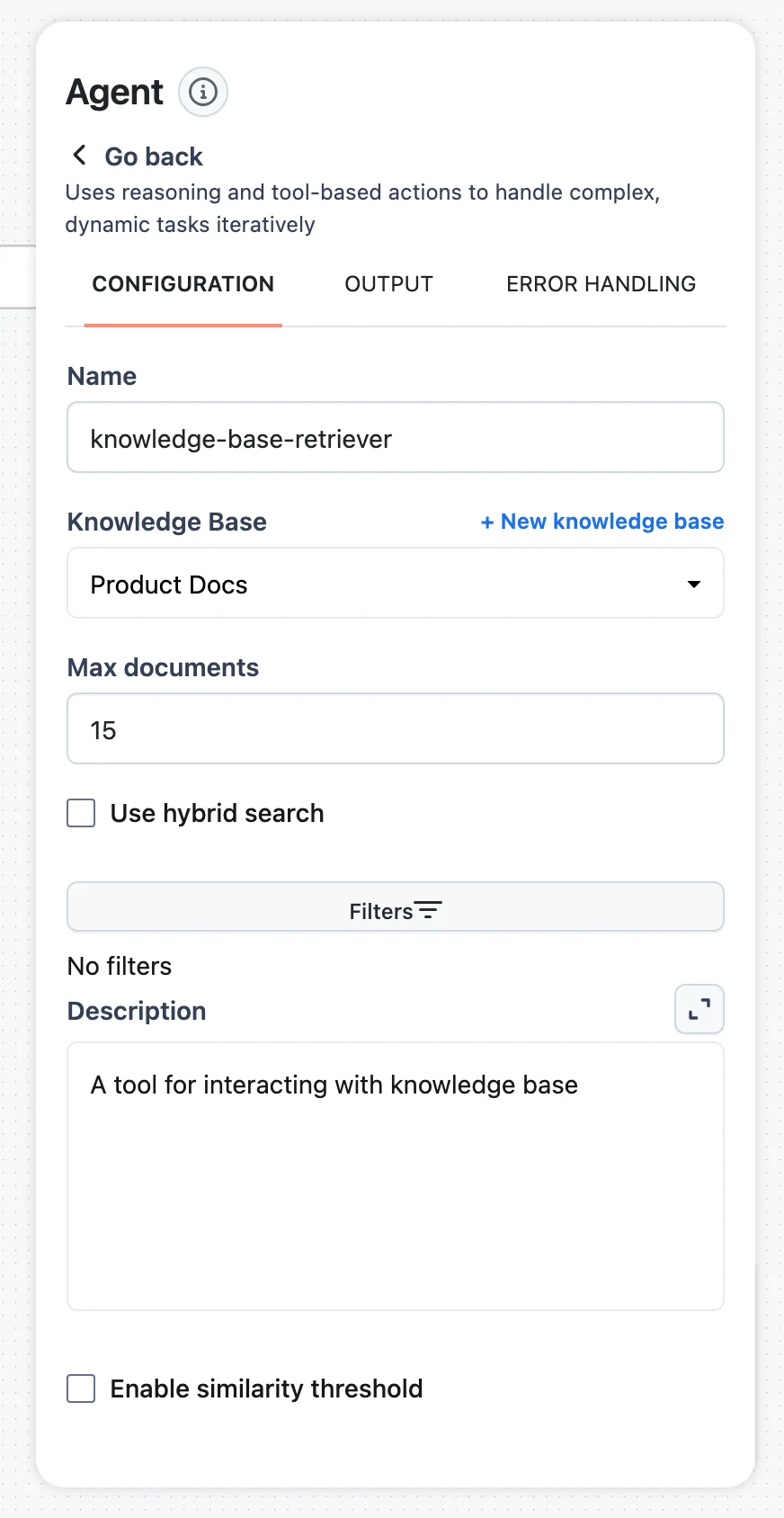
Create a workflow with an Agent node, click Add knowledge, and point the Knowledge Base Retriever at the team's Knowledge Base. Write a specific tool Description ("Searches Meridian HR policies: benefits, leave, onboarding, travel") — it is what the agent reads when deciding to query. Tune Max documents, hybrid search, and the similarity threshold per Connect a Knowledge Base to Agents.
Enable memory with per-user scoping
Switch on Enable memory on the Agent node and map the User ID and Session ID inputs from your workflow input. Use Input / Output save mode for clean multi-turn chat. The agent then stores and retrieves history strictly by those ids — configuration reference in Agent Memory.
Optional: screen inputs
If employees might paste customer data into the assistant, put a PII Detector in front of the agent and branch flagged messages to a refusal path — see Guardrails & Validators.
Permissions and compliance spotlight
This is where an internal assistant succeeds or fails review. Dynamiq's enforcement points, as actually implemented:
Per-team isolation with projects
Put each team's assistant — Knowledge Base, Connections, workflow, App — in its own project. Make the project Private so it is accessible only to org Owners/Admins and explicitly added project members; Internal projects are open to every org member. Organization roles are Owner, Admin, and Member, and Owner/Admin are currently enforced identically — see Members & Roles for exactly what each tier can do.
Project-member roles (admin / editor / viewer) are stored but not yet enforced — authorization checks only verify project membership. Don't rely on viewer as a read-only guarantee; isolate teams at the project boundary, not the role boundary. Also note Owners and Admins can open any Private project in the org.
Access Keys scoped per team
Mint a project-scoped Access Key per consuming service — the HR bot's key cannot call the engineering assistant. Keys support expiry dates, show only a preview after creation (Dynamiq stores a SHA-512 fingerprint, not the secret), record who created them, and revoke instantly via delete. Rotation is create-then-delete with zero downtime.
Who connects the Drive: builder-level vs per-user
There are two legitimate designs, with different compliance meanings:
- Builder-level Connection (shared). A project admin authorizes one OAuth Connection — say a service account with read access to the published HR policy folder. Every employee's question is answered from that one grant. Simple, predictable, and appropriate when the content is uniformly readable by the audience. The Connection is project-scoped and shared by every workflow in the project (OAuth Connections); Google's default scopes include
drive.readonly, and tokens are stored server-side, refreshed automatically, and stripped from API reads. - Per-end-user requirement. If the assistant should only ever see what the asking employee can see, flag the connection as an end-user requirement instead: each user authorizes their own account once per App, credentials are stored as system-managed, end-user-scoped connections that other users' runs can't touch, and unmet requirements are detectable per
user_idbefore each run. The trade-off is onboarding friction (every employee completes a consent flow) and per-user token lifecycle to care about.
Note the scoping: Knowledge Base sync uses a project Connection — so a synced Knowledge Base reflects the connecting account's access, shared by all who can query it. If document-level entitlement matters, split content into separate Knowledge Bases (and projects) along permission boundaries rather than syncing everything into one.
Memory isolation by user_id and session_id
Agent memory activates only when a run provides user_id / session_id, and retrieval is filtered by those ids — two sessions of the same user don't see each other, and users never see each other's history. The ids are strings your application controls, so your backend must set them from its authenticated identity, never from user-editable input. Sub-agents receive derived ids and never share memory with their parent. Scoped deletion (memory.delete(user_id=..., session_id=...)) supports erasure requests. Details in Agent Memory.
Auditability through traces
Every run records a trace — and every Knowledge Base Retriever call appears in it with the query and the retrieved chunks, so "what did the assistant look up to produce this answer" is always answerable. Knowledge Base items keep per-file ingestion traces too.
Usage monitoring per team
Because each team is a project with its own App, the App's Monitoring tab gives per-team cost, tokens, requests, and latency charts (also queryable via GET /v1/apps/{app_id}/metrics). At the org level, Settings → Usage tracks monthly App invocations, Knowledge base ingestions, and Knowledge base retrievals against plan limits — see Usage & Billing.
Dynamiq gives you the enforcement primitives — org roles, project membership, scoped keys, per-user requirements, memory scoping, guardrail nodes, and full traces. Mapping these onto your regulatory framework (and any certification claims) is your compliance team's review to make; see Security for how the platform stores credentials and enforces access.
Deploy and integrate
Deploy the workflow as an App (Deploy a Workflow App). Two integration paths, with an important authentication difference:
- Hosted Chat Assistant / embedded widget — zero frontend work, but both run in the browser without an Access Key, so they require the App's endpoint to be public. For an internal assistant, only choose this if the URL lives behind your own network or SSO perimeter. See Chat Widget & Assistant.
- Your own bot via the Runs API — the recommended enterprise path. Keep the App private, and have your backend (the Slack-style bot service) call
POST /v1/runswith the project-scoped Access Key, passing the employee's identity and thread as ids:
curl -X POST "https://<your-app-hostname>/v1/runs" \
  -H "Authorization: Bearer $DYNAMIQ_ACCESS_KEY" \
  -H "Content-Type: application/json" \
  -d '{
    "input": {"question": "How many days of parental leave do we offer?"},
    "stream": true,
    "user_id": "emp-10482",
    "session_id": "0f6a2d4e-8b3c-4f1a-9d2e-7c5b6a4f3e21"
  }'
Map your chat thread to a stable session_id (it must be a UUID) and the authenticated employee to user_id — the same ids drive memory scoping and make runs filterable per user in GET /v1/runs and in Conversations & Sessions. Use "stream": true for token-by-token responses in your UI; the full contract is in The Runs API.
Evaluate and monitor
Don't ship retrieval changes on vibes. Build a QA dataset of 50–100 representative employee questions with columns like question and ground_truth_answer, release a version, and score the assistant with the predefined RAG metrics:
ContextPrecision— do the retrieved chunks that mattered rank high?ContextRecall— do the retrieved chunks cover the ground truth?- Add
Faithfulnessto catch answers not grounded in the retrieved context.
Run them in With workflow mode in an evaluation run: each dataset row is fed through the workflow version you select, and metric inputs are mapped with selectors like $.dataset.question and $.workflow.output. Because datasets, metrics, and workflow versions are all pinned per run, you get a reproducible baseline — rerun the same setup after every chunking or top-k change and compare scores. Promising or problematic production traces can be added straight into a draft dataset version from the trace side sheet.
In steady state, watch the App's Monitoring tab for request volume, latency, and cost per team, and spot-check Traces for runs where the retriever's query or retrieved chunks look off.
Next steps
Build a RAG Pipeline
The end-to-end Knowledge Base tutorial behind this journey.
End-User Connection Requirements
Per-user authorization when the assistant must act as the asking employee.
Members & Roles
The exact permission model your isolation design rests on.
Evaluation Runs
Score retrieval quality on every change, reproducibly.
Healthcare: Patient Document Intake
A patient-document intake pipeline that screens for PII and prompt injection before any LLM sees the text, then extracts schema-conformant clinical data.
Overview
Chat is Dynamiq's built-in super agent — research, files, code, browsing, and your connected apps in one conversation.